
Kunena 7.0.4 Released
The Kunena team has announce the arrival of Kunena 7.0.4 [K 7.0.4] in stable which is now available for download as a native Joomla extension for J! 5.4.x/6.0.x. This version addresses most of the issues that were discovered in K 6.2 / K 6.3 / K 6.4 and issues discovered during the last development stages of K 7.0
As general background, My Joomla site template makes a mess of Kunena .
We do not answer questions about other templates for Kunena here.
If you are having problems then, for your own benefit, it would save us all a lot of time if you would kindly post your configuration report when you ask for help from this forum. If you do not post your configuration report we will not ask you for it but you will probably not get your problem solved, either.
Question How to change the colour of some text


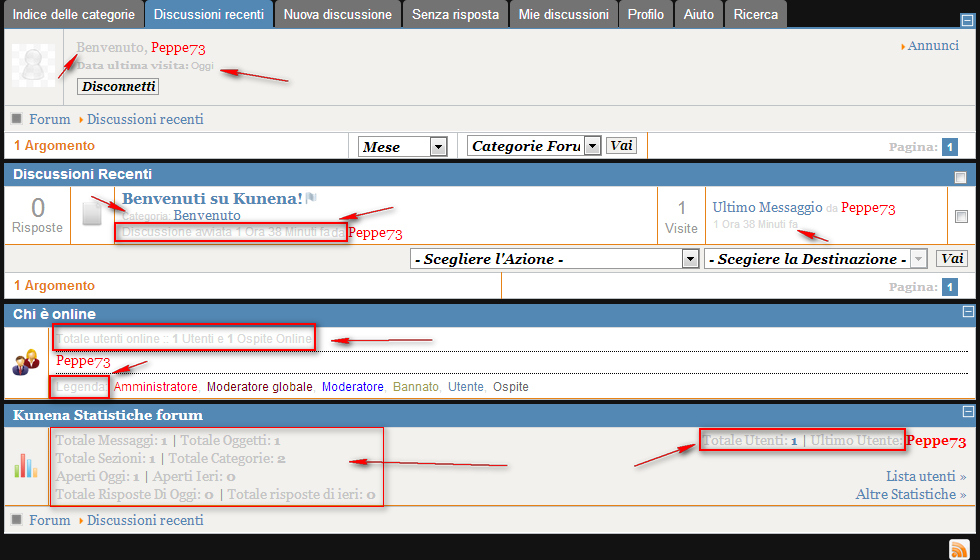
I have a problem with the customization of font colors of the template forum kunema,
for sending me to understand better screenscht would like to change the font color highlighted and indicated by the arrows, I cercao to change the "kunema defoult-min.css",
without understanding where action can you help me?
thanks
Please Log in or Create an account to join the conversation.


(1) How do I change the colours of my template in Kunena? ; and
(2) My Joomla site template makes a mess of Kunena
Blue Eagle vs. Crypsis reference guide
Read my blog and

Please Log in or Create an account to join the conversation.
Please Log in or Create an account to join the conversation.
Blue Eagle vs. Crypsis reference guide
Read my blog and
Please Log in or Create an account to join the conversation.
sozzled wrote: Do you still want to resolve this issue or do you want to debate the suggestions that we have given you?
I'm not arguing,
are just hints and tips that I have posted are not useful, because many colors are bound to the template I can not change them
Please Log in or Create an account to join the conversation.
You asked your question nearly 6 days ago and you have still not resolved your problem. Do you want to resolve your problems quickly? :dry: If you want to resolve your problems quickly, read the information I posted in msg #2 in this topic.
If you know anything about CSS you can change these colours easily, by adding extra rules to your Jooma site template, and they will only affect the Kunena component.
Blue Eagle vs. Crypsis reference guide
Read my blog and
Please Log in or Create an account to join the conversation.