
Kunena 7.0.10 & Kunena 6.4.15 – Security Updates Released and K7.1 in RC1
The Kunena team has announce the arrival of Kunena 7.0.10 [K 7.0.10] as security release which is now available for download as a native Joomla extension for J! 5.4.x/6.0.x./6.1.x/6.2.x and 6.4.15 [K 6.4.15]. This version addresses most of the issues that were discovered in K 6.2 / K 6.3 / K 6.4 and issues discovered during the last development stages of K 7.0
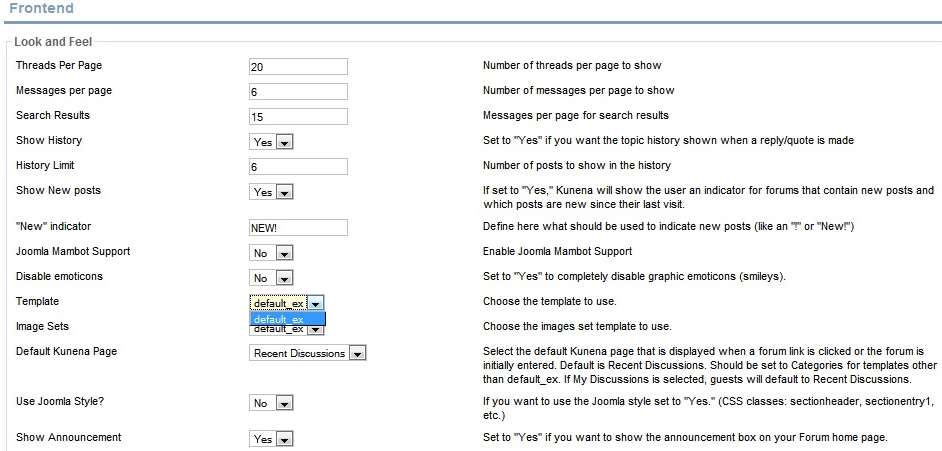
Question There is only one endorsed and supported Kunena template


Since Kunena 1.5.8, if you don't use default_gray, default_green and default_red, these templates aren't copied on your filesystem and if you don't use default, you can't choose this template. If the users upgrade from previous kunena version and he using deprecated, it's this case he will be issues.
A lot of users doesn't search on the forums, but i have renammed the sticky topic, with your title. I think now this discussion is ended.
I don't provide support by PM, because this can be useful for someone else.
Please Log in or Create an account to join the conversation.


 Let me inform you of something that you may be unaware of.
I am currently testing both K 1.5.8 and K 1.5.9 (on different websites, obviously). On these websites I have K 1.5.7 as the base system and I am upgrading to the later version(s). On both these sites I had explicitly deleted the following file structures before performing the upgrade:
../components/com_kunena/templates/default_gray
../components/com_kunena/templates/default_green
../components/com_kunena/templates/default_red
xillibit wrote:
As I said, I deleted the file structures - I assume this means that I "don't use" them. After the upgrade these file structures were copied back again! This occurs both for both upgrades: from K 1.5.7 -> K 1.5.8 and K 1.5.7 -> K 1.5.9. The situation has not disappeared, but perhaps there's something else that I've overlooked and maybe it's not just a case of deleting the file structures as I thought? :blush: Puzzling, eh? :side:Since Kunena 1.5.8, if you don't use default_gray, default_green and default_red, these templates aren't copied on your filesystem ...
I will try, later, installing Kunena on a totally clean website to see if these file structures are copied and let you know my findings.
I really do appreciate the help that you've given to this community, xillibit, and I thank you, most sincerely, for your help in this matter.

Please Log in or Create an account to join the conversation.
image missing http://www.kunena.com/media/kunena/attachments/legacy/images/KConfig_templateChoices.jpg
If, however, you are upgrading from an older version of Kunena, those file structures are installed as part of the upgrade, even if you deleted them before you perform the upgrade.
So xillibit and I are both correct ... and this is the end of my involvement in the discussion. :lol:
Please Log in or Create an account to join the conversation.

You can remove old templates (and other deprecated files) by uninstalling before installing it again.
Please Log in or Create an account to join the conversation.


I would have dumped kunena and tried a more established forum with the variety of look I needed much earlier. Now I will have to reconsider my use of this board just because you didnt think the plague of issues these templates brought were as important as other fixes. Im still quite shocked you thought it viable to release something you wanted to become popular with such little choice available. How did you hope to compete in a cms where its implicit folk will not have uniform default websites? Just curious if this is a labour of love or if you were hoping to become the dominant joomla forum like many of us thought?
Please Log in or Create an account to join the conversation.


Of course this doesnt mean you can't install one of the many user contributed forums available here.
Joomla Extension Templates: extensiontemplates.com
Please Log in or Create an account to join the conversation.