


- Posts: 80
- Thank you received: 0
Kunena 7.1.1 & Kunena 6.4.17 – Security Updates Released
The Kunena team has announce the arrival of Kunena 7.1.1 [K 7.1.1] in stable which is now available for download as a native Joomla extension for J! 5.4.x/6.0.x./6.1.x./6.2.x This version addresses most of the issues that were discovered in K 6.2 / K 6.3 / K 6.4 / K7.0 and issues discovered during the last development stages of K 7.1
Just a reminder: K6.4.17 receives only securities fixes until end of 2026, so it's advised for users to upgrade to K7.1.
Question Kunena 4.0,3 Buttons ändern.
11 years 3 months ago #167395
by flexmax90
Kunena 4.0,3 Buttons ändern. was created by flexmax90
Hallo,
gibt es irgend wo ein Tutorial wo ersichtlich ist wie man die Buttons von Kunena ändert ?
Es geht um diese Buttons.

Danke
gibt es irgend wo ein Tutorial wo ersichtlich ist wie man die Buttons von Kunena ändert ?
Es geht um diese Buttons.
Danke
Please Log in or Create an account to join the conversation.


Less
More
- Posts: 12299
- Thank you received: 2545
11 years 3 months ago - 11 years 3 months ago #167397
by rich
Important! Always create a backup before you make any changes to your website!
Replied by rich on topic Kunena 4.0,3 Buttons ändern.
Auch hier wieder die Frage:
Was willst genau willst du ändern? Eine Beschreibungen wären hilfreich. Wenn du in der Administration das Template Blu Eagle öffnest, hast du verschiedene Buttons zur Auswahl.
Was willst genau willst du ändern? Eine Beschreibungen wären hilfreich. Wenn du in der Administration das Template Blu Eagle öffnest, hast du verschiedene Buttons zur Auswahl.
Important! Always create a backup before you make any changes to your website!
Last edit: 11 years 3 months ago by rich.
The following user(s) said Thank You: flexmax90
Please Log in or Create an account to join the conversation.
11 years 3 months ago #167399
by flexmax90
Replied by flexmax90 on topic Kunena 4.0,3 Buttons ändern.
Die von Kunena mage ich nicht, möchte welche selber erstellen, doch ich weiß nicht wo ich die buttons / Code finde, daher wäre ein Tutorial sehr hilfreich.
so in etwa möchte ich das haben...
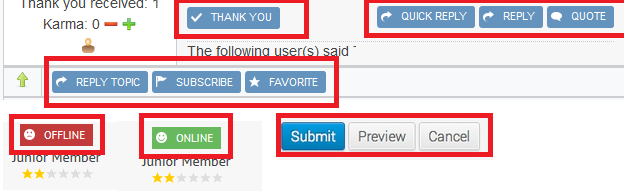
so in etwa möchte ich das haben...
Please Log in or Create an account to join the conversation.
Less
More
- Posts: 12299
- Thank you received: 2545
11 years 3 months ago #167400
by rich
Important! Always create a backup before you make any changes to your website!
Replied by rich on topic Kunena 4.0,3 Buttons ändern.
Das ist ein einziges Bild. Du findest es in „components/com_kunena/template/blue_eagle/media/iconsets/buttons/default“. Wenn du deine eigenen Buttons erstellen willst, kopiere das darin enthaltene default.png und bearbeite es. Danach erstellst du einen neuen Ordner in „components/com_kunena/template/blue_eagle/media/iconsets/buttons“. Nenne diesen wie du willst und kopiere die bearbeitete Bilddatei hinein.
Danach kannst du in der Administration beim Template Blue Eagle diesen Ordner auswählen.
Danach kannst du in der Administration beim Template Blue Eagle diesen Ordner auswählen.
Important! Always create a backup before you make any changes to your website!
Please Log in or Create an account to join the conversation.
Less
More
- Posts: 12299
- Thank you received: 2545
11 years 3 months ago #167401
by rich
Important! Always create a backup before you make any changes to your website!
Replied by rich on topic Kunena 4.0,3 Buttons ändern.
Vielleicht findest du hier was passendes.
www.kunena.org/forum/170-K-17-Templates-...imitstart=0&start=10
Diese Icons funktionieren immer noch, obwohl sie für K 1.6 erstellt wurden.
Wenn du die Zip heruntergeladen hast, musst du diese entpacken und dann bis zum Ordner „buttons“ navigieren. Darin sind dann die Ordner mit den verschiedenen Buttons enthalten.
Diese Icons funktionieren immer noch, obwohl sie für K 1.6 erstellt wurden.
Wenn du die Zip heruntergeladen hast, musst du diese entpacken und dann bis zum Ordner „buttons“ navigieren. Darin sind dann die Ordner mit den verschiedenen Buttons enthalten.
Important! Always create a backup before you make any changes to your website!
Please Log in or Create an account to join the conversation.
Time to create page: 0.130 seconds