


- Posts: 80
- Thank you received: 0
Kunena 7.1.1 & Kunena 6.4.17 – Security Updates Released
The Kunena team has announce the arrival of Kunena 7.1.1 [K 7.1.1] in stable which is now available for download as a native Joomla extension for J! 5.4.x/6.0.x./6.1.x./6.2.x This version addresses most of the issues that were discovered in K 6.2 / K 6.3 / K 6.4 / K7.0 and issues discovered during the last development stages of K 7.1
Just a reminder: K6.4.17 receives only securities fixes until end of 2026, so it's advised for users to upgrade to K7.1.
Solved [erledigt] DropDown menu im Hintergrund ???
11 years 9 months ago #161585
by flexmax90
[erledigt] DropDown menu im Hintergrund ??? was created by flexmax90
Hallo,
ich hab ein problem mit meinem drop down Menu.
wenn ich mit der Maus über den Menü fahre, erscheint das DropDown Menü hinter der Ankündigsbox von Kunena.
ich hab mal ein bild eingefügt damit es besser verständlich ist.
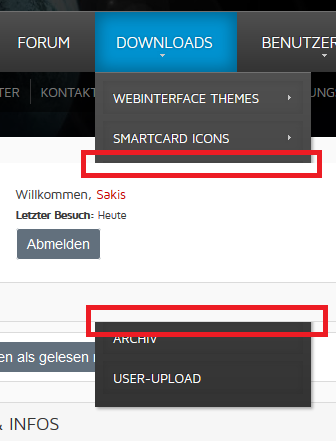
danke im vorraus für die hilfe.
ich hab ein problem mit meinem drop down Menu.
wenn ich mit der Maus über den Menü fahre, erscheint das DropDown Menü hinter der Ankündigsbox von Kunena.
ich hab mal ein bild eingefügt damit es besser verständlich ist.
danke im vorraus für die hilfe.
Please Log in or Create an account to join the conversation.


Less
More
- Posts: 12299
- Thank you received: 2545
11 years 9 months ago #161587
by rich
Important! Always create a backup before you make any changes to your website!
Replied by rich on topic [erledigt] DropDown menu im Hintergrund ???
Obwohl es den Spruch „ein Bild sagt mehr als tausend Worte“ gibt, ist es in diesem Fall nicht sehr hilfreich. Ohne deine Seite zu sehen, kann man dazu nicht viel sagen. Erstelle bitte einen Konfigurationsbericht.
Important! Always create a backup before you make any changes to your website!
Please Log in or Create an account to join the conversation.
11 years 9 months ago #161589
by flexmax90
Replied by flexmax90 on topic [erledigt] DropDown menu im Hintergrund ???
This message contains confidential information
Database collation check: The collation of your table fields are correct
Joomla! SEF: Enabled | Joomla! SEF rewrite: Enabled | FTP layer: Disabled |
This message contains confidential informationhtaccess: Exists | PHP environment: Max execution time: 30 seconds | Max execution memory: 512M | Max file upload: 32M
Kunena menu details:
Warning: Spoiler!
ID Name Menutype Link Path 119 Forum kunenamenu view=home&defaultmenu=119 forum 120 Index kunenamenu view=category&layout=list forum/index 121 Aktuell kunenamenu view=topics&mode=replies forum/aktuell 122 Neues Thema kunenamenu view=topic&layout=create forum/neuesthema 123 Ohne Antwort kunenamenu view=topics&mode=noreplies forum/ohneantwort 124 Meine Themen kunenamenu view=topics&layout=user&mode=default forum/meinethemen 125 Profil kunenamenu view=user forum/profil 127 Suche kunenamenu view=search forum/suche
Joomla default template details : gamers | author: Shape5.com | version: 1.0 | creationdate: Unknown
Kunena default template details : Blue Eagle | author: Kunena Team | version: 3.0.6 | creationdate: 2014-07-28
Kunena version detailed: Kunena 3.0.6 | 2014-07-28 [ Tala ]
| Kunena detailed configuration:| Kunena integration settings:Warning: Spoiler!
Kunena config settings: board_offline 0 enablerss 1 threads_per_page 20 messages_per_page 6 messages_per_page_search 15 showhistory 1 historylimit 6 shownew 1 disemoticons 0 template blue_eagle showannouncement 0 avataroncat 1 catimagepath category_images showchildcaticon 1 rtewidth 450 rteheight 300 enableforumjump 1 reportmsg 1 username 1 askemail 0 showemail 0 showuserstats 1 showkarma 1 useredit 1 useredittime 0 useredittimegrace 600 editmarkup 1 allowsubscriptions 1 subscriptionschecked 1 allowfavorites 1 maxsubject 50 maxsig 300 regonly 1 pubwrite 0 floodprotection 0 mailmod 0 mailadmin 0 captcha 1 mailfull 1 allowavatarupload 1 allowavatargallery 1 avatarquality 75 avatarsize 2048 imageheight 800 imagewidth 800 imagesize 150 filetypes txt,rtf,pdf,zip,tar.gz,tgz,tar.bz2 filesize 120 showranking 1 rankimages 1 userlist_rows 30 userlist_online 1 userlist_avatar 1 userlist_name 0 userlist_posts 1 userlist_karma 1 userlist_email 0 userlist_joindate 1 userlist_lastvisitdate 1 userlist_userhits 1 latestcategory showstats 1 showwhoisonline 1 showgenstats 1 showpopuserstats 1 popusercount 5 showpopsubjectstats 1 popsubjectcount 5 usernamechange 0 showspoilertag 1 showvideotag 1 showebaytag 1 trimlongurls 1 trimlongurlsfront 40 trimlongurlsback 20 autoembedyoutube 1 autoembedebay 1 ebaylanguagecode en-us sessiontimeout 1800 highlightcode 0 rss_type topic rss_timelimit month rss_limit 100 rss_included_categories rss_excluded_categories rss_specification rss2.0 rss_allow_html 1 rss_author_format name rss_author_in_title 1 rss_word_count 0 rss_old_titles 1 rss_cache 900 defaultpage recent default_sort asc sef 1 showimgforguest 0 showfileforguest 1 pollnboptions 4 pollallowvoteone 1 pollenabled 1 poppollscount 5 showpoppollstats 1 polltimebtvotes 00:15:00 pollnbvotesbyuser 100 pollresultsuserslist 1 maxpersotext 50 ordering_system mesid post_dateformat ago post_dateformat_hover datetime hide_ip 1 imagetypes jpg,jpeg,gif,png checkmimetypes 1 imagemimetypes image/jpeg,image/jpg,image/gif,image/png imagequality 50 thumbheight 32 thumbwidth 32 hideuserprofileinfo put_empty boxghostmessage 0 userdeletetmessage 0 latestcategory_in 1 topicicons 1 debug 0 catsautosubscribed 0 showbannedreason 0 version_check 1 showthankyou 1 showpopthankyoustats 1 popthankscount 5 mod_see_deleted 0 bbcode_img_secure text listcat_show_moderators 1 lightbox 1 show_list_time 720 show_session_type 0 show_session_starttime 0 userlist_allowed 1 userlist_count_users 1 enable_threaded_layouts 0 category_subscriptions post topic_subscriptions every pubprofile 0 thankyou_max 10 email_recipient_count 0 email_recipient_privacy bcc captcha_post_limit 0 keywords 0 userkeywords 0 image_upload registered file_upload registered topic_layout flat time_to_create_page 1 show_imgfiles_manage_profile 1 hold_newusers_posts 0 hold_guest_posts 0 attachment_limit 8 pickup_category 0 article_display intro send_emails 1 fallback_english 1 cache 1 cache_time 60 iptracking 1 rss_feedburner_url autolink 1 access_component 0 statslink_allowed 1 superadmin_userlist 0 | Joomla! detailed language files installed:Warning: Spoiler!Kunena - AlphaUserPoints Enabled: activity=1 avatar=0 profile=0 activity_points_limit=0
Kunena - Community Builder Disabled
Kunena - Gravatar Disabled
Kunena - JomSocial Disabled
Kunena - Joomla Enabled: access=1 login=1
Kunena - Kunena Enabled: avatar=1 profile=1
Kunena - UddeIM Disabled
Warning: Spoiler!
Joomla! languages installed: de-DE German (DE-CH-AT) en-GB English (United Kingdom)
Third-party components: AlphaUserPoints 1.9.13
Third-party SEF components: None
Plugins: None
Modules: Kunena Login 3.0.1
Please Log in or Create an account to join the conversation.
Less
More
- Posts: 12299
- Thank you received: 2545
11 years 9 months ago - 11 years 9 months ago #161590
by rich
Important! Always create a backup before you make any changes to your website!
Replied by rich on topic [erledigt] DropDown menu im Hintergrund ???
Füge in deinem Joomla! Template in die custom.css folgenden Code ein:
Der Pfad ist: „templates/gamers/css/custom.css“
Code:
#subMenusContainer {
z-index: 33;
}
Important! Always create a backup before you make any changes to your website!
Last edit: 11 years 9 months ago by rich.
The following user(s) said Thank You: flexmax90
Please Log in or Create an account to join the conversation.
11 years 9 months ago #161591
by flexmax90
Replied by flexmax90 on topic [erledigt] DropDown menu im Hintergrund ???
Das nenne ich Support 
vielen dank, hat super geklappt.
vielen dank, hat super geklappt.
Please Log in or Create an account to join the conversation.
11 years 9 months ago #161592
by flexmax90
Replied by flexmax90 on topic [erledigt] DropDown menu im Hintergrund ???
Mir jetzt noch ein fehler aufgefallen.
wenn ich runterscrolle, verschwindet das menü im hintergrund.
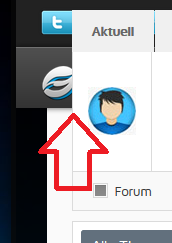
wenn ich runterscrolle, verschwindet das menü im hintergrund.
Please Log in or Create an account to join the conversation.
Time to create page: 0.148 seconds