Kunena 7.1.1 & Kunena 6.4.17 – Security Updates Released

The Kunena team has announce the arrival of Kunena 7.1.1 [K 7.1.1] in stable which is now available for download as a native Joomla extension for J! 5.4.x/6.0.x./6.1.x./6.2.x This version addresses most of the issues that were discovered in K 6.2 / K 6.3 / K 6.4 / K7.0 and issues discovered during the last development stages of K 7.1
Just a reminder: K6.4.17 receives only securities fixes until end of 2026, so it's advised for users to upgrade to K7.1.

Solved [gelöst] Farbe der (K)Button ...
More
12 years 3 months ago #157966 by adminhkcw
Hallo!

Habe jetzt eine Weile gesucht und viel probiert, komme aber trotzdem nicht weiter...

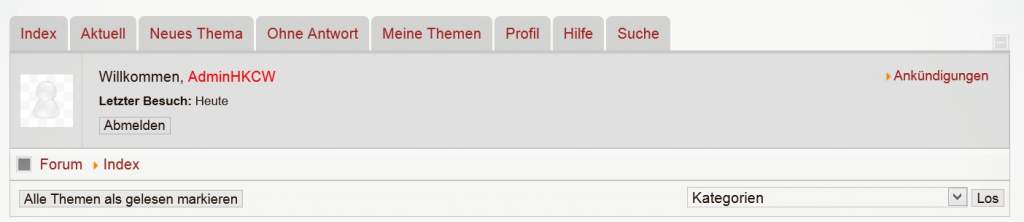
Auf der HKCW.de betreibe ich ein Kunena-Forum und die Button "Abmelden", "Alle Themen als gelesen markieren" und "los" sind grau mit grauer Schrift...

Firebug gibt dazu folgendes aus:
<input type="submit" value="Abmelden" class="kbutton" name="submit">
oder
<input type="submit" value="Alle Themen als gelesen markieren" class="kbutton ks">
oder
<input type="submit" value="Los" class="kbutton ks" name="Go">

Irgendwo stehe ich auf dem Schlauch.. Kann mir jemand verraten, wo ich in den CSS-Dateien die Hintergrund- und Schriftfarbe der KButton finde?

Vielen Dank und Grüße!

Please Log in or Create an account to join the conversation.

More
12 years 3 months ago #157968 by rich
Herzlich willkommen bei Kunena!

Trage diesen Code ans Ende in deine Joomla! template.css ein. Möglich, dass du hinten ein !important anhängen musst, falls die Änderung nicht sichtbar ist. Gefundene Codes solltest du nie direkt in den Kunena css Dateien ändern, sondern einfach kopieren und am Ende deiner Joomla template.css einfügen. Änderungen in den Kunena css wären beim nächsten Upgrade wieder weg.
Code:
#Kunena input.kbutton { color: #000000; background-color: #ffffff; }

Important! Always create a backup before you make any changes to your website!

Please Log in or Create an account to join the conversation.

More
12 years 3 months ago #157970 by adminhkcw
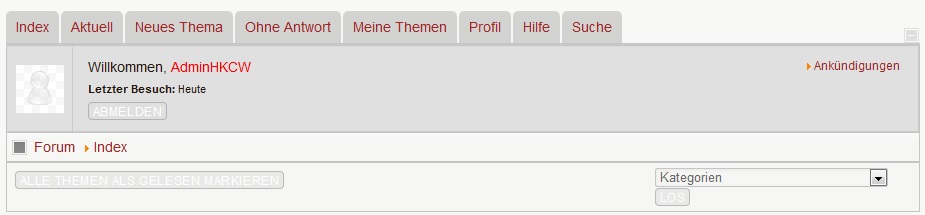
Top!! Vielen Dank, hat geklappt und sieht jetzt so aus:


Die Angabe !important war allerdings notwendig.

Vielen Dank und ich setze mich jetzt ans css-lernen..

Please Log in or Create an account to join the conversation.

Time to create page: 0.106 seconds