


- Posts: 1663
- Thank you received: 201
Kunena 7.0.8 Released
The Kunena team has announce the arrival of Kunena 7.0.8 [K 7.0.8] in stable which is now available for download as a native Joomla extension for J! 5.4.x/6.0.x./6.1.x. This version addresses most of the issues that were discovered in K 6.2 / K 6.3 / K 6.4 and issues discovered during the last development stages of K 7.0
This category contains miscellaneous, uncategorised user contributions, (templates, modules, plugins and hacks) relating to older versions of Kunena that are no longer supported.
This category may also contain a few topics relating to K 1.6 that may have been moved here possibly by mistake.
The topics in this category are for historical interest only. Owing to the structural differences between K 1.6 and K 1.7, these ideas in these topics will not work with later versions and, for that reason, the topics are locked.
This category may also contain a few topics relating to K 1.6 that may have been moved here possibly by mistake.
The topics in this category are for historical interest only. Owing to the structural differences between K 1.6 and K 1.7, these ideas in these topics will not work with later versions and, for that reason, the topics are locked.
Loved Kunena Login module with K, JS or CB Avatar
16 years 10 months ago #29916
by @quila
Replied by @quila on topic Re:Kunena Login module with Avatar
Hi Martin,
If you have installed 1.5.2 version and in the Module Parameters, for "Avatar Integration" option, select Community Builder, all links is pointed to CB.
Or not?
Regards
If you have installed 1.5.2 version and in the Module Parameters, for "Avatar Integration" option, select Community Builder, all links is pointed to CB.
Or not?
Regards
Please Log in or Create an account to join the conversation.


16 years 10 months ago - 16 years 10 months ago #29936
by MartinD
Replied by MartinD on topic Re:Kunena Login module with Avatar
@quila wrote:
ok - I was being silly and did not look in to the parameters! Thx for the info..
But under German language I get the following for FORGOT_YOUR_LOGIN

Hi Martin,
If you have installed 1.5.2 version and in the Module Parameters, for "Avatar Integration" option, select Community Builder, all links is pointed to CB.
Or not?
Regards
ok - I was being silly and did not look in to the parameters! Thx for the info..
But under German language I get the following for FORGOT_YOUR_LOGIN
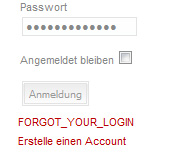
Last edit: 16 years 10 months ago by MartinD.
Please Log in or Create an account to join the conversation.
16 years 10 months ago #29981
by @quila
Replied by @quila on topic Re:Kunena Login module with Avatar
Hello Martin,
this is a language string not translated.
Open the file de-DE.mod_klogin.ini in the folder
Translation included with module is from version 1.5.1.
Regards
this is a language string not translated.
Open the file de-DE.mod_klogin.ini in the folder
and translate this linelanguage / de-DE /
#version 1.5.2
AVATARINTEGRATION=Avatar Integration
AVATARINTEGRATIONDESC=You can choose from which Component show Avatar
FORGOT_YOUR_LOGIN=Forgot Login?
Translation included with module is from version 1.5.1.
Regards
Please Log in or Create an account to join the conversation.
16 years 10 months ago - 16 years 10 months ago #29983
by MartinD
Replied by MartinD on topic Re:Kunena Login module with Avatar
Hi quila
Thx for reply but it still does not work...
This is my ini file..
P.S It's currently disabled...
Thx for reply but it still does not work...
This is my ini file..
P.S It's currently disabled...
Code:
# $Id: de-DE.mod_klogin.ini $
# Deutsche Übersetzung Jan Gieselberg - www.joomla-downloads.de
# License http://www.gnu.org/licenses/gpl-2.0.html GNU/GPL, see LICENSE.php
# Note : All ini files need to be saved as UTF-8 - No BOM
#version 1.5.1
AVATARHEIGHT=Avatar Höhe
AVATARHEIGHTDESC=Avatar Höhe
PROFILEBOX_GUEST=Gast
POSAVATAR=Avatar Position
POSAVATARDESC=Position des Avatar, Links oder Rechts. Nur für das horizontale Template.
STYLE=Style
STYLEDESC=Das Kunena Login Style
LOGIN MESSAGE KUNENA=Um dich anmelden zu können musst du bereits einen Account registriert haben. Dies dauert nur wenige Minuten und ermögligt dir den vollen Funktionsumfang unserer Seite zu nutzen. Bitte beachte in diesem Zusammenhang unsere Nutzungsbedingungen.
RULES=Nutzungsbedingungen
HELP=Hilfe
ONLY HORIZONTAL=Nur für das horizontale Style
#version 1.5
BUTTON_LOGIN=Anmelden
BUTTON_LOGOUT=Abmelden
DESCLOGINFORM=This Module displays a username and password login form. It also displays a link to retrieve a forgotten password. If user registration is enabled (in the Global Configuration settings), another link will be shown to enable self-registration for users. It also display Avatar from Kunena Forum and link to My Profile, My Discussions and Recent Discussions.
ENCRYPT LOGIN FORM=Encrypt Login Form
FORGOT_YOUR_PASSWORD=Password vergessen?
FORGOT_YOUR_USERNAME=Benutzername vergessen?
GREETING=Begrüßung
HINAME=Willkommen %s,
LOGIN MESSAGE=Login Meldung
LOGIN REDIRECTION URL=Login Weiterleitung Seite
LOGOUT MESSAGE=Logout Meldung
LOGOUT REDIRECTION URL=Logout Weiterleitung Seite
MOD_LOGIN=<em>mod_login</em>
NAME/USERNAME=Name/Benutzername
NO ACCOUNT YET?=Noch nicht registriert?
PARAMPOSTTEXT=Text oder HTML das unter dem Login-Formular angezeigt werden soll.
PARAMPRETEXT=Text oder HTML das über dem Login-Formular angezeigt werden soll.
PARAMLOGINREDIRECTURL=Wähle eine Seite auf die Benutzer nach erfolgten Login weitergeleitet werden sollen. Wird kein extra Punkt gewählt lädt die Startseite als Standard.
PARAMLOGOUTREDIRECTURL=Wähle eine Seite auf die Benutzer nach erfolgten Login weitergeleitet werden sollen. Wird kein extra Punkt gewählt lädt die Startseite als Standard.
PARAMLOGINMESSAGE=Zeige/verstecke das JavaScript Pop-up beim erfolgreichen Login
PARAMLOGOUTMESSAGE=Zeige/verstecke das JavaScript Pop-up beim erfolgreichen Logout
PASSWORD=Passwort
POST-TEXT=Post-Text
PRE-TEXT=Pre-Text
REGISTER=Erstelle einen Account
REMEMBER ME=Angemeldet bleiben
SHOW/HIDE THE SIMPLE GREETING TEXT=Zeige/verstecke den einfachen Begrüßungstext
SUBMIT ENCRYPTED LOGIN DATA (REQUIRES SSL)=Login-Daten über eine verschlüsselte Verbindung senden. Nicht einschalten wenn das Joomla nicht über ein solches Zertifikat verfügt! https://
MYPROFILE= Mei Profil
MYPROFILEDESC=Zeige einen Link zu meinem Profil
MYPOSTS=Meine Beiträge
MYPOSTSDESC=Zeige einen Link zu meinen Beiträgen
RECENT=Aktuelle Beiträge
RECENTDESC=Show link to Recent Discussions
ANNOUNCEMENT=Ankündigungen
LASTVISIT=Letzter Besuch
LASTVISITDESC=Zeige Datum des letzten Besuchs
NEWAVATAR=Wähle einen neuen Avatar
MYMESSAGE=Meine Nachrichten
MYMESSAGEDESC=Zeige einen link zum provaten Nachrichteneingang
MESSAGECOMPONENT=Nachrichten Komponente
MESSAGECOMPONENTDESC=Wähle eine installierte Komponente für die Privaten Nachrichten
ENCRYPT=Verschlüssele das Login Formular
ENCRYPTDESC=Übermittle die Logindaten verschlüsselt (benötigt SSL)
GREETINGDESC=Zeige/Verstecke den einfachen Begrüßungstext
SHOWAVATAR=Zeige Avatar
SHOWAVATARDESC=Wähle Ja wenn du das Avatar-Bild im Kunena Login-Module anzeigen lassen möchtest.
AVATARWIDTH=Avatar Breite
AVATARWIDTHDESC=Avatar Breite
#version 1.5.2
AVATARINTEGRATION=Avatar Integration
AVATARINTEGRATIONDESC=You can choose from which Component show Avatar
FORGOT_YOUR_LOGIN=Username oder Passwort vergessen?
Last edit: 16 years 10 months ago by MartinD.
Please Log in or Create an account to join the conversation.
16 years 10 months ago #29984
by @quila
Replied by @quila on topic Re:Kunena Login module with Avatar
Hi,
this must work,
in your Joomla backend, default language for Site is German right?
try replase your file with this attached and let me know.
this must work,
in your Joomla backend, default language for Site is German right?
try replase your file with this attached and let me know.
Please Log in or Create an account to join the conversation.
16 years 10 months ago - 16 years 10 months ago #29986
by MartinD
Replied by MartinD on topic Re:Kunena Login module with Avatar
Yes - Default is German..
I shall try it shortly, my server host is having problems at the moment..
Post Edit: Nope - Still the same...
I shall try it shortly, my server host is having problems at the moment..
Post Edit: Nope - Still the same...
Last edit: 16 years 10 months ago by MartinD.
Please Log in or Create an account to join the conversation.
Time to create page: 0.264 seconds