


- Posts: 159
- Thank you received: 8
Kunena 7.0.4 Released
The Kunena team has announce the arrival of Kunena 7.0.4 [K 7.0.4] in stable which is now available for download as a native Joomla extension for J! 5.4.x/6.0.x. This version addresses most of the issues that were discovered in K 6.2 / K 6.3 / K 6.4 and issues discovered during the last development stages of K 7.0
This category contains miscellaneous, uncategorised user contributions, (templates, modules, plugins and hacks) relating to older versions of Kunena that are no longer supported.
This category may also contain a few topics relating to K 1.6 that may have been moved here possibly by mistake.
The topics in this category are for historical interest only. Owing to the structural differences between K 1.6 and K 1.7, these ideas in these topics will not work with later versions and, for that reason, the topics are locked.
This category may also contain a few topics relating to K 1.6 that may have been moved here possibly by mistake.
The topics in this category are for historical interest only. Owing to the structural differences between K 1.6 and K 1.7, these ideas in these topics will not work with later versions and, for that reason, the topics are locked.
Question hack for moderator buttons
16 years 10 months ago - 16 years 10 months ago #18875
by guerilla
hack for moderator buttons was created by guerilla
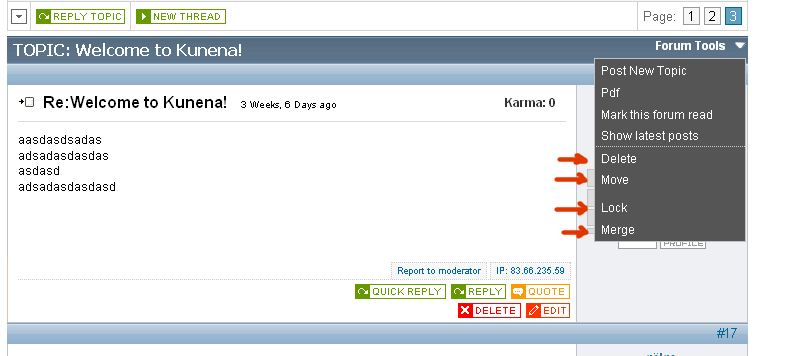
as you know the moderator buttons like "delete", "lock", "move" etc shown near new topic button and i think this button crowded look so ugly. so i made a hack that shows moderator tools under forum tools slider menu. i think it must be default at next releases of kunena.
here is a screen cap:

open view.php file and find this rows:
change to this:
find and delete theese rows (there are two of them, first at the top of the page and seconds at the bottom, delete all):
then open your default/plugin/forumttols/forumtool.php file and find this part:
and add this code below:
thats all...
here is a screen cap:
open view.php file and find this rows:
Code:
if ($is_Moderator)
{
// offer the moderator always the move link to relocate a topic to another forum
// and the (un)sticky bit links
// and the (un)lock links
$thread_move = CKunenaLink::GetTopicPostLink('move', $catid, $id, isset($fbIcons['move']) ? '<img src="' . KUNENA_URLICONSPATH . $fbIcons['move'] . '" alt="Move" border="0" title="' . _VIEW_MOVE . '" />':_GEN_MOVE);
if ($topicSticky == 0)
{
$thread_sticky = CKunenaLink::GetTopicPostLink('sticky', $catid, $id, isset($fbIcons['sticky']) ? '<img src="' . KUNENA_URLICONSPATH . $fbIcons['sticky'] . '" alt="Sticky" border="0" title="' . _VIEW_STICKY . '" />':_GEN_STICKY);
}
else
{
$thread_sticky = CKunenaLink::GetTopicPostLink('unsticky', $catid, $id, isset($fbIcons['unsticky']) ? '<img src="' . KUNENA_URLICONSPATH . $fbIcons['unsticky'] . '" alt="Unsticky" border="0" title="' . _VIEW_UNSTICKY . '" />':_GEN_UNSTICKY);
}
if ($topicLocked == 0)
{
$thread_lock = CKunenaLink::GetTopicPostLink('lock', $catid, $id, isset($fbIcons['lock']) ? '<img src="' . KUNENA_URLICONSPATH . $fbIcons['lock'] . '" alt="Lock" border="0" title="' . _VIEW_LOCK . '" />':_GEN_LOCK);
}
else
{
$thread_lock = CKunenaLink::GetTopicPostLink('unlock', $catid, $id, isset($fbIcons['unlock']) ? '<img src="' . KUNENA_URLICONSPATH . $fbIcons['unlock'] . '" alt="Unlock" border="0" title="' . _VIEW_UNLOCK . '" />':_GEN_UNLOCK);
}
$thread_delete = CKunenaLink::GetTopicPostLink('delete', $catid, $id, isset($fbIcons['delete']) ? '<img src="' . KUNENA_URLICONSPATH . $fbIcons['delete'] . '" alt="Delete" border="0" title="' . _VIEW_DELETE . '" />':_GEN_DELETE);
$thread_merge = CKunenaLink::GetTopicPostLink('merge', $catid, $id, isset($fbIcons['merge']) ? '<img src="' . KUNENA_URLICONSPATH . $fbIcons['merge'] . '" alt="Merge" border="0" title="' . _VIEW_MERGE . '" />':_GEN_MERGE);
}
change to this:
Code:
if ($is_Moderator)
{
// offer the moderator always the move link to relocate a topic to another forum
// and the (un)sticky bit links
// and the (un)lock links
$thread_move = CKunenaLink::GetTopicPostLink('move', $catid, $id, _GEN_MOVE);
if ($topicSticky == 0)
{
$thread_sticky = CKunenaLink::GetTopicPostLink('sticky', $catid, $id, _GEN_STICKY);
}
else
{
$thread_sticky = CKunenaLink::GetTopicPostLink('unsticky', $catid, $id, _GEN_UNSTICKY);
}
if ($topicLocked == 0)
{
$thread_lock = CKunenaLink::GetTopicPostLink('lock', $catid, $id, _GEN_LOCK);
}
else
{
$thread_lock = CKunenaLink::GetTopicPostLink('unlock', $catid, $id, _GEN_UNLOCK);
}
$thread_delete = CKunenaLink::GetTopicPostLink('delete', $catid, $id, _GEN_DELETE);
$thread_merge = CKunenaLink::GetTopicPostLink('merge', $catid, $id, _GEN_MERGE);
}
find and delete theese rows (there are two of them, first at the top of the page and seconds at the bottom, delete all):
Code:
if ($is_Moderator)
{
echo '<div class="fb_message_buttons_row" style="text-align: center;">';
echo $thread_delete;
echo ' '.$thread_move;
echo ' '.$thread_sticky;
echo ' '.$thread_lock;
echo '</div>';
}
Code:
if (isset($thread_merge))
{
echo '<div class="fb_message_buttons_row" style="text-align: left;">';
echo $thread_merge;
echo '</div>';
}
then open your default/plugin/forumttols/forumtool.php file and find this part:
Code:
</ul>
</div>
</div>
</div>
and add this code below:
Code:
<?php
if ($is_Moderator)
{
if (isset($thread_delete)){echo '<li style="border-top:1px dotted #ccc">'.$thread_delete.'</li>';}
if (isset($thread_move)){echo '<li>'.$thread_move.'</li>';}
if (isset($thread_sticky)){echo '<li>'.$thread_sticky.'</li>';}
if (isset($thread_lock)){echo '<li>'.$thread_lock.'</li>';}
if (isset($thread_merge)){echo '<li>'.$thread_merge.'</li>';}
}
?>
thats all...

Last edit: 16 years 10 months ago by guerilla.
Please Log in or Create an account to join the conversation.

16 years 10 months ago - 16 years 10 months ago #19017
by JBHawaii
Mahalo,
JBHawaii
Replied by JBHawaii on topic Re: hack for moderator buttons
I believe you have referenced the wrong file "fb_write.html.php"
For the first file to edit it should be:
"/components/com_kunena/template/default_ex/view.php"
Aside from that, all works as intended
Btw, This is a must have feature Great Work m8! Karma for you!
For the first file to edit it should be:
"/components/com_kunena/template/default_ex/view.php"
Aside from that, all works as intended
Btw, This is a must have feature Great Work m8! Karma for you!
Mahalo,
JBHawaii
Last edit: 16 years 10 months ago by JBHawaii.
Please Log in or Create an account to join the conversation.
16 years 10 months ago #19073
by guerilla
Replied by guerilla on topic Re: hack for moderator buttons
you are right, it must be view.php
Please Log in or Create an account to join the conversation.


16 years 10 months ago #19470
by TaLoche
Replied by TaLoche on topic Re:hack for moderator buttons
Hi there, thanks for the hack.
Just to mention, there's a tiny error, that won't enable you to put a topic into sticky mode.
In your change in the view.php file, you put:
when it should be:
Just to mention, there's a tiny error, that won't enable you to put a topic into sticky mode.
In your change in the view.php file, you put:
Code:
if ($topicSticky == 0)
{
$thread_sticky = CKunenaLink:: GetTopicPostLink('sticky', $catid, _GEN_STICKY);
}
when it should be:
Code:
if ($topicSticky == 0)
{
$thread_sticky = CKunenaLink::GetTopicPostLink('sticky', $catid, $id, _GEN_STICKY);
}
Please Log in or Create an account to join the conversation.
16 years 10 months ago #19473
by guerilla
Replied by guerilla on topic Re:hack for moderator buttons
i corrected. thanks for notice
Please Log in or Create an account to join the conversation.
Time to create page: 0.237 seconds