
Kunena 7.0.9 & Kunena 6.4.14 – Security Updates Released
The Kunena team has announce the arrival of Kunena 7.0.9 [K 7.0.9] in stable which is now available for download as a native Joomla extension for J! 5.4.x/6.0.x./6.1.x. This version addresses most of the issues that were discovered in K 6.2 / K 6.3 / K 6.4 and issues discovered during the last development stages of K 7.0
The Kunena Search plugin added additional functionality to the standard Joomla search feature. Please do not confuse this plugin with the module that is used to display a search box; questions about the module are covered in another category.
This category is for the plugin developed, endorsed, maintained and supported by the Kunena project team. The topics in this category only relate to the plugin developed for K 1.6 and later versions.
This category is for the plugin developed, endorsed, maintained and supported by the Kunena project team. The topics in this category only relate to the plugin developed for K 1.6 and later versions.
Question Kunena Internal Error: Please enable Kunena Debug Mode and report problem
- chrisjclay
-
 Topic Author
- Offline
- New Member
-

Less
More
14 years 10 months ago - 14 years 10 months ago #111329
by chrisjclay
Hi,
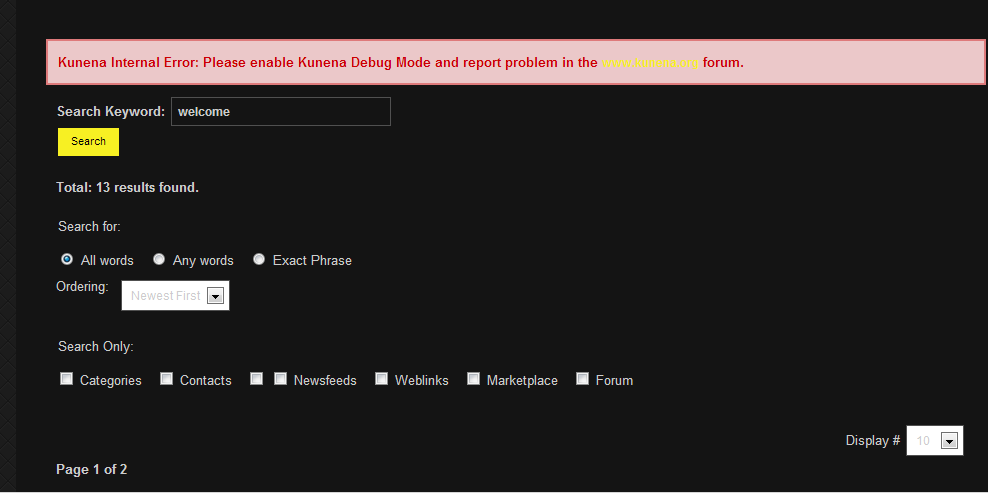
I just upgraded to Kunena 1.7.1. I hadn't used the search plugin before but it sounded handy so I installed and enabled it (using the 1.7.1 version of the plugin.) However, when I did a test search, this error appeared above the search results:
Kunena Internal Error: Please enable Kunena Debug Mode and report problem in the www.kunena.org forum.
I then enabled Kunena's debug mode, but doing another test search only brought up the same error. Strangely, if I check the box on the search results page that says "forum" and do ANOTHER search, the error message doesn't appear...
Regards,
Chris
I just upgraded to Kunena 1.7.1. I hadn't used the search plugin before but it sounded handy so I installed and enabled it (using the 1.7.1 version of the plugin.) However, when I did a test search, this error appeared above the search results:
Kunena Internal Error: Please enable Kunena Debug Mode and report problem in the www.kunena.org forum.
I then enabled Kunena's debug mode, but doing another test search only brought up the same error. Strangely, if I check the box on the search results page that says "forum" and do ANOTHER search, the error message doesn't appear...
Regards,
Chris
Last edit: 14 years 10 months ago by chrisjclay.
Please Log in or Create an account to join the conversation.


14 years 10 months ago #111331
by xillibit
I don't provide support by PM, because this can be useful for someone else.
Replied by xillibit on topic Kunena Internal Error: Please enable Kunena Debug Mode and report problem
Hello,
Do you have looked in your php error log or apache error log ?
Do you have looked in your php error log or apache error log ?
I don't provide support by PM, because this can be useful for someone else.
Please Log in or Create an account to join the conversation.


14 years 10 months ago #111333
by sozzled
Blue Eagle vs. Crypsis reference guide
Read my blog and

Replied by sozzled on topic Re: Kunena Internal Error: Please enable Kunena Debug Mode and report problem
Just looking at the image of the search results screen, there's something a little fishy. See the two checkboxes in front of the work "Newsfeeds": why are there two checkboxes unless maybe the first checkbox relates to a corrupted/misconfigured/conflicting plugin that has been installed? So, I'm wondering if there's a conflict with Kunena and something else on your website. Have you tried disabling other "Search - xxxxxx" plugins?
Would it be possible, please, to see your K 1.7.1 configuration report? Thanks
Would it be possible, please, to see your K 1.7.1 configuration report? Thanks
Blue Eagle vs. Crypsis reference guide
Read my blog and
Please Log in or Create an account to join the conversation.
- chrisjclay
-
Topic Author
- Offline
- New Member
-
14 years 10 months ago #111335
by chrisjclay
Replied by chrisjclay on topic Re: Kunena Internal Error: Please enable Kunena Debug Mode and report problem
Hi,
I found this:
[Thu Nov 17 11:11:14 2011] [error] [client 70.66.209.5] File does not exist: /home/rvoabcor/public_html/404.shtml, referer: www.rvoabc.org/search?searchphrase=all&searchword=welcome
[Thu Nov 17 11:11:14 2011] [error] [client 70.66.209.5] File does not exist: /home/rvoabcor/public_html/templates/nb3/imagesbody, referer: www.rvoabc.org/search?searchphrase=all&searchword=welcome
... but since then I fixed "imagesbody" (it should have been images/body in the template's css file). No new errors being logged, but the problem continues...
Chris
I found this:
[Thu Nov 17 11:11:14 2011] [error] [client 70.66.209.5] File does not exist: /home/rvoabcor/public_html/404.shtml, referer: www.rvoabc.org/search?searchphrase=all&searchword=welcome
[Thu Nov 17 11:11:14 2011] [error] [client 70.66.209.5] File does not exist: /home/rvoabcor/public_html/templates/nb3/imagesbody, referer: www.rvoabc.org/search?searchphrase=all&searchword=welcome
... but since then I fixed "imagesbody" (it should have been images/body in the template's css file). No new errors being logged, but the problem continues...
Chris
Please Log in or Create an account to join the conversation.
- chrisjclay
-
Topic Author
- Offline
- New Member
-
14 years 10 months ago #111336
by chrisjclay
Replied by chrisjclay on topic Re: Kunena Internal Error: Please enable Kunena Debug Mode and report problem
Hmm, good point. I'll try disabling the other plugins and then post the configuration report here if that doesn't solve it.
Chris
Chris
Please Log in or Create an account to join the conversation.
- chrisjclay
-
Topic Author
- Offline
- New Member
-
14 years 10 months ago #111337
by chrisjclay
Replied by chrisjclay on topic Re: Kunena Internal Error: Please enable Kunena Debug Mode and report problem
The missing label beside one of the search checkboxes is related to the Content search plugin (disabling it makes the seemingly extra checkbox disappear.) Not sure why there's no label, but anyway everything works fine if I disable the "Search - Marketplace" plugin. It's the plugin to go along with Marketplace, by CodingFish.com.
It would be a shame if we have to disable either the forum search or the marketplace search - any ideas on how they can both be installed yet play nicely together?
Thanks for all the help...
Chris
It would be a shame if we have to disable either the forum search or the marketplace search - any ideas on how they can both be installed yet play nicely together?
Thanks for all the help...
Chris
Please Log in or Create an account to join the conversation.
Time to create page: 0.214 seconds