


- Posts: 5
- Thank you received: 0
Kunena 7.1.1 & Kunena 6.4.17 – Security Updates Released
The Kunena team has announce the arrival of Kunena 7.1.1 [K 7.1.1] in stable which is now available for download as a native Joomla extension for J! 5.4.x/6.0.x./6.1.x./6.2.x This version addresses most of the issues that were discovered in K 6.2 / K 6.3 / K 6.4 / K7.0 and issues discovered during the last development stages of K 7.1
Just a reminder: K6.4.17 receives only securities fixes until end of 2026, so it's advised for users to upgrade to K7.1.
Topics that are moved into this category are generally considered to be closed. Users may want to add additional information but these topics should not be resurrected in order to discuss new problems or unrelated matters.
Question Discussbot Documentation
15 years 8 months ago - 15 years 8 months ago #88006
by insite
Discussbot Documentation was created by insite
Would someone be kind enough to point me (and others most likely) to the documentation for using the discussbot plugin. I've done a searcha and found very little that helps. And the plugin doesn't come with any information on it's use, nnor does the readme file, and the installed extension has no instructions either. All I want to do is add it to articles and have the discussion automatically created within the appropriate category of kenuna.
Thanks to anyone who can help.
edit: joomla 1.6 and yes I've looked at the sticky thread about discussbot instructions but it seems incomplete. Have no idea what half the stuff mentioned is or where to find the parameters in the control panel or how to configure the tag in a document to include the parameters if that is what we are meant to do... just need a well-thought overview of how to use this plugin.
Last edit: 15 years 8 months ago by insite. Reason: mention cms
Please Log in or Create an account to join the conversation.
15 years 8 months ago - 15 years 8 months ago #88010
by insite
Replied by insite on topic Re: Discussbot Documentation
Okay, done about as much reading as I care to bother with for this plugin. What is becomming apparent is that I should be seeing more fields when I choose to edit the content-kunena discuss plugin. In particular, there should be a category mapping field. The only fields available to me are Enabled, Access, and Ordering. Nothing else can be edited and there isn't any further parameter switch to be found. So I must assume I have a failed or incomplete install of the discuccbot. Will download and install again and hopefully it works after that. Otherwise I just have to give up and remove kunena.
Edit: downloaded the plugin again and reinstalled. No change to the plugin or fields avaialable. Best to move on now to a component that has adequate documentation.
Edit: downloaded the plugin again and reinstalled. No change to the plugin or fields avaialable. Best to move on now to a component that has adequate documentation.
Last edit: 15 years 8 months ago by insite.
Please Log in or Create an account to join the conversation.


15 years 8 months ago #88028
by xillibit
I don't provide support by PM, because this can be useful for someone else.
Replied by xillibit on topic Re: Discussbot Documentation
Hello,
Sorry about that, but the documentation for this plugin is mostly present here : www.kunena.org/forum/178-kunena-discuss-...t-instructions#59474
Sorry about that, but the documentation for this plugin is mostly present here : www.kunena.org/forum/178-kunena-discuss-...t-instructions#59474
I don't provide support by PM, because this can be useful for someone else.
Please Log in or Create an account to join the conversation.
15 years 8 months ago #88033
by insite
Replied by insite on topic Re: Discussbot Documentation
Thanks for responding xillibit, however, I had already read that thread and it is not detailed enough.
The plugin 1.6.2 doesn't have any of these fields at all when clicked to edit. This is honestly a frustrating plugin. Doesn't work, no documentation, no examples in the forum or on the site.
I give up on this product.
Where is this... where are the parameters to hover over, explain please.There are some brief instructions in every parameter -- just hover over them and you should see those.
Where is the category mapping field so I can set this?Category Mapping: list of category pairs (Joomla, Kunena), like this: 1,20;2,21;3,22
The plugin 1.6.2 doesn't have any of these fields at all when clicked to edit. This is honestly a frustrating plugin. Doesn't work, no documentation, no examples in the forum or on the site.
I give up on this product.
Please Log in or Create an account to join the conversation.
15 years 8 months ago #88038
by xillibit
I don't provide support by PM, because this can be useful for someone else.
Replied by xillibit on topic Re: Discussbot Documentation
When you over, by example category mapping, you see that :
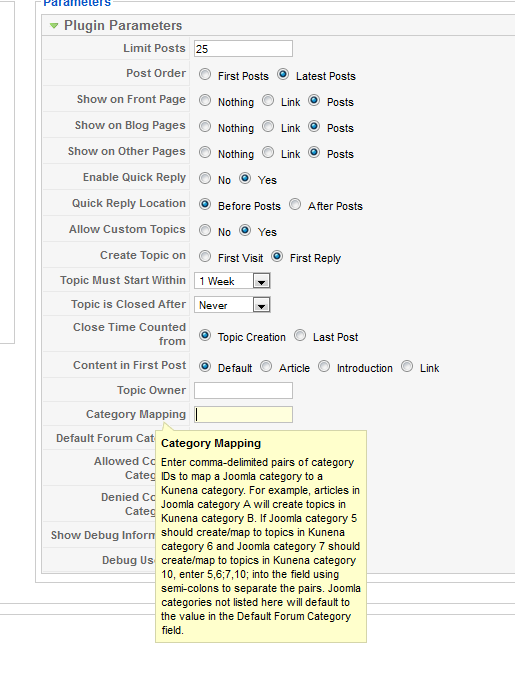
With this description, you should be able to configure the plugin by yourself
With this description, you should be able to configure the plugin by yourself
I don't provide support by PM, because this can be useful for someone else.
Please Log in or Create an account to join the conversation.
15 years 8 months ago - 15 years 8 months ago #88056
by insite
Replied by insite on topic Re: Discussbot Documentation
Thanks for supplying the image.
It is as I thought, I do not have that form available from the plugin.
Where do you navigate to find that form?
I have gone to 'manage plugins', then 'edit kunena discussbot', but I do not get that form. Like I have said, it is not available and all I get are the three fields mentioned in the earlier post.
edit: I add an image of what I see.

There are no options for parameters there.
It is as I thought, I do not have that form available from the plugin.
Where do you navigate to find that form?
I have gone to 'manage plugins', then 'edit kunena discussbot', but I do not get that form. Like I have said, it is not available and all I get are the three fields mentioned in the earlier post.
edit: I add an image of what I see.
There are no options for parameters there.
Last edit: 15 years 8 months ago by insite. Reason: add image
Please Log in or Create an account to join the conversation.
Time to create page: 0.126 seconds