
- Posts: 16
- Thank you received: 0
Kunena 7.0.9 & Kunena 6.4.14 – Security Updates Released
The Kunena team has announce the arrival of Kunena 7.0.9 [K 7.0.9] in stable which is now available for download as a native Joomla extension for J! 5.4.x/6.0.x./6.1.x. This version addresses most of the issues that were discovered in K 6.2 / K 6.3 / K 6.4 and issues discovered during the last development stages of K 7.0
This category is for the plugin developed, endorsed, maintained and supported by the Kunena project team. The topics in this category only relate to the plugin developed for K 1.6 and later versions.
Question Connect already existing thread to article and Discuss?
- LarsAgerstrand
-
 Topic Author
- Offline
- Junior Member
-

Less
More
14 years 7 months ago #117332
by LarsAgerstrand
Hi,
I have a long ordinary thread in the forum.
I have now created an article about that matter and I would like to connect the thread to that article. So that the thread is connect as the default comment place for that article. Or else there will be two threads on the matter which is not good!
Is that possible?
I have a long ordinary thread in the forum.
I have now created an article about that matter and I would like to connect the thread to that article. So that the thread is connect as the default comment place for that article. Or else there will be two threads on the matter which is not good!
Is that possible?
Please Log in or Create an account to join the conversation.


14 years 7 months ago #117416
by Matias
Replied by Matias on topic Re: Connect already existing thread to article and Discuss?
Yes it is. Kunena Discuss actually has tooltips on how to do it (just go through the settings).
We have {kunenadiscuss:xxx} rule (check how it should be written), which can be used to assign any topic to the current article. Also make sure that discuss doesn't "close" the topic by allowing to post into infinity.
When you have make the binding between article and kunena discuss, you can safely remove above tag.
PS. tag can also be used to change topic to another.
We have {kunenadiscuss:xxx} rule (check how it should be written), which can be used to assign any topic to the current article. Also make sure that discuss doesn't "close" the topic by allowing to post into infinity.
When you have make the binding between article and kunena discuss, you can safely remove above tag.
PS. tag can also be used to change topic to another.
Please Log in or Create an account to join the conversation.

14 years 4 months ago - 14 years 4 months ago #124262
by proterra
Didn´t know how it runs.
Have now an article, and merge the create thread with the existing, but that didn´t runs really.
The merge thread have the rule [ article ] 574 [ / article ]" 574 is the ID from the article. But if I´m only (without) merging fill out the code, nothing happens
My plan:
Have an new article and want it connect with a forum discussion.
Is it possible? And how it runs.
Replied by proterra on topic Re: Connect already existing thread to article and Discuss?
Matias wrote: Yes it is. Kunena Discuss actually has tooltips on how to do it (just go through the settings).
We have {kunenadiscuss:xxx} rule (check how it should be written), which can be used to assign any topic to the current article. Also make sure that discuss doesn't "close" the topic by allowing to post into infinity.
When you have make the binding between article and kunena discuss, you can safely remove above tag.
PS. tag can also be used to change topic to another.
Didn´t know how it runs.
Have now an article, and merge the create thread with the existing, but that didn´t runs really.
The merge thread have the rule [ article ] 574 [ / article ]" 574 is the ID from the article. But if I´m only (without) merging fill out the code, nothing happens
My plan:
Have an new article and want it connect with a forum discussion.
Is it possible? And how it runs.
Last edit: 14 years 4 months ago by proterra.
Please Log in or Create an account to join the conversation.
14 years 3 months ago #125219
by proterra
Replied by proterra on topic Re: Connect already existing thread to article and Discuss?
Maybe someone can help?
Please Log in or Create an account to join the conversation.
14 years 3 months ago #125230
by Matias
Replied by Matias on topic Re: Connect already existing thread to article and Discuss?
Add {kunena_discuss:XXX} into your article where XXX is topic ID. Also remember to check if the feature is enabled.
If it works, you won't see above tag in your article. After getting the binding, you can remove the line.
If it works, you won't see above tag in your article. After getting the binding, you can remove the line.
The following user(s) said Thank You: proterra
Please Log in or Create an account to join the conversation.

14 years 2 months ago - 14 years 2 months ago #127731
by plunk
Replied by plunk on topic Re: Connect already existing thread to article and Discuss?
Struggling myself I found out:
When i go frontend to the forum, to the specific topic, the url looks like this:
/index.php?option=com_kunena&view=topic&catid=15&id=155&Itemid=25
id=155
{kunena_discuss:155} is the right syntax
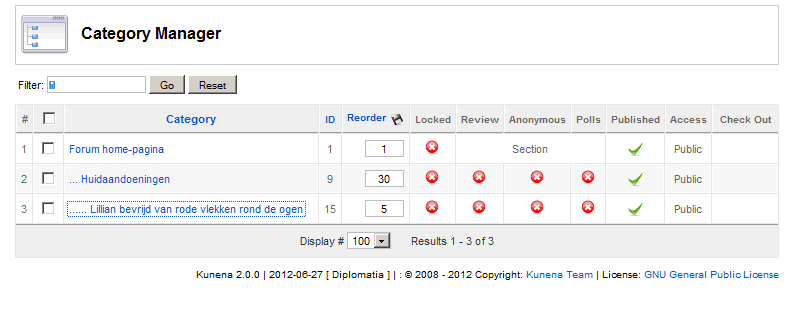
My surprise was: 155, from Kunena category manager I would have expected 15 (see attachment 1).
I still don't understand! Why 155, where can I find that ID backend???
When i go frontend to the forum, to the specific topic, the url looks like this:
/index.php?option=com_kunena&view=topic&catid=15&id=155&Itemid=25
id=155
{kunena_discuss:155} is the right syntax
My surprise was: 155, from Kunena category manager I would have expected 15 (see attachment 1).
I still don't understand! Why 155, where can I find that ID backend???
Last edit: 14 years 2 months ago by plunk.
Please Log in or Create an account to join the conversation.
Time to create page: 0.199 seconds