


- Posts: 13
- Thank you received: 0
Kunena 7.0.4 Released
The Kunena team has announce the arrival of Kunena 7.0.4 [K 7.0.4] in stable which is now available for download as a native Joomla extension for J! 5.4.x/6.0.x. This version addresses most of the issues that were discovered in K 6.2 / K 6.3 / K 6.4 and issues discovered during the last development stages of K 7.0
Question [gelöst ] Kategorie Bilder Pfad
17 years 2 months ago - 17 years 2 months ago #4466
by Sygarius
[gelöst ] Kategorie Bilder Pfad was created by Sygarius
Grüße
Mein Problem ist folgendes, ich habe Joomla seit 2 Wochen und letzte Woche Fireboard installiert. Ging Problemlos, aber erst danach erfahren das Fireboard eingestellt und Kunena der Nachfolger ist. Also Heute Kunena installiert, ebenfalls Problemlos.
Womit ich nicht klar komme, ist Kategorie Bilder.
Ich weiß aus Foren über Fireboard das es möglich war anhand von der Kategorie ID Bilder abzulegen (Extrem schlecht oder garnicht dokumentiert)Ich weiß auch wo und in welchem Format (ID-NR_on.gif also z.B. 1_on.gif/1_off.gif/1_notlogin.gif) aber in der Konfiguration den Pfad setzen, da geb ich auf. Alles probiert, die Voreinstellung, Pfad im html Format wie z.B.
usw...
Ist das so schwer das es kaum einer macht? Ich finde kein Beispiel Forum wo Kategorie Images zu sehen sind.
Kann mich jemand darüber aufklären wie der Pfad "richtig" zu setzen ist und was ich noch beachten muss?
Syg.
Mein Problem ist folgendes, ich habe Joomla seit 2 Wochen und letzte Woche Fireboard installiert. Ging Problemlos, aber erst danach erfahren das Fireboard eingestellt und Kunena der Nachfolger ist. Also Heute Kunena installiert, ebenfalls Problemlos.
Womit ich nicht klar komme, ist Kategorie Bilder.
Ich weiß aus Foren über Fireboard das es möglich war anhand von der Kategorie ID Bilder abzulegen (Extrem schlecht oder garnicht dokumentiert)Ich weiß auch wo und in welchem Format (ID-NR_on.gif also z.B. 1_on.gif/1_off.gif/1_notlogin.gif) aber in der Konfiguration den Pfad setzen, da geb ich auf. Alles probiert, die Voreinstellung, Pfad im html Format wie z.B.
Code:
"http://meinedomain.de/media/kunena/attachments/legacy/category_images/"
Ist das so schwer das es kaum einer macht? Ich finde kein Beispiel Forum wo Kategorie Images zu sehen sind.
Kann mich jemand darüber aufklären wie der Pfad "richtig" zu setzen ist und was ich noch beachten muss?
Syg.
Last edit: 17 years 2 months ago by Sygarius.
Please Log in or Create an account to join the conversation.


17 years 2 months ago #4474
by Lintzy
Replied by Lintzy on topic Re:Kategorie Bilder Pfad
Das ist doch schon voreingestellt, oder nicht? Bei mir ist es so, siehe Screenshot. Und auch der Ordner ist auf dem Server vorhanden.


Please Log in or Create an account to join the conversation.
17 years 2 months ago - 17 years 2 months ago #4489
by Sygarius
Replied by Sygarius on topic Re:Kategorie Bilder Pfad
Das ist richtig, aber bei dieser "Voreinstellung" sehe ich keine Bilder, da ja für Kategorie 1 Bilder in dem Ordner schon mitgeliefert werden sollte dann ja auch genau diese dann angezeigt werden, das ist nicht so. Also stimmt der Pfad nicht oder es muss mehr beachtet werden als ich weiß. (Ich hab mal diese 3 default ID 1 Bilder kopiert und sie als 2_on.gif usw hochgeladen. Nichts...
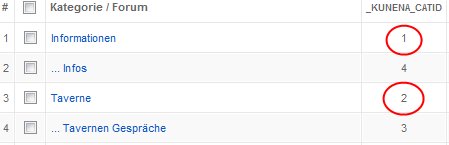
Wie ich schon sagte entweder Pfad falsch (Ganz Joomla und Rest von Kunena inc. Avatare funktioniert Fehlerfrei) oder es muss mehr getan werden als die Bilder in den Ordner kopieren. Die "_KUNENA_CATID" wird mir in der Konfiguration angezeigt, es gibt die ID 1 und 2 aber ich sehe im Frontend keine Bilder.
Wie ich schon sagte entweder Pfad falsch (Ganz Joomla und Rest von Kunena inc. Avatare funktioniert Fehlerfrei) oder es muss mehr getan werden als die Bilder in den Ordner kopieren. Die "_KUNENA_CATID" wird mir in der Konfiguration angezeigt, es gibt die ID 1 und 2 aber ich sehe im Frontend keine Bilder.
Last edit: 17 years 2 months ago by Sygarius.
Please Log in or Create an account to join the conversation.
17 years 2 months ago #4824
by Sygarius
Replied by Sygarius on topic Re:Kategorie Bilder Pfad
Kennt wirklich keiner die Einstellungen um Kategorie Bilder anzuzeigen? Oder vielleicht mach ich ja nur Denkfehler und die Möglichkeit steht nur auf dem Papier (Was ich inzwischen wirklich glaube, ich finde zur Zeit kein Fireboard / Kunena Forum das Kategorie Bilder anzeigt)
Syg.
Syg.
Please Log in or Create an account to join the conversation.
17 years 2 months ago #4837
by Lintzy
Hilft dir das weiter? Die Bilder werden nicht durchnummeriert, sondern tragen die Nummer der Kategorie.
Replied by Lintzy on topic Re:Kategorie Bilder Pfad
Category images folder is "components/com_kunena/category_images" or you can change on admin.
category images working with category id :
catid_notlogin.gif
catid_on.gif
catid_off.gif
for example :
your category id is "3" create
3_notlogin.gif
3_on.gif
3_off.gif
than upload your images on your category images folder. default config folder is :
"components/com_kunena/category_images"
Hilft dir das weiter? Die Bilder werden nicht durchnummeriert, sondern tragen die Nummer der Kategorie.
Please Log in or Create an account to join the conversation.
17 years 2 months ago #4919
by Sygarius
Replied by Sygarius on topic Re:Kategorie Bilder Pfad
Ich Quote mich mal selber
Sygarius wrote:
Wie du dort lesen kannst habe ich deinen wohlgemeinten Rat schon vorab berücksichtigt. So gibt es die Kategorie ID 1 und 2

Ich habe bewußt diese ID angegeben und wie man an dem Bild sehen kann ID 1 und 2 sind Real.
Syg.
Sygarius wrote:
Die "_KUNENA_CATID" wird mir in der Konfiguration angezeigt, es gibt die ID 1 und 2 aber ich sehe im Frontend keine Bilder.
Wie du dort lesen kannst habe ich deinen wohlgemeinten Rat schon vorab berücksichtigt. So gibt es die Kategorie ID 1 und 2
Ich habe bewußt diese ID angegeben und wie man an dem Bild sehen kann ID 1 und 2 sind Real.
Syg.
Please Log in or Create an account to join the conversation.
Time to create page: 0.560 seconds