


- Posts: 7245
- Thank you received: 566
Kunena 7.0.4 Released
The Kunena team has announce the arrival of Kunena 7.0.4 [K 7.0.4] in stable which is now available for download as a native Joomla extension for J! 5.4.x/6.0.x. This version addresses most of the issues that were discovered in K 6.2 / K 6.3 / K 6.4 and issues discovered during the last development stages of K 7.0
This category is for K 1.7 issues only.
To get started please see
K 1.6 & K 1.7 Installation Guide
in our
Documentation Wiki
Question How to migrate from Kunena 1.5.14 to 1.6.3 on server with MySQL 5.5.8?
15 years 2 months ago #86452
by Matias
Replied by Matias on topic How to migrate from Kunena 1.5.14 to 1.6.3 on server with MySQL 5.5.8?
Try running query:
SHOW CREATE TABLE tablename
And tell me what you got.
SHOW CREATE TABLE tablename
And tell me what you got.
Please Log in or Create an account to join the conversation.
- joomlauser
-
 Topic Author
- Offline
- Senior Member
-

Less
More
- Posts: 111
- Thank you received: 5
15 years 2 months ago - 15 years 2 months ago #86549
by joomlauser
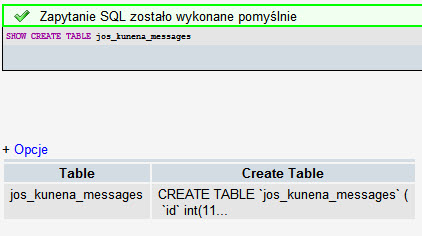
I run SHOW CREATE TABLE jos_kunena_messages - the result below:
I have to say that erlier I run kunena migration script on my localhost, then after fresh kunena v1.6.3 installation on server with mysql 5.5.8 I imported kunena tables. So I run above query on table nontipical migration.
Replied by joomlauser on topic How to migrate from Kunena 1.5.14 to 1.6.3 on server with MySQL 5.5.8?
I don't know if I understand your command in the right way.Matias wrote: Try running query:
SHOW CREATE TABLE tablename
And tell me what you got.
I run SHOW CREATE TABLE jos_kunena_messages - the result below:
I have to say that erlier I run kunena migration script on my localhost, then after fresh kunena v1.6.3 installation on server with mysql 5.5.8 I imported kunena tables. So I run above query on table nontipical migration.
Last edit: 15 years 2 months ago by joomlauser.
Please Log in or Create an account to join the conversation.
15 years 2 months ago #86706
by Matias
Replied by Matias on topic How to migrate from Kunena 1.5.14 to 1.6.3 on server with MySQL 5.5.8?
Command was just the one I was looking for. But CREATE TABLE is much, much longer, so we need to find a way to show the whole result, not just truncated version of it.
Please Log in or Create an account to join the conversation.
- joomlauser
-
Topic Author
- Offline
- Senior Member
-
Less
More
- Posts: 111
- Thank you received: 5
15 years 1 month ago #89325
by joomlauser
Replied by joomlauser on topic How to migrate from Kunena 1.5.14 to 1.6.3 on server with MySQL 5.5.8?
Does anybody has any other idea?Matias wrote: Command was just the one I was looking for. But CREATE TABLE is much, much longer, so we need to find a way to show the whole result, not just truncated version of it.
Please Log in or Create an account to join the conversation.


15 years 1 month ago #90185
by thalion
Replied by thalion on topic How to migrate from Kunena 1.5.14 to 1.6.3 on server with MySQL 5.5.8?
I found a solution.
Open file
/install/model.php
under Admin Kunena folder, find this function:
Basically, this function recreate a table from an old table's structure. So it uses old syntax.
After this row (or any similar row):
add:
Do not reload the error page on your web browser; instead, go back and click again on migrate button.
This should work.
Open file
/install/model.php
under Admin Kunena folder, find this function:
Code:
protected function migrateTable
Basically, this function recreate a table from an old table's structure. So it uses old syntax.
After this row (or any similar row):
Code:
$create = preg_replace('/COLLATE [\w\d_]+/', '', $create);
add:
Code:
$create = str_replace(" TYPE=", " ENGINE=", $create);
Do not reload the error page on your web browser; instead, go back and click again on migrate button.
This should work.
Please Log in or Create an account to join the conversation.
- joomlauser
-
Topic Author
- Offline
- Senior Member
-
Less
More
- Posts: 111
- Thank you received: 5
15 years 1 month ago - 15 years 1 month ago #90231
by joomlauser
Replied by joomlauser on topic How to migrate from Kunena 1.5.14 to 1.6.3 on server with MySQL 5.5.8?
Hello, It seems to work but in some time during migration I got an error:
Fatal error: Class 'KunenaFactory' not found in /administrator/components/com_kunena/install/upgrade/upgrade-1.6.0_configuration.php on line 17 (kunena installator has problem with step 6 - finish installation)
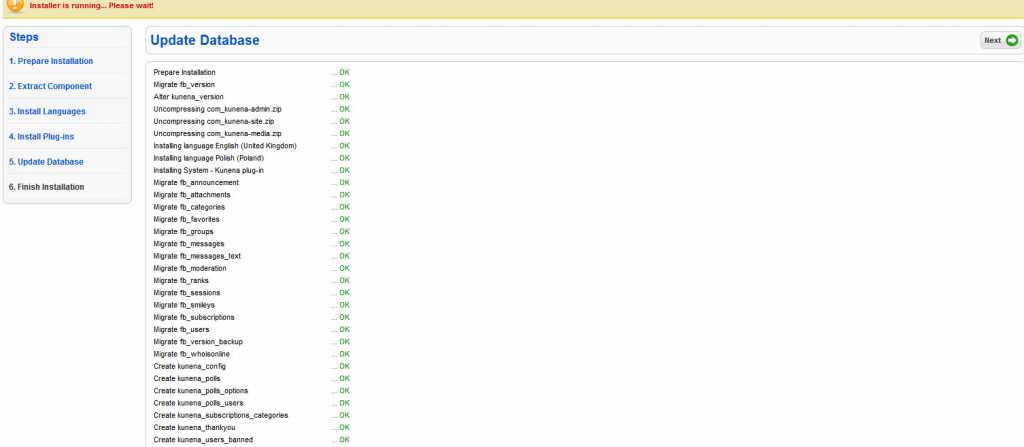
I checked the line from error above:
Any Idea?
Thanks
Fatal error: Class 'KunenaFactory' not found in /administrator/components/com_kunena/install/upgrade/upgrade-1.6.0_configuration.php on line 17 (kunena installator has problem with step 6 - finish installation)
I checked the line from error above:
$config = KunenaFactory::getConfig ();
Any Idea?
Thanks
Last edit: 15 years 1 month ago by joomlauser.
Please Log in or Create an account to join the conversation.
Time to create page: 0.250 seconds