


- Posts: 45
- Thank you received: 7
Kunena 7.0.6 & Kunena 6.4.12 – Security Updates Released
The Kunena team has announce the arrival of Kunena 7.0.6 [K 7.0.6] in stable which is now available for download as a native Joomla extension for J! 5.4.x/6.0.x. This version addresses most of the issues that were discovered in K 6.2 / K 6.3 / K 6.4 and issues discovered during the last development stages of K 7.0.
The Kunena team is also pleased to announce the twelfth version of Kunena 6.4, a native Joomla extension for Joomla! 5.0, 5.1, 5.2, 5.3, 5.4 and 6.0.
Topics that are moved into this category are generally considered to be closed. Users may want to add additional information but these topics should not be resurrected in order to discuss new problems or unrelated matters.
Question attachments (add file) popup issue
15 years 2 weeks ago #96587
by nima.abbc
attachments (add file) popup issue was created by nima.abbc
hello,
as you can see in the picture attached, the yellow popup box for "allowed file extentions" is a bit short!
i searched in css files (thanks to FireBug!!!) and change the width property of "kfile-hide" class in both kunena.forum.css and kunena.forum-min.css files:
but it didnt work!
any ideas how to enlarge width of it?
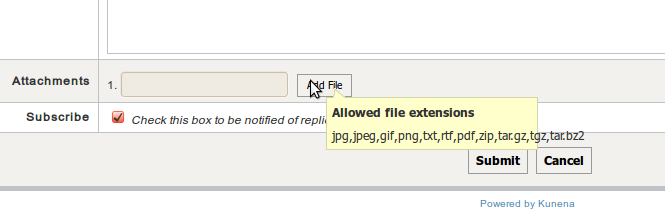
as you can see in the picture attached, the yellow popup box for "allowed file extentions" is a bit short!
i searched in css files (thanks to FireBug!!!) and change the width property of "kfile-hide" class in both kunena.forum.css and kunena.forum-min.css files:
Code:
#Kunena .kfile-hide {
position: relative;
width: 100px;
height: 23px;
overflow: hidden;
}
but it didnt work!
any ideas how to enlarge width of it?
Please Log in or Create an account to join the conversation.

15 years 2 weeks ago #96617
by yuzef
Love Simplicty
read...... and learn........
My Joomla Test Site
Replied by yuzef on topic Re: attachments (add file) popup issue
i think that was caused by your joomla theme. please try default joomla template and see your kunena forum again, is the problem persist ?
Love Simplicty
read...... and learn........
My Joomla Test Site
Please Log in or Create an account to join the conversation.


15 years 2 weeks ago - 15 years 2 weeks ago #96618
by sozzled
Blue Eagle vs. Crypsis reference guide
Read my blog and

Replied by sozzled on topic Re: attachments (add file) popup issue
This took me a little while to find the answer. The size of the tip layer is defined in the Kunena template CSS file as
The solution is to add following lines to your Joomla site template CSS file:
... or some other value as as your choose.
The reason that the tip text exceeds the "popup" dimensions is because there are no breaking space characters. If there were breaking space characters, the text would wrap onto a new line.
Code:
.tool-tip {
background: none repeat scroll 0 0 #FFFFCC;
border: 1px solid #D4D5AA;
float: left;
max-width: 200px;
padding: 5px;
}
Code:
.tool-tip {
max-width: 300px;
}
The reason that the tip text exceeds the "popup" dimensions is because there are no breaking space characters. If there were breaking space characters, the text would wrap onto a new line.
Blue Eagle vs. Crypsis reference guide
Read my blog and
Last edit: 15 years 2 weeks ago by sozzled.
Please Log in or Create an account to join the conversation.
15 years 2 weeks ago #96619
by nima.abbc
Replied by nima.abbc on topic Re: attachments (add file) popup issue
i'm using JA_Purity which is one of joomla default templates!yuzef wrote: i think that was caused by your joomla theme. please try default joomla template and see your kunena forum again, is the problem persist ?
Please Log in or Create an account to join the conversation.
15 years 2 weeks ago #96620
by nima.abbc
which css file exactly???
i searched all css file in joomla/components/com_kunena/template/default/css but there is no such css id...
Replied by nima.abbc on topic Re: attachments (add file) popup issue
sozzled wrote: This took me a little while to find the answer. The size of the tip layer is defined in the Kunena template CSS file as
The solution is to add following lines to your Joomla site template CSS file:Code:.tool-tip { background: none repeat scroll 0 0 #FFFFCC; border: 1px solid #D4D5AA; float: left; max-width: 200px; padding: 5px; }... or some other value as as your choose.Code:.tool-tip { max-width: 300px; }
The reason that the tip text exceeds the "popup" dimensions is because there are no breaking space characters. If there were breaking space characters, the text would wrap onto a new line.
which css file exactly???
i searched all css file in joomla/components/com_kunena/template/default/css but there is no such css id...
Please Log in or Create an account to join the conversation.
15 years 2 weeks ago #96623
by sozzled
Blue Eagle vs. Crypsis reference guide
Read my blog and
Replied by sozzled on topic Re: attachments (add file) popup issue
Your Joomla site template CSS file ... don't change Kunena at all. Simple. Easy.nima.abbc wrote: which css file exactly???
Blue Eagle vs. Crypsis reference guide
Read my blog and
The following user(s) said Thank You: nima.abbc
Please Log in or Create an account to join the conversation.
Time to create page: 0.272 seconds