
- Posts: 23
- Thank you received: 0
Kunena 7.0.9 & Kunena 6.4.14 – Security Updates Released
The Kunena team has announce the arrival of Kunena 7.0.9 [K 7.0.9] in stable which is now available for download as a native Joomla extension for J! 5.4.x/6.0.x./6.1.x. This version addresses most of the issues that were discovered in K 6.2 / K 6.3 / K 6.4 and issues discovered during the last development stages of K 7.0
Topics that are moved into this category are generally considered to be closed. Users may want to add additional information but these topics should not be resurrected in order to discuss new problems or unrelated matters.
Question rt_zephyr_j16 template - Kunena edit button CSS conflict
- Sparkybear
-
 Topic Author
- Offline
- Junior Member
-

Less
More
15 years 4 months ago - 15 years 4 months ago #95540
by Sparkybear
Yeah sorry, it definitely would help wouldnt it.....
User - kunena
P'word - Password
Thanks and sorry for mistaking you all for clairoviants
Replied by Sparkybear on topic Re: Edit button - CSS Error ????
sozzled wrote: Even with the URL of your forum we can't see the edit button problem unless we have a test account to login to your site. Do you have a test account?
Yeah sorry, it definitely would help wouldnt it.....
User - kunena
P'word - Password
Thanks and sorry for mistaking you all for clairoviants
Last edit: 15 years 4 months ago by Sparkybear.
Please Log in or Create an account to join the conversation.


15 years 4 months ago #95541
by sozzled
Blue Eagle vs. Crypsis reference guide
Read my blog and

Replied by sozzled on topic Re: Edit button - CSS Error ????
The problem originates from the Joomla site template (from Rockettheme) that you are using. Look at line 58 of ../templates/rt_zephyr_j16/css/joomla.css on your site that has the following definitions:
Remove the "float: left;" and it will work.
Code:
.component-content span.edit {margin-left: 10px;float: left;}
Remove the "float: left;" and it will work.
Blue Eagle vs. Crypsis reference guide
Read my blog and
The following user(s) said Thank You: Sparkybear
Please Log in or Create an account to join the conversation.
- Sparkybear
-
Topic Author
- Offline
- Junior Member
-
Less
More
- Posts: 23
- Thank you received: 0
15 years 4 months ago #95698
by Sparkybear
Hi
THank you very much for looking BUT I cant find such a line in joomla.css - Line 58 reads /* Typography */
In that section i can find nothing relating to ".component-content span.edit" whatsoever. I have searched the entire joomla.css for it using search function in DW CS5 and cant find it.
I also searched the rest of the css file to no avail
What am I getting wrong this time ???
Replied by Sparkybear on topic Re: Edit button - CSS Error ????
sozzled wrote: The problem originates from the Joomla site template (from Rockettheme) that you are using. Look at line 58 of ../templates/rt_zephyr_j16/css/joomla.css on your site that has the following definitions:
Code:.component-content span.edit {margin-left: 10px;float: left;}
Remove the "float: left;" and it will work.
Hi
THank you very much for looking BUT I cant find such a line in joomla.css - Line 58 reads /* Typography */
In that section i can find nothing relating to ".component-content span.edit" whatsoever. I have searched the entire joomla.css for it using search function in DW CS5 and cant find it.
I also searched the rest of the css file to no avail
What am I getting wrong this time ???
Please Log in or Create an account to join the conversation.
15 years 4 months ago - 15 years 4 months ago #95701
by sozzled
Blue Eagle vs. Crypsis reference guide
Read my blog and
Replied by sozzled on topic Re: rt_zephyr_j16 template - Kunena edit button CSS conflict
You are looking at the wrong file. The file is ../libraries/gantry/css/joomla.css
I'm sorry for the confusion, it was my fault. I know what I meant to type but I copied and pasted the wrong URL.
I'm sorry for the confusion, it was my fault. I know what I meant to type but I copied and pasted the wrong URL.
Blue Eagle vs. Crypsis reference guide
Read my blog and
Last edit: 15 years 4 months ago by sozzled.
The following user(s) said Thank You: Sparkybear
Please Log in or Create an account to join the conversation.
- Sparkybear
-
Topic Author
- Offline
- Junior Member
-
Less
More
- Posts: 23
- Thank you received: 0
15 years 4 months ago - 15 years 4 months ago #95703
by Sparkybear
Replied by Sparkybear on topic Re: rt_zephyr_j16 template - Kunena edit button CSS conflict
[
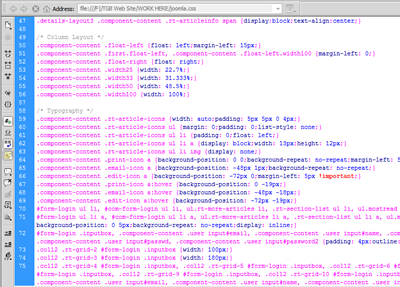
Ok I MAY be being dumb, it has been known BUT I have double checked and I cant find it. I have attached image of joomla.css file which was located in /public_html/templates/rt_zephyr_j16/css/ (Copied and pasted from FTP programme just to make sure.
Your help is very much appreciated for more than one reason, which will become apparent
Thanks
P.S. I read a lot of your posts - trying to learn - in a post you made you spoke of 3 recommended "things" to have to help with css etc, one of them was firebug, which I downloaded and getting to grips with (slowly but surely) what were the other 2. I cant find the relevant post.
sozzled wrote: You are looking at the wrong file. The file is ../templates/rt_zephyr_j16/css/joomla.css
Ok I MAY be being dumb, it has been known
BUT I have double checked and I cant find it. I have attached image of joomla.css file which was located in /public_html/templates/rt_zephyr_j16/css/ (Copied and pasted from FTP programme just to make sure.Your help is very much appreciated for more than one reason, which will become apparent
Thanks
P.S. I read a lot of your posts - trying to learn - in a post you made you spoke of 3 recommended "things" to have to help with css etc, one of them was firebug, which I downloaded and getting to grips with (slowly but surely) what were the other 2. I cant find the relevant post.
Last edit: 15 years 4 months ago by Sparkybear.
Please Log in or Create an account to join the conversation.
15 years 4 months ago - 15 years 4 months ago #95706
by sozzled
Blue Eagle vs. Crypsis reference guide
Read my blog and
Replied by sozzled on topic Re: rt_zephyr_j16 template - Kunena edit button CSS conflict
You have two files called joomla.css. One of them is located at ../templates/rt_zephyr_j16/css/joomla.css and the other is located at ../libraries/gantry/css/joomla.css. It took me a lot of digging around (using Firebug) to make sure that I got the right one.
Unfortunately, your microscopically small picture of whatever you tried to post is impossible for me to guess what you're trying to show me, but whatever is the answer there are two facts that you need to appreciate:
(1) Your Rockettheme template has a definition for a similarly-named element in Kunena. We're not trying to point the blame at anyone here, but these things are sometimes unavoidable. Unless CSS "namespaces" can be reserved by different developers (as an analogy, think of the way that computer hardware components have unique plug-and-play identifiers) we're never going to fully resolve the problem.
(2) Wherever it's defined, you need to make sure that there is no "float: left" definition for the span.edit CSS directive. Wherever it's defined (and if it's defined in both of the CSS files that I mentioned earlier then you may need to change them both), the definition should look like this:
.component-content span.edit {margin-left: 10px;}
I can't remember where I wrote about the three recommendations that I may have offered before, sorry.
Unfortunately, your microscopically small picture of whatever you tried to post is impossible for me to guess what you're trying to show me, but whatever is the answer there are two facts that you need to appreciate:
(1) Your Rockettheme template has a definition for a similarly-named element in Kunena. We're not trying to point the blame at anyone here, but these things are sometimes unavoidable. Unless CSS "namespaces" can be reserved by different developers (as an analogy, think of the way that computer hardware components have unique plug-and-play identifiers) we're never going to fully resolve the problem.
(2) Wherever it's defined, you need to make sure that there is no "float: left" definition for the span.edit CSS directive. Wherever it's defined (and if it's defined in both of the CSS files that I mentioned earlier then you may need to change them both), the definition should look like this:
.component-content span.edit {margin-left: 10px;}
I can't remember where I wrote about the three recommendations that I may have offered before, sorry.
Blue Eagle vs. Crypsis reference guide
Read my blog and
Last edit: 15 years 4 months ago by sozzled.
The following user(s) said Thank You: Sparkybear
Please Log in or Create an account to join the conversation.
Time to create page: 0.278 seconds