
- Posts: 3
- Thank you received: 0
Kunena 7.0.4 Released
The Kunena team has announce the arrival of Kunena 7.0.4 [K 7.0.4] in stable which is now available for download as a native Joomla extension for J! 5.4.x/6.0.x. This version addresses most of the issues that were discovered in K 6.2 / K 6.3 / K 6.4 and issues discovered during the last development stages of K 7.0
Topics that are moved into this category are generally considered to be closed. Users may want to add additional information but these topics should not be resurrected in order to discuss new problems or unrelated matters.
Question search keyword input field not visible
- mickeywuff
-
 Topic Author
- Offline
- New Member
-

Less
More
15 years 1 month ago - 15 years 1 month ago #92116
by mickeywuff
search keyword input field not visible was created by mickeywuff
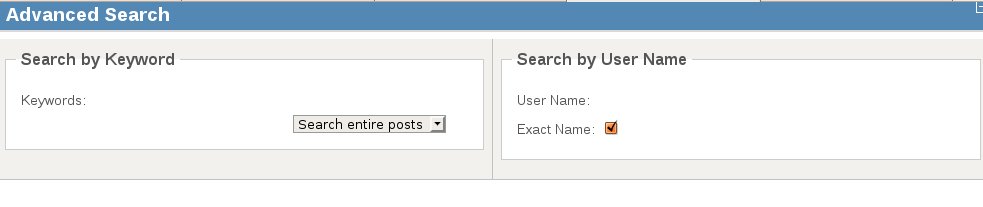
Hi , i use the default template , everythings seem fine but when click on search , the search page doesn't show the keyword and username input text field . the field is there but it is not visible , you can click on it and enter text for the search but the box just not visible .
Last edit: 15 years 1 month ago by mickeywuff.
Please Log in or Create an account to join the conversation.


15 years 1 month ago #92129
by sozzled
Blue Eagle vs. Crypsis reference guide
Read my blog and

Replied by sozzled on topic Re: search keyword input field not visible
Let me clarify your question. Are you saying that your search feature does not display like it does here at
www.kunena.org
? That's strange. I haven't heard of a case like this before. It sounds like your site template is interfering with the way that Kunena pages display on your website (or you have a corrupted Kunena installation).
Would you like to post your K 1.6 configuration report so that we can see this problem for ourselves, please?
Would you like to post your K 1.6 configuration report so that we can see this problem for ourselves, please?
Blue Eagle vs. Crypsis reference guide
Read my blog and
Please Log in or Create an account to join the conversation.
- mickeywuff
-
Topic Author
- Offline
- New Member
-
Less
More
- Posts: 3
- Thank you received: 0
15 years 1 month ago - 15 years 1 month ago #92152
by mickeywuff
Replied by mickeywuff on topic Re: search keyword input field not visible
the rest of the search page is ok only the "search by keywords" and the "search by username" input box has no border around it (check it out at the attachment).Is there any css file that I can edit to add the border ?
Last edit: 15 years 1 month ago by mickeywuff.
Please Log in or Create an account to join the conversation.
15 years 1 month ago #92181
by sozzled
Blue Eagle vs. Crypsis reference guide
Read my blog and
Replied by sozzled on topic Re: search keyword input field not visible
Is your website available for us to view this problem for ourselves? I'm sorry but there is insufficient information in your K 1.6 configuration report for us to be able to help you unless we can see this situation at first hand. Any advice that we might offer at this time would be uneducated guesswork.
The only conclusion that I can come to, based on the information you have provided, is that there's something wrong on your site and that you need to fix it. However, I'm sorry but I have never seen this problem before (and I can't see it now) and I don't know of any way to help you.
The only conclusion that I can come to, based on the information you have provided, is that there's something wrong on your site and that you need to fix it. However, I'm sorry but I have never seen this problem before (and I can't see it now) and I don't know of any way to help you.
Blue Eagle vs. Crypsis reference guide
Read my blog and
Please Log in or Create an account to join the conversation.
- mickeywuff
-
Topic Author
- Offline
- New Member
-
Less
More
- Posts: 3
- Thank you received: 0
15 years 1 month ago - 15 years 1 month ago #92230
by mickeywuff
Replied by mickeywuff on topic Re: search keyword input field not visible
:laugh: HOHOHO :laugh: ! I solved it by editing the site template ccs file (not kunena template) and change the input border 0 to 1 .
Oohhhh man, why didn't I use firebug a little earlier to find the bug ? but then again most of the time firebug with its north by north west link would lead you to some exotic end of the world cliff, you are left with the choice ,either jump or turn off your PC . :silly:
Oohhhh man, why didn't I use firebug a little earlier to find the bug ? but then again most of the time firebug with its north by north west link would lead you to some exotic end of the world cliff, you are left with the choice ,either jump or turn off your PC . :silly:
Last edit: 15 years 1 month ago by mickeywuff.
Please Log in or Create an account to join the conversation.
Time to create page: 0.250 seconds