
- Posts: 16
- Thank you received: 0
Kunena 7.0.9 & Kunena 6.4.14 – Security Updates Released
The Kunena team has announce the arrival of Kunena 7.0.9 [K 7.0.9] in stable which is now available for download as a native Joomla extension for J! 5.4.x/6.0.x./6.1.x. This version addresses most of the issues that were discovered in K 6.2 / K 6.3 / K 6.4 and issues discovered during the last development stages of K 7.0
Topics that are moved into this category are generally considered to be closed. Users may want to add additional information but these topics should not be resurrected in order to discuss new problems or unrelated matters.
Question It is possible to insert a pagebreak INSIDE a topic?
- gato_de_botas
-
 Topic Author
- Offline
- Junior Member
-

Less
More
15 years 6 months ago - 15 years 6 months ago #88850
by gato_de_botas
I am writing a topic, but it is too big. I would like to insert a PAGEBREAK to divide the text in 3 or 4 pages.
But I could not find a PAGEBREAK button in the Kunena editor.
It is possible to insert a pagebreak INSIDE a topic?
I see that at top right of topic, there is a PAGE text showing, it may suggest that the pagebreak is possible, but I can not find the button in kunena editor.
But I could not find a PAGEBREAK button in the Kunena editor.
It is possible to insert a pagebreak INSIDE a topic?
I see that at top right of topic, there is a PAGE text showing, it may suggest that the pagebreak is possible, but I can not find the button in kunena editor.
Last edit: 15 years 6 months ago by gato_de_botas.
Please Log in or Create an account to join the conversation.


15 years 6 months ago #88883
by xillibit
I don't provide support by PM, because this can be useful for someone else.
Replied by xillibit on topic Re: It is possible to insert a pagebreak INSIDE a topic?
Hello,
It's not possible to have pagebreak in Kunena, this is reserved for Joomla! articles
It's not possible to have pagebreak in Kunena, this is reserved for Joomla! articles
I don't provide support by PM, because this can be useful for someone else.
Please Log in or Create an account to join the conversation.
- gato_de_botas
-
Topic Author
- Offline
- Junior Member
-
Less
More
- Posts: 16
- Thank you received: 0
15 years 6 months ago #88946
by gato_de_botas
Replied by gato_de_botas on topic Re: It is possible to insert a pagebreak INSIDE a topic?
thanks!
What about the PAGE ICONS to the upper right border?
What about the PAGE ICONS to the upper right border?
Please Log in or Create an account to join the conversation.


15 years 6 months ago #88948
by sozzled
Blue Eagle vs. Crypsis reference guide
Read my blog and

Replied by sozzled on topic Re: It is possible to insert a pagebreak INSIDE a topic?
I'm sorry, I don't understand the question. What are these "page icons" that you are referring to - can you show us a picture of them, please - how are they involved in Kunena and what is the problem (or our question), please?
Blue Eagle vs. Crypsis reference guide
Read my blog and
Please Log in or Create an account to join the conversation.
- gato_de_botas
-
Topic Author
- Offline
- Junior Member
-
Less
More
- Posts: 16
- Thank you received: 0
15 years 6 months ago - 15 years 6 months ago #88972
by gato_de_botas
Replied by gato_de_botas on topic Re: It is possible to insert a pagebreak INSIDE a topic?
I am referring to the pagination, look above the number 01 topic in this page. For what serves this pagination?
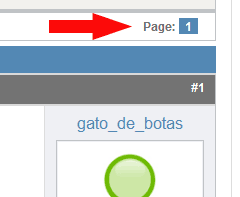
My question is about paginating a topic. For example, this reply is just some lines long. But if I should have to write a very long text now, like 200 lines long, then maybe it would be a good ideia to divide the reply in some pages.
My question is about paginating a topic. For example, this reply is just some lines long. But if I should have to write a very long text now, like 200 lines long, then maybe it would be a good ideia to divide the reply in some pages.
Last edit: 15 years 6 months ago by gato_de_botas.
Please Log in or Create an account to join the conversation.
15 years 6 months ago - 15 years 6 months ago #89027
by sozzled
Blue Eagle vs. Crypsis reference guide
Read my blog and
Replied by sozzled on topic Re: It is possible to insert a pagebreak INSIDE a topic?
Thank you for the picture that explains better what you are discussing.
The page number (shown in your picture) refers to the way that all of the messages in a topic are displayed. When you originally chose, as the subject of this topic, "Is it possible to insert a page break inside a topic?", the answer is that you can insert "page breaks" between replies within a topic. The "page breaks" in this case are not able to be controlled individually on a topic by topic basis. These breaks are defined by the configuration setting
Forum Configuration » Frontend » Look and Feel » Messages per page = <number>
Now the important thing to understand is what is meant by a topic and what is meant by a message. You post a message on the forum. People then reply to that message and you can reply to their messages. The collection of your message and the replies to that message are together called a topic. The first message defines the topic. Some topics can be quite short; they might never be more than one message. Some topics can grow to be very long, that is they might involve many hundreds of messages, and therefore there needs to be a convenient way of breaking the display into smaller segments so that users do not have to scroll through many pages (or even dozens of pages) to find the message(s) that they are interested in looking at.
Therefore, when you are looking lots of messages (in other words a long topic") a page break is created after every <number> of messages displayed on a page. At www.kunena.org this <number> is 10 messages. And so, when a topic reaches the 11th message, a page break is generated. In this way it is true that you can insert a page-break within a topic. The page number you showed in your image (page "1") shows that we are looking at page 1 of a topic.
However, when we look at your question, again,
gato_de_botas wrote:
I hope that I have helped you to understand what purpose is served by the page number at the top of this page, the difference between topics and messages, how topics are paginated, and that it is not possible to insert page-breaks within individual messages posted in a topic.
The page number (shown in your picture) refers to the way that all of the messages in a topic are displayed. When you originally chose, as the subject of this topic, "Is it possible to insert a page break inside a topic?", the answer is that you can insert "page breaks" between replies within a topic. The "page breaks" in this case are not able to be controlled individually on a topic by topic basis. These breaks are defined by the configuration setting
Forum Configuration » Frontend » Look and Feel » Messages per page = <number>
Now the important thing to understand is what is meant by a topic and what is meant by a message. You post a message on the forum. People then reply to that message and you can reply to their messages. The collection of your message and the replies to that message are together called a topic. The first message defines the topic. Some topics can be quite short; they might never be more than one message. Some topics can grow to be very long, that is they might involve many hundreds of messages, and therefore there needs to be a convenient way of breaking the display into smaller segments so that users do not have to scroll through many pages (or even dozens of pages) to find the message(s) that they are interested in looking at.
Therefore, when you are looking lots of messages (in other words a long topic") a page break is created after every <number> of messages displayed on a page. At www.kunena.org this <number> is 10 messages. And so, when a topic reaches the 11th message, a page break is generated. In this way it is true that you can insert a page-break within a topic. The page number you showed in your image (page "1") shows that we are looking at page 1 of a topic.
However, when we look at your question, again,
gato_de_botas wrote:
We are not discussing paginating a topic. In this case we are discussing how to insert page-breaks within a message. I am sorry but Kunena does not offer a way to insert a page-break within a message.My question is about paginating a topic. For example, this reply is just some lines long. But if I should have to write a very long text now, like 200 lines long, then maybe it would be a good idea to divide the reply in some pages.
I hope that I have helped you to understand what purpose is served by the page number at the top of this page, the difference between topics and messages, how topics are paginated, and that it is not possible to insert page-breaks within individual messages posted in a topic.
Blue Eagle vs. Crypsis reference guide
Read my blog and
Last edit: 15 years 6 months ago by sozzled.
Please Log in or Create an account to join the conversation.
Time to create page: 0.219 seconds