


- Posts: 5
- Thank you received: 0
Kunena 7.0.5 & Kunena 6.4.11 – Security Updates Released
The Kunena team has announce the arrival of Kunena 7.0.5 [K 7.0.5] in stable which is now available for download as a native Joomla extension for J! 5.4.x/6.0.x. This version addresses most of the issues that were discovered in K 6.2 / K 6.3 / K 6.4 and issues discovered during the last development stages of K 7.0.
The Kunena team is also pleased to announce the eleventh version of Kunena 6.4, a native Joomla extension for Joomla! 5.0, 5.1, 5.2, 5.3, 5.4 and 6.0.
Topics that are moved into this category are generally considered to be closed. Users may want to add additional information but these topics should not be resurrected in order to discuss new problems or unrelated matters.
Question problems with pagination
15 years 6 months ago #69866
by hansettes
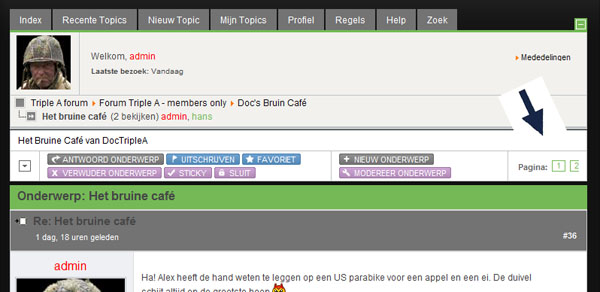
Hope somebody can help me with this :
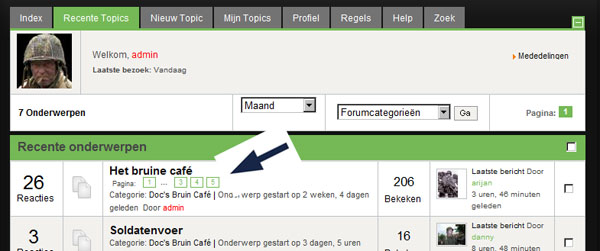
I would like to see the pagination in "kunena2.jpg" to be the same as in "kunena1.jpg".
I know it's possible, because I see it in this forum. Do I have to change something somewhere?
As you can see in "kunena2.jpg" the pagenumbers roll off the screen. It's not possible to navigate to a certain page.
I tried something in the template of the website, but that doesn't help.
Thanks,
Hans Ettes
Netherlands
problems with pagination was created by hansettes
Hope somebody can help me with this :
I would like to see the pagination in "kunena2.jpg" to be the same as in "kunena1.jpg".
I know it's possible, because I see it in this forum. Do I have to change something somewhere?
As you can see in "kunena2.jpg" the pagenumbers roll off the screen. It's not possible to navigate to a certain page.
I tried something in the template of the website, but that doesn't help.
Thanks,
Hans Ettes
Netherlands
Please Log in or Create an account to join the conversation.


15 years 6 months ago - 15 years 6 months ago #69922
by sozzled
Blue Eagle vs. Crypsis reference guide
Read my blog and

Replied by sozzled on topic My Joomla site template makes a mess of how the pagination display appears for K 1.6
You posted your question in the K 1.5 Hacks Tips and Tricks category but your question concerns K 1.6! This explains why it has taken so long to answer your question. I have moved your topic to a more appropriate category for you.
Your problem is not with pagination. Your problem is with the way that the the pagination feature is displayed on your website. The problem is caused by your Joomla site template. You can fix this problem quite easily with Firebug for Firefox.
If you cannot work out what you need to fix, please provide us with a working URL where we can see this problem for ourselves. Thank you.
Your problem is not with pagination. Your problem is with the way that the the pagination feature is displayed on your website. The problem is caused by your Joomla site template. You can fix this problem quite easily with Firebug for Firefox.
If you cannot work out what you need to fix, please provide us with a working URL where we can see this problem for ourselves. Thank you.
Blue Eagle vs. Crypsis reference guide
Read my blog and
Last edit: 15 years 6 months ago by sozzled.
The following user(s) said Thank You: hansettes
Please Log in or Create an account to join the conversation.
15 years 6 months ago #69935
by hansettes
Replied by hansettes on topic Re: My Joomla site template makes a mess of how the pagination display appears for K 1.6
Hello,
Thanks for your answer.
I tried Firefox and also Internet Explorer and also Chrome. It's not a big surprise but Firefox and Chrome show something else than IE.
I'm not really familiar with Firebug. I use it sometimes. Most people use IE so it's important to me that the site workes in IE. Unfortunally Firefox or Chrome are not the first browser people use on the web.
What I would like to see is :1 2 ... 9 10 11 12
and not : 1 2 3 4 5 6 7 8 9 10 11 12
I hope you understand what I mean; I'm Dutch and not used to speak or write english.
My site : www.triplea-reenactment.nl
the forum is for registered people (members)
You could use :
name = tester
password=12345
Hans Ettes
Thanks for your answer.
I tried Firefox and also Internet Explorer and also Chrome. It's not a big surprise but Firefox and Chrome show something else than IE.
I'm not really familiar with Firebug. I use it sometimes. Most people use IE so it's important to me that the site workes in IE. Unfortunally Firefox or Chrome are not the first browser people use on the web.
What I would like to see is :1 2 ... 9 10 11 12
and not : 1 2 3 4 5 6 7 8 9 10 11 12
I hope you understand what I mean; I'm Dutch and not used to speak or write english.
My site : www.triplea-reenactment.nl
the forum is for registered people (members)
You could use :
name = tester
password=12345
Hans Ettes
Please Log in or Create an account to join the conversation.
15 years 6 months ago #69951
by sozzled
Blue Eagle vs. Crypsis reference guide
Read my blog and
Replied by sozzled on topic Re: problems with pagination
I would just like to correct one small misconception: most people do not use Internet Explorer. As argued in
Browser Market Share is in the Eye of the Beholder
it depends on where you rely for this information. According to one source (
www.w3schools.com/browsers/browsers_stats.asp
), less than one in every three people uses any kind of Internet Explorer. According to another source (
www.netmarketshare.com/browser-market-share.aspx?qprid=0
), IE (all versions) accounts for less than 60%. Let's not argue about "most people use Internet Explorer". The reality is that IE 8 does things differently and outside the recommendations laid down by the W3C and web designers/developers have to make special arrangements to cope with those issues.
I looked at the website (maximised window) using both Internet Explorer 8 and with Firefox 3.6.12 on a 22-inch flat screen monitor running with a 1920 x 1080 pixel resolution and I did not see any cutting off on the right side of the website. I'm not saying there may not be a problem. I am saying that the problem may not lie in the CSS.
Can other people see this problem?
I looked at the website (maximised window) using both Internet Explorer 8 and with Firefox 3.6.12 on a 22-inch flat screen monitor running with a 1920 x 1080 pixel resolution and I did not see any cutting off on the right side of the website. I'm not saying there may not be a problem. I am saying that the problem may not lie in the CSS.
Can other people see this problem?
Blue Eagle vs. Crypsis reference guide
Read my blog and
Please Log in or Create an account to join the conversation.
15 years 6 months ago #69996
by hansettes
Replied by hansettes on topic Re: problems with pagination
There's something strange going on...
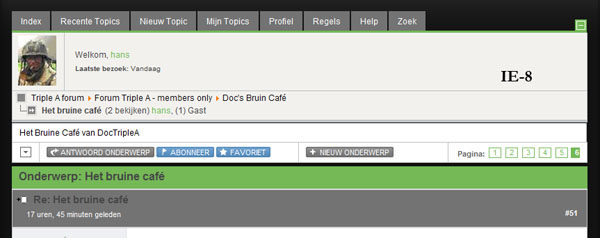
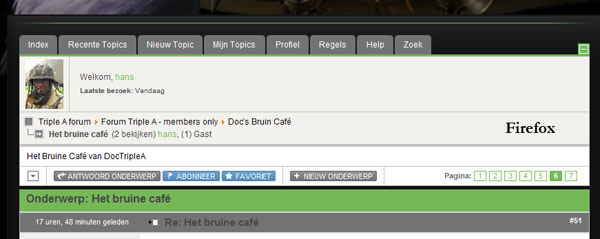
When I use my laptop which has a maximum resolution of 1440x900 pixels (Acer Aspire 7720G with NVIDIA Geforce 8600M GT Turbocache), I see a different thing when using IE-8, Firefox and Chrome (see the pics). I tried other resolutions like the; "old" 1024x768; same results.
On other computers in my home everything looks OK (like in the pics Firefox and Chrome) whatever browser I use!
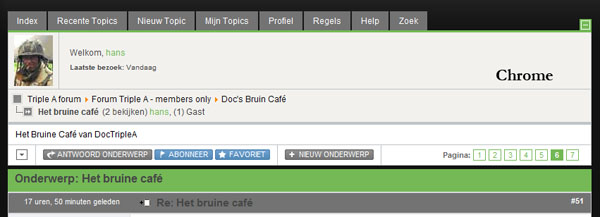
Isn't that strange?
Normally I use my laptop when working on my website.
When I use my laptop which has a maximum resolution of 1440x900 pixels (Acer Aspire 7720G with NVIDIA Geforce 8600M GT Turbocache), I see a different thing when using IE-8, Firefox and Chrome (see the pics). I tried other resolutions like the; "old" 1024x768; same results.
On other computers in my home everything looks OK (like in the pics Firefox and Chrome) whatever browser I use!
Isn't that strange?
Normally I use my laptop when working on my website.
Please Log in or Create an account to join the conversation.
15 years 6 months ago #70056
by sozzled
Blue Eagle vs. Crypsis reference guide
Read my blog and
Replied by sozzled on topic Re: IE8 (?) Problems in displaying page numbers
OK, we'll have to agree that there's something "strange" going on but that's where we'll have to leave it. You've disabled the test account on your site so there's nothing more that we can do to assist you. For example, I could have shown you pictures of what I see when I use IE8 and Firefox.
Blue Eagle vs. Crypsis reference guide
Read my blog and
Please Log in or Create an account to join the conversation.
Time to create page: 0.281 seconds