


- Posts: 192
- Thank you received: 4
Kunena 7.1.1 & Kunena 6.4.17 – Security Updates Released
The Kunena team has announce the arrival of Kunena 7.1.1 [K 7.1.1] in stable which is now available for download as a native Joomla extension for J! 5.4.x/6.0.x./6.1.x./6.2.x This version addresses most of the issues that were discovered in K 6.2 / K 6.3 / K 6.4 / K7.0 and issues discovered during the last development stages of K 7.1
Just a reminder: K6.4.17 receives only securities fixes until end of 2026, so it's advised for users to upgrade to K7.1.
Topics that are moved into this category are generally considered to be closed. Users may want to add additional information but these topics should not be resurrected in order to discuss new problems or unrelated matters.
Question Google Chrome: Kunena CSS alignment issues
16 years 2 months ago - 16 years 1 month ago #62332
by madLyfe
word up!
Google Chrome: Kunena CSS alignment issues was created by madLyfe
i was wondering if this is typical behavior? i am using RC3 on the default template.. you can see by the arrows it seems more natural to have the profile info fill over towards the persons personal info..

word up!
Last edit: 16 years 1 month ago by sozzled. Reason: Changed subject to improve the relevance in searching
Please Log in or Create an account to join the conversation.

16 years 2 months ago #62599
by severdia
Author of Using Joomla from O'Reilly Media. | www.usingjoomlabook.com
Replied by severdia on topic Re: profile alignment
Can you clarify? What arrows?
Author of Using Joomla from O'Reilly Media. | www.usingjoomlabook.com
Please Log in or Create an account to join the conversation.
16 years 2 months ago #62697
by madLyfe
word up!
Replied by madLyfe on topic Re: profile alignment
lol funny.. just saying that empty space needs to go..
word up!
Please Log in or Create an account to join the conversation.


16 years 2 months ago #62705
by sozzled
Using Firebug for Firefox, you will immediately see the cause of the behaviour you are experiencing with your site template. www.getfirebug.com/
Blue Eagle vs. Crypsis reference guide
Read my blog and

Replied by sozzled on topic Re: profile alignment
Yes, this is probably a "typical" behaviour for your site template. If you use a different site template you will see a different behaviour. As you see on this site, the behaviour you have shown in your image is not the same, is it?madLyfe wrote: i was wondering if this is typical behavior?
Using Firebug for Firefox, you will immediately see the cause of the behaviour you are experiencing with your site template. www.getfirebug.com/
Blue Eagle vs. Crypsis reference guide
Read my blog and
Please Log in or Create an account to join the conversation.
16 years 2 months ago #62706
by madLyfe
word up!
Replied by madLyfe on topic Re: profile alignment
actually im using afterburner as well for my site.. you can see here that its a chrome issue.. and it does it on this site too..
here is my site doing it:
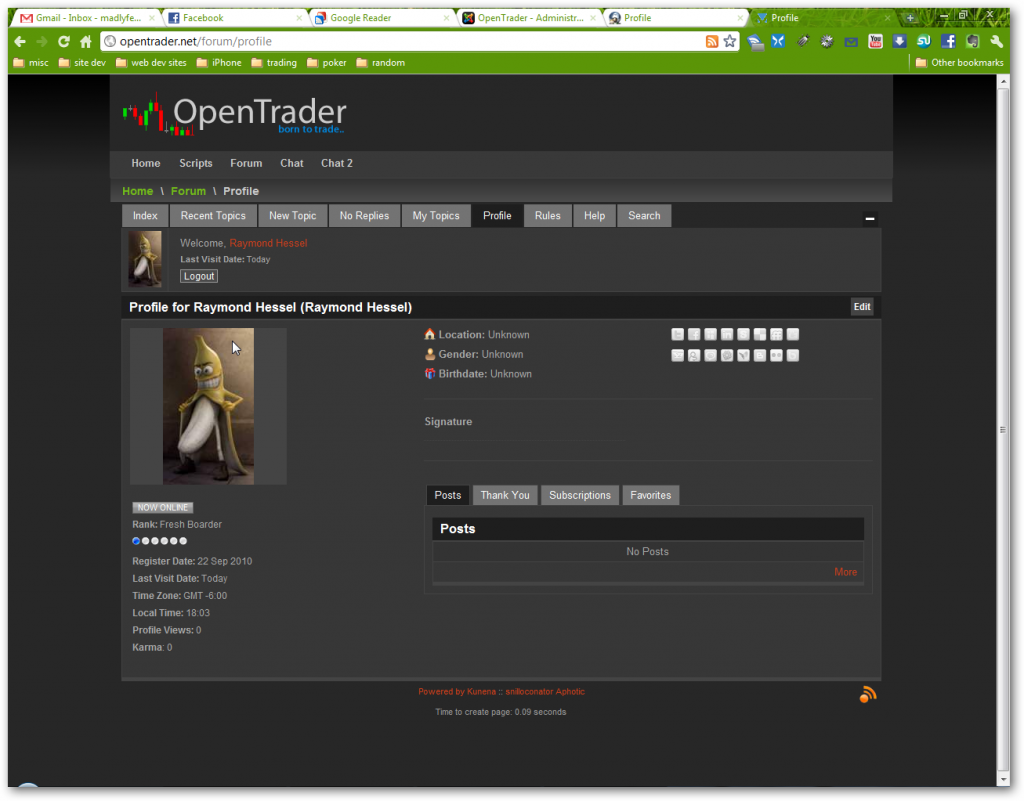
here it is on your site:

and here it is in firefox working properly:
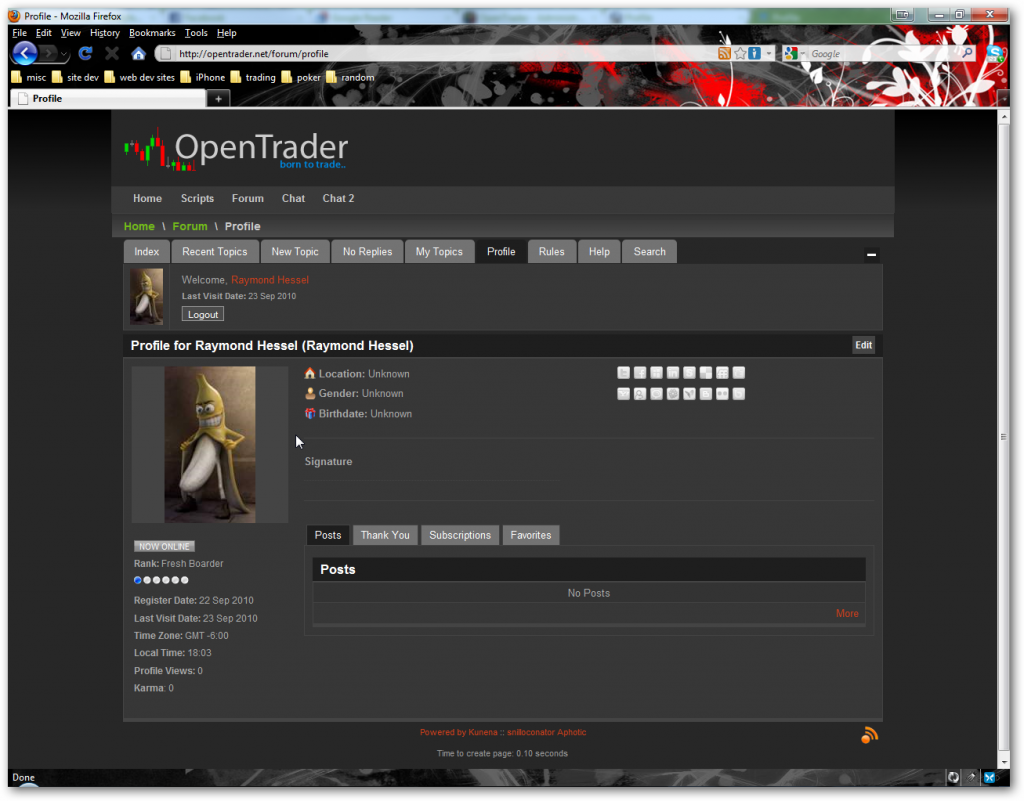
and working properly in firefox on your site:

here is my site doing it:
here it is on your site:
and here it is in firefox working properly:
and working properly in firefox on your site:
word up!
Please Log in or Create an account to join the conversation.
- snilloconator
-

- Offline
- Premium Member
-

- aka snilly
16 years 2 months ago #62771
by snilloconator
Replied by snilloconator on topic Re: profile alignment
Well I can look at this when I get home, should be an easy fix... Only thing this will be added code for RC3 and would change when a new RC comes out unless added.
One thing I did notice is the social bookmarks in the Aphotic template have proper alignment even in chrome. I'll add the code here later that fixed this so it can maybe be implemented for the next RC.
One thing I did notice is the social bookmarks in the Aphotic template have proper alignment even in chrome. I'll add the code here later that fixed this so it can maybe be implemented for the next RC.

Please Log in or Create an account to join the conversation.
Time to create page: 0.135 seconds