


- Posts: 77
- Thank you received: 5
Kunena 7.0.8 Released
The Kunena team has announce the arrival of Kunena 7.0.8 [K 7.0.8] in stable which is now available for download as a native Joomla extension for J! 5.4.x/6.0.x./6.1.x. This version addresses most of the issues that were discovered in K 6.2 / K 6.3 / K 6.4 and issues discovered during the last development stages of K 7.0
Topics that are moved into this category are generally considered to be closed. Users may want to add additional information but these topics should not be resurrected in order to discuss new problems or unrelated matters.
Question I need to get rid of the profile box
15 years 11 months ago #58065
by WinuxFF
I need to get rid of the profile box was created by WinuxFF
Basically i want to hide the box in yellow frame
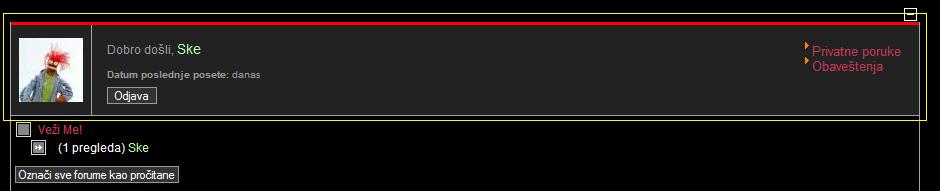
What should i do?
P.S
I knew how to do this in K1.5 but now in K1.6 there is a completely new structure hence theres a lot of "old" fb_named files that confuses me.
Thanks in advance.
What should i do?
P.S
I knew how to do this in K1.5 but now in K1.6 there is a completely new structure hence theres a lot of "old" fb_named files that confuses me.
Thanks in advance.
Please Log in or Create an account to join the conversation.


15 years 11 months ago - 15 years 11 months ago #58067
by Cerberus
Replied by Cerberus on topic Re: I need to get rid of the profile box
you will need to confirm nothing else is missing but after a very quick look before i disappear to work try this
in the css file change that section to look like above.
Code:
#Kunena div.kpbox {
border-bottom:1px solid #5F5F5F;
border-top:1px solid #5F5F5F;
display:none;
}
in the css file change that section to look like above.
Last edit: 15 years 11 months ago by Cerberus.
Please Log in or Create an account to join the conversation.
15 years 11 months ago #58125
by WinuxFF
Replied by WinuxFF on topic Re: I need to get rid of the profile box
Never underestimate the power of display:none; 
This will work but not in the way i wanted to, however your help is greatly appreciated as it lead me to the exact location of the files that controls the content in that box by simple Dreamveawer search for kpbox across entire template folder
Thank You
Solved
This will work but not in the way i wanted to, however your help is greatly appreciated as it lead me to the exact location of the files that controls the content in that box by simple Dreamveawer search for kpbox across entire template folder
Thank You
Solved
Please Log in or Create an account to join the conversation.


15 years 11 months ago #58412
by Matias
Replied by Matias on topic Re: I need to get rid of the profile box
You can also set login integration to none (when it's fixed).
The following user(s) said Thank You: WinuxFF
Please Log in or Create an account to join the conversation.
15 years 10 months ago #64809
by WinuxFF
Replied by WinuxFF on topic Re: I need to get rid of the profile box
Hi Matias
i waited for the stable release to try your proposal, unfortunately its not fixed.
Login integration is set to none, yet, kpbox is still shown to loged in users.
I need to disable it permanently so no one can see it
I am going to apply the previous fix, directly in template files.
Thanks.
i waited for the stable release to try your proposal, unfortunately its not fixed.
Login integration is set to none, yet, kpbox is still shown to loged in users.
I need to disable it permanently so no one can see it
I am going to apply the previous fix, directly in template files.
Thanks.
Please Log in or Create an account to join the conversation.


15 years 10 months ago #64913
by sozzled

This worked for me. :S
Blue Eagle vs. Crypsis reference guide
Read my blog and

Replied by sozzled on topic Re: I need to get rid of the profile box
I just tested this myself: see configuration settings belowWinuxFF wrote: I waited for the stable release to try your proposal, unfortunately its not fixed.
Login integration is set to none, yet, kpbox is still shown to loged in users.
This worked for me. :S
Blue Eagle vs. Crypsis reference guide
Read my blog and
Please Log in or Create an account to join the conversation.
Time to create page: 0.236 seconds