

- Posts: 1
- Thank you received: 0
Kunena 7.0.9 & Kunena 6.4.14 – Security Updates Released
The Kunena team has announce the arrival of Kunena 7.0.9 [K 7.0.9] in stable which is now available for download as a native Joomla extension for J! 5.4.x/6.0.x./6.1.x. This version addresses most of the issues that were discovered in K 6.2 / K 6.3 / K 6.4 and issues discovered during the last development stages of K 7.0
Topics that are moved into this category are generally considered to be closed. Users may want to add additional information but these topics should not be resurrected in order to discuss new problems or unrelated matters.
Sticky The 5 minute quick and dirty Kunena 1.6 template
16 years 2 months ago #53808
by Asran
Replied by Asran on topic Re: The 5 minute quick and dirty Kunena 1.6 template
hi!
I changed the XXXXXX and the YYYYY but I can not change the main colors as my website is dark (grey #222222)
How Can I change it please?
Regards
I changed the XXXXXX and the YYYYY but I can not change the main colors as my website is dark (grey #222222)
How Can I change it please?
Regards
The topic has been locked.


16 years 2 months ago #53851
by Baze
i use photoshop, just select the buttons that you want to change, hold ctrl and press u, then play with the hue slider
Replied by Baze on topic Re: The 5 minute quick and dirty Kunena 1.6 template
J!Stefan wrote: yes, but how do change the color??
i use photoshop, just select the buttons that you want to change, hold ctrl and press u, then play with the hue slider
The topic has been locked.
- gettinricher
-

- Offline
- New Member
-

Less
More
- Posts: 1
- Thank you received: 0
16 years 1 month ago #56581
by gettinricher
Replied by gettinricher on topic Re: The 5 minute quick and dirty Kunena 1.6 template
I've tried this method and am having a dog of a time with it. I've successfully gotten the tabs to change colors, but nothing else. Any ideas on what I'm doing wrong?
The topic has been locked.

16 years 1 month ago #56582
by severdia
Author of Using Joomla from O'Reilly Media. | www.usingjoomlabook.com
Replied by severdia on topic Re: The 5 minute quick and dirty Kunena 1.6 template
Can you post a link? You may have CSS in your template file that is overriding the above changes.
Author of Using Joomla from O'Reilly Media. | www.usingjoomlabook.com
The topic has been locked.
16 years 1 month ago - 16 years 1 month ago #57387
by Bube
Replied by Bube on topic Text Color
Hey i come from germany my English is not good sorry...
My question is:
How can I change the Text Color because i have a white background and white Textcolour.
Maybe you can tell me how can I make the Background transparent.
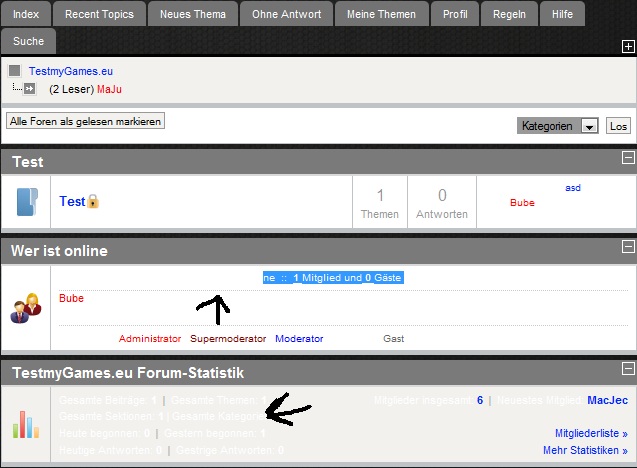
I hope you have an answer.
Chris
My question is:
How can I change the Text Color because i have a white background and white Textcolour.
Maybe you can tell me how can I make the Background transparent.
I hope you have an answer.
Chris
Last edit: 16 years 1 month ago by Bube.
The topic has been locked.
16 years 1 month ago #57388
by severdia
Author of Using Joomla from O'Reilly Media. | www.usingjoomlabook.com
Replied by severdia on topic Re: The 5 minute quick and dirty Kunena 1.6 template
It's hard to say without actually seeing your forum, but you might try:
#Kunena {
color: #000000;
}
Add that to your Joomla template CSS file near the bottom. You may need to add the !important too.
#Kunena {
color: #000000;
}
Add that to your Joomla template CSS file near the bottom. You may need to add the !important too.
Author of Using Joomla from O'Reilly Media. | www.usingjoomlabook.com
The following user(s) said Thank You: komora
The topic has been locked.
Time to create page: 0.230 seconds