Kunena 7.0.4 Released

The Kunena team has announce the arrival of Kunena 7.0.4 [K 7.0.4] in stable which is now available for download as a native Joomla extension for J! 5.4.x/6.0.x. This version addresses most of the issues that were discovered in K 6.2 / K 6.3 / K 6.4 and issues discovered during the last development stages of K 7.0

Topics that are moved into this category are generally considered to be closed. Users may want to add additional information but these topics should not be resurrected in order to discuss new problems or unrelated matters.

Solved [Solved] Help finding element in kunena.skinner-min.css
More
14 years 1 week ago - 14 years 1 week ago #122549 by yaksushi
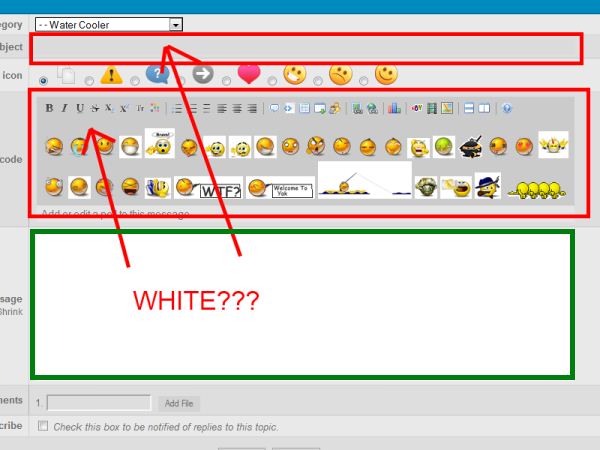
I've managed to make the Message box on my forum white by commenting out #Kunena textarea in kunena.skimmer-min.css
Code:
/**#Kunena textarea**/,#Kunena select,#Kunena select:focus,#Kunena select:hover{border:1px solid rgba(0,0,0,0.2);color:inherit;background-color:inherit;}


But I'm unable to find the elements that I need to comment out to make the Subject input box and Boardcode selection boxes white. Anyone know what elements they are in kunena.skimmer-min.css?

I'm using K2 v2.5.6
Last edit: 14 years 1 week ago by sozzled. Reason: Change topic icon

Please Log in or Create an account to join the conversation.

More
14 years 1 week ago #122570 by sozzled

yaksushi wrote: I've managed to make the Message box on my forum white by commenting out #Kunena textarea in kunena.skimmer-min.css

As we have written on dozens (if not hundreds) of occasions in the past, if you want to change the way that Kunena works on your site, in 99% of all cases, you should not modify (and there's no reason that you should modify) any of the CSS files that are included with the standard template. In this way you keep Kunena nice and clean and easy to upgrade later when new versions become available.

Have you looked at the FAQs menu item at the top of this forum? Did you read what we wrote in How do I change the colours of my template in Kunena?

Add the following lines to the end of your Joomla site template CSS file (../templates/rt_clarion/css/template.css):
Code:
#kpost-subject .kcol-mid { background-color: white !important; } #Kunena .kpostbuttons { background-color: white !important; }
You should not need to have to use the !important qualifier; I've included it because you've obviously hacked a lot of the original Kunena CSS files and so I don't know what else you've messed up.

Please Log in or Create an account to join the conversation.

More
14 years 1 week ago #122626 by yaksushi
Thanks for the help, and I have moved my changes to my template.css file. ;)

Please Log in or Create an account to join the conversation.

Time to create page: 0.282 seconds