Kunena 7.0.5 & Kunena 6.4.11 – Security Updates Released

The Kunena team has announce the arrival of Kunena 7.0.5 [K 7.0.5] in stable which is now available for download as a native Joomla extension for J! 5.4.x/6.0.x. This version addresses most of the issues that were discovered in K 6.2 / K 6.3 / K 6.4 and issues discovered during the last development stages of K 7.0.

The Kunena team is also pleased to announce the eleventh version of Kunena 6.4, a native Joomla extension for Joomla! 5.0, 5.1, 5.2, 5.3, 5.4 and 6.0.

Before posting in this category, please read sticky topics and, as general background, My Joomla site template makes a mess of Kunena .

If you have questions about third-party templates, please use the User-written Templates category or contact the author directly. This category should only be used for questions about templates developed and supported by the Kunena project.

Question Template alignment problems.
More
14 years 11 months ago - 14 years 11 months ago #96819 by Jfrm
Hi!

I'm using Joomla 1.63 with last Kunema version.
In Joomla I have made a custom template and in Kunena I'm using default one.

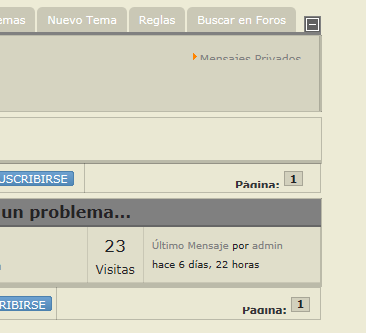
All is working perfectly but two missalign I couldn't identify (Private messages and page index):


I have made lot of changes both to my joomla and kunena templates (Kunena already in debug mode), but don't find a way to affect those areas or solve this problem.

I will apreciate any advice. Thanks in advance.
Last edit: 14 years 11 months ago by Jfrm.

Please Log in or Create an account to join the conversation.

More
14 years 11 months ago #96916 by 9themestore
Hi Jfrm,

I think, you should post the live site link. :)

- Please provide your site url if it has been lived.
- Please share tip if it worked fine with you.
- Don't be shy about using the "Thanks" button below if you found my comment helpful :)

Please Log in or Create an account to join the conversation.

More
14 years 11 months ago - 14 years 11 months ago #96918 by Jfrm
Thanks for your reply, but there is not a live site at the moment. I'm preparing in local.

Anyway I have finally found solution changing: components\com_kunena\template\default\css\kunena.forum.css

#Kunena .kpagination li{

border:0;
margin:0;
padding:0;
font-size: .667em;
list-style-type:none;
line-height: .667em;
display:inline; /* Original: display:inline-block;*/
}

#Kunena td.kprofileboxcnt ul li {
list-style-type:none;
display: inline; /* Original: display: block;*/
background: 0 none;
}

With this changes all is ok. Thanks
Last edit: 14 years 11 months ago by Jfrm.

Please Log in or Create an account to join the conversation.

More
14 years 11 months ago #96928 by 9themestore
Hi,

Replace your code section by the following css section.
Code:
#Kunena .kpagination, #Kunena .kpagination ul { overflow: hidden; } #Kunena .kpagination li{ border:0; margin:0; padding:0; font-size: .667em; list-style-type:none; line-height: .667em; display:block; /* Original: display:inline-block;*/ float: left; /* Add new */ } #Kunena td.kprofileboxcnt ul { overflow: hidden; } #Kunena td.kprofileboxcnt ul li { list-style-type:none; display: block; /* Original: display: block;*/ float: left; /* Add new */ background: 0 none; }

Tell me if don't work. :)

- Please provide your site url if it has been lived.
- Please share tip if it worked fine with you.
- Don't be shy about using the "Thanks" button below if you found my comment helpful :)
The following user(s) said Thank You: Jfrm, web3mantra

Please Log in or Create an account to join the conversation.

Time to create page: 0.288 seconds