Kunena 7.0.4 Released

The Kunena team has announce the arrival of Kunena 7.0.4 [K 7.0.4] in stable which is now available for download as a native Joomla extension for J! 5.4.x/6.0.x. This version addresses most of the issues that were discovered in K 6.2 / K 6.3 / K 6.4 and issues discovered during the last development stages of K 7.0

Before posting in this category, please read sticky topics and, as general background, My Joomla site template makes a mess of Kunena .

If you have questions about third-party templates, please use the User-written Templates category or contact the author directly. This category should only be used for questions about templates developed and supported by the Kunena project.

Question Change the color of borders
More
15 years 2 months ago #86592 by dave22
Hi all.

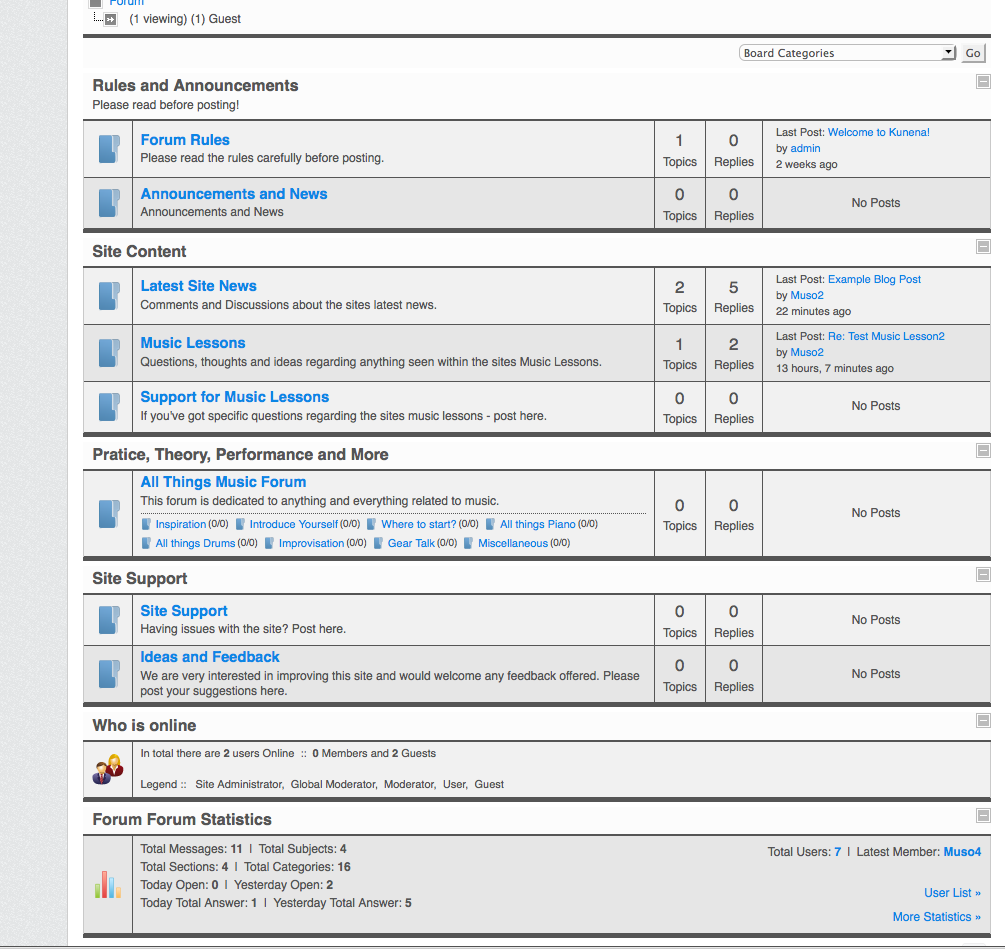
I have the default template set and am using the skinner which I am happy about. I am wondering how I can change the color of the real dark lines in the picture attached. I don't want to change the site's template colours, just the lines within the forum. I can do this when the skinner is not on, but it's much closer to what I want with the skinner so just this one change is needed.

Any ideas?

Thanks in advance!
Dave

Please Log in or Create an account to join the conversation.

More
15 years 2 months ago #86726 by GoremanX
looks like you're using IE8 :) Those lines aren't nearly as dark in any other browsers.

You need to edit the CSS file to get the change you want. I think the CSS file you need to edit is:
components/com_kunena/template/default/css/kunena.skinner-min.css

Unfortunately, that file is all on one line!!! It loads in browsers a lot faster that way, but it's a pain to edit. Also, if you don't know how to edit CSS files, you're better off asking someone else to do it for you.

Please note, the change will be blown away the next time you upgrade Kunena to the latest version. What I did was copy the default template (the entire directory) to a new directory, rename it to something else, and then start making changes in there. Then I set Kunena to use the new template instead.

THE place to discuss photography!
www.friendlyphotozone.com

Please Log in or Create an account to join the conversation.

More
15 years 2 months ago #86749 by sozzled
We don't recommend modifying any -min.css files. These are called minified CSS files. It's also probably not a good idea to modify any of the files in the default (or sample) template folders either. These files are replaced whenever you upgrade Kunena.

This leaves you with two choices: build your own template or modify your Joomla site template. Building your own template is the ideal method but it's a little complicated. For small changes like this, however, modifying your Joomla site template is probably a better way to go.

However, having written all of this, that doesn't answer you question, does it? The answer to your question, Dave, is to use a tool like Firebug for Firefox, inspect the webpage element that you want to change and make the necessary adjustments to your Joomla site file. But if this isn't what you want to do, how about showing us which items you want to change the border colours to and we'll see if there's some other way to point you in the right path.

Please Log in or Create an account to join the conversation.

Time to create page: 0.211 seconds