Kunena 7.0.5 & Kunena 6.4.11 – Security Updates Released

The Kunena team has announce the arrival of Kunena 7.0.5 [K 7.0.5] in stable which is now available for download as a native Joomla extension for J! 5.4.x/6.0.x. This version addresses most of the issues that were discovered in K 6.2 / K 6.3 / K 6.4 and issues discovered during the last development stages of K 7.0.

The Kunena team is also pleased to announce the eleventh version of Kunena 6.4, a native Joomla extension for Joomla! 5.0, 5.1, 5.2, 5.3, 5.4 and 6.0.

Before posting in this category, please read sticky topics and, as general background, My Joomla site template makes a mess of Kunena .

If you have questions about third-party templates, please use the User-written Templates category or contact the author directly. This category should only be used for questions about templates developed and supported by the Kunena project.

Important [SOzzLVED] Manage template - Problem with kunena (1.6) - HELP

More
15 years 4 months ago - 15 years 4 months ago #80127 by astrogoal
Guys i love kunena but 8 templates are too much...
however i ask if you want help me...
it is impossible for me... i pray to add to wiky how manage template ;)


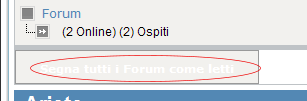
I would to make black as the original this words in white (en english Mark as reasd all the categories)
Last edit: 15 years 4 months ago by astrogoal.

Please Log in or Create an account to join the conversation.

More
15 years 4 months ago - 15 years 4 months ago #80153 by sozzled
First of all, let's try not to panic.

Firebug for Firefox will help you isolate most website design issues in a matter of seconds. Yes, there are eight CSS files associated with Kunena 1.6 but not all of these are used at the same time and Firebug for Firefox can pin-point exactly which file contains the CSS rule that you need to modify if you want to hide something ... or if you want to change the colour of something ... or whatever it is that you can do with CSS.

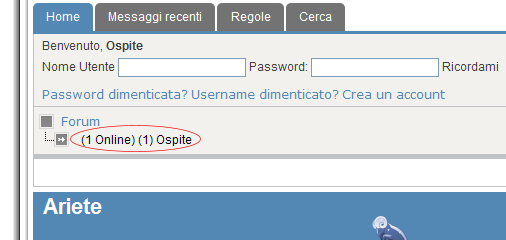
You can hide the details shown in your "forum1.gif" image and, yes, you can change the colour of the font in "forum2.gif".

Add the following lines the end of your site template file:

#Kunena .path-element-users {
display: none;
}

#Kunena .klist-markallcatsread input.kbutton {
color: black;
}


Next time, please try to use a more meaningful subject for your question, a more appropriate category to ask your question, and (in the words of the Hitch-hiker's Guide to the Galaxy) "Don't Panic!" ;)
Last edit: 15 years 4 months ago by sozzled.
The following user(s) said Thank You: astrogoal

Please Log in or Create an account to join the conversation.

More
15 years 4 months ago #80329 by astrogoal

sozzled wrote:
Add the following lines the end of your site template file:


#Kunena .klist-markallcatsread input.kbutton {
color: black;
}[/color]


Text colour doesn't change ... :(

Please Log in or Create an account to join the conversation.

More
15 years 4 months ago - 15 years 4 months ago #80351 by sozzled
I would like to see your website (so that I can see the CSS code of your template), please.

The Wiki has information about how to add your own template: see How to create a template for Kunena . Some day, one of us might finish writing this document with pictures of how easy it is.
Last edit: 15 years 4 months ago by sozzled.

Please Log in or Create an account to join the conversation.

Time to create page: 0.254 seconds