Kunena 7.0.4 Released

The Kunena team has announce the arrival of Kunena 7.0.4 [K 7.0.4] in stable which is now available for download as a native Joomla extension for J! 5.4.x/6.0.x. This version addresses most of the issues that were discovered in K 6.2 / K 6.3 / K 6.4 and issues discovered during the last development stages of K 7.0

Before posting in this category, please read sticky topics and, as general background, My Joomla site template makes a mess of Kunena .

If you have questions about third-party templates, please use the User-written Templates category or contact the author directly. This category should only be used for questions about templates developed and supported by the Kunena project.

Question Resize header font into default size.

More
15 years 7 months ago - 15 years 7 months ago #62772 by angelsport
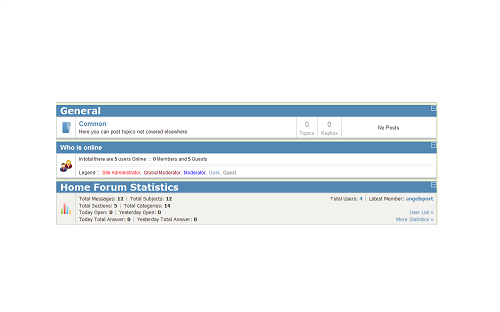
Hello, I have something strange i installed kunena 1.6 and all the headers are big just one is not.
Can i change the size of the fonts in the headers into the default size?
The general header is the big header and who is online is the default header.
See picture.

Thx angelsport

Joomla 1.5.22 - Kunena 1.6.3

Everybody is my friend...until he prove that he is not...
Last edit: 15 years 7 months ago by angelsport.

Please Log in or Create an account to join the conversation.

More
15 years 7 months ago #62905 by severdia
All of those are H2 so you should be able change them in your CSS file. They also have individual classes to style them separately.

.kheader
.kfrontstats
.kwhoisonline

Author of Using Joomla from O'Reilly Media. | www.usingjoomlabook.com

Please Log in or Create an account to join the conversation.

More
15 years 7 months ago - 15 years 7 months ago #63052 by angelsport

severdia wrote: All of those are H2 so you should be able change them in your CSS file. They also have individual classes to style them separately.

.kheader
.kfrontstats
.kwhoisonline

Thanx for your anwser but i have some questions about this.

1: Is this CSS file what you mean the template CSS from Joomla?
2: Can i change all the size in one time or do i resize this one by one?
3: Where can i resize the fonts in the CSS because i dont know to much about this?

I hope that you can give me some more details about this and would be very greatfull.
Rgds,

Angelsport

Joomla 1.5.22 - Kunena 1.6.3

Everybody is my friend...until he prove that he is not...
Last edit: 15 years 7 months ago by angelsport.

Please Log in or Create an account to join the conversation.

Time to create page: 0.204 seconds