

- Posts: 3
- Thank you received: 0
Kunena 7.0.9 & Kunena 6.4.14 – Security Updates Released
The Kunena team has announce the arrival of Kunena 7.0.9 [K 7.0.9] in stable which is now available for download as a native Joomla extension for J! 5.4.x/6.0.x./6.1.x. This version addresses most of the issues that were discovered in K 6.2 / K 6.3 / K 6.4 and issues discovered during the last development stages of K 7.0
Before posting in this category, please read sticky topics and, as general background,
My Joomla site template makes a mess of Kunena
.
If you have questions about third-party templates, please use the User-written Templates category or contact the author directly. This category should only be used for questions about templates developed and supported by the Kunena project.
If you have questions about third-party templates, please use the User-written Templates category or contact the author directly. This category should only be used for questions about templates developed and supported by the Kunena project.
Question IE7 layout problem... help appreciated!
15 years 3 weeks ago - 15 years 3 weeks ago #107049
by eadaoin
IE7 layout problem... help appreciated! was created by eadaoin
Hi all,
(I'm running version: Kunena 1.7.0 | 2011-08-29 | 5135 on Joomla! 1.5.23 Stable, and the Rockeththeme Terran Tribune template.)
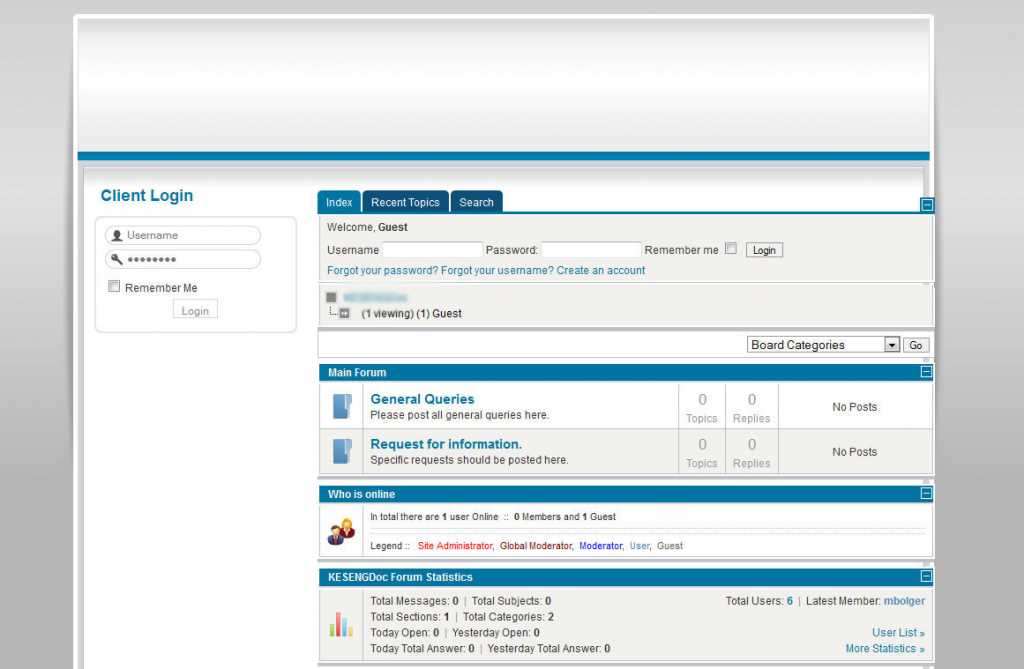
When I first installed it, the Kunena main text area was protruding slightly beyond the edge of the template in both Firefox and IE8, see original.jpg attachment below.
I edited the CSS file kunena.forum-min.css, to change the minimum width value from 700 to 600:
#Kunena {padding: 0;margin: 0;line-height: 1.333em;min-width:600px;}
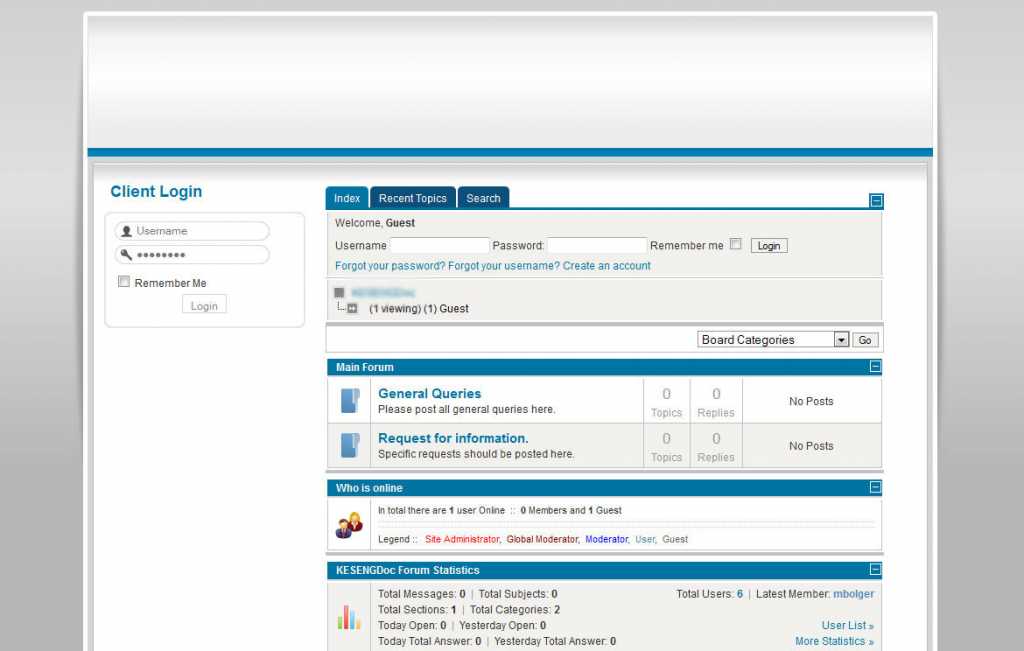
This worked, and in Firefox and IE8 it displays properly, see attached adjusted_firefox.jpg
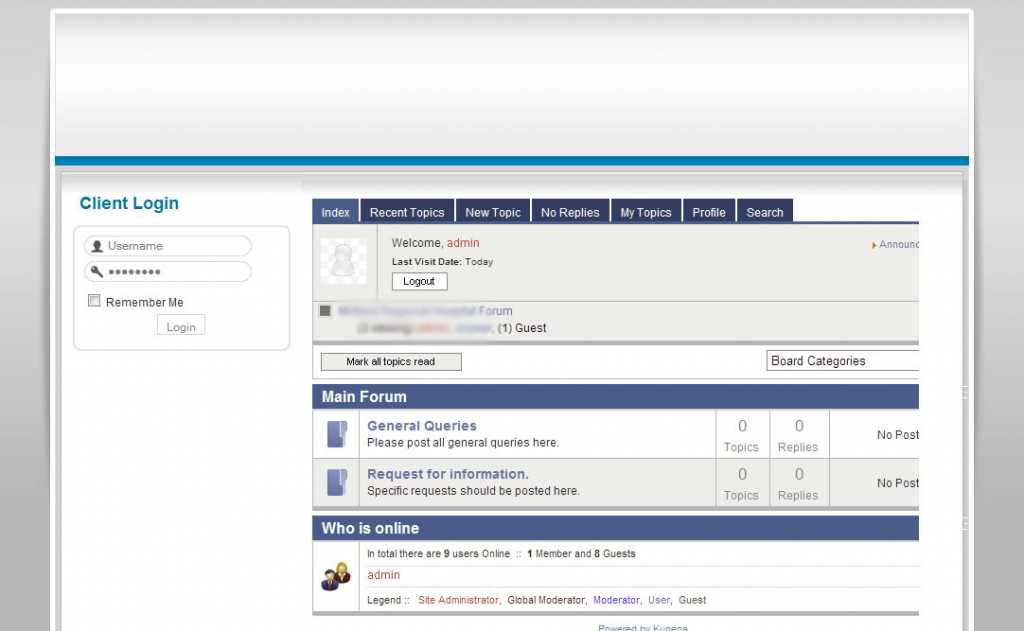
However, in IE7, the width has altered, but instead of fitting the contents into the new width, it appears that the overlapping has been cut off, see adjusted_IE7.jpg.
I can't figure out which of the values in the IE CSS files to alter in order to make the content fit into the given space without losing anything.... any help would be much appreciated!
Thanks,
Éadaoin
(I'm running version: Kunena 1.7.0 | 2011-08-29 | 5135 on Joomla! 1.5.23 Stable, and the Rockeththeme Terran Tribune template.)
When I first installed it, the Kunena main text area was protruding slightly beyond the edge of the template in both Firefox and IE8, see original.jpg attachment below.
I edited the CSS file kunena.forum-min.css, to change the minimum width value from 700 to 600:
#Kunena {padding: 0;margin: 0;line-height: 1.333em;min-width:600px;}
This worked, and in Firefox and IE8 it displays properly, see attached adjusted_firefox.jpg
However, in IE7, the width has altered, but instead of fitting the contents into the new width, it appears that the overlapping has been cut off, see adjusted_IE7.jpg.
I can't figure out which of the values in the IE CSS files to alter in order to make the content fit into the given space without losing anything.... any help would be much appreciated!
Thanks,
Éadaoin
Last edit: 15 years 3 weeks ago by eadaoin.
Please Log in or Create an account to join the conversation.
15 years 2 weeks ago #107196
by eadaoin
Replied by eadaoin on topic Re: IE7 layout problem... help appreciated!
Well, I found a workaround that works for me.
I don't need the width to be flexible, as I intend to keep the 'Left' positioned modules. So, I edited kunena.forum-min.css, to change the minimum width value to a width value, i.e.
#Kunena {padding: 0;margin: 0;line-height: 1.333em;min-width:600px;} is now
#Kunena {padding: 0;margin: 0;line-height: 1.333em; width:650px;}.
Not strictly a fix, but IE is happy, and so am I
I don't need the width to be flexible, as I intend to keep the 'Left' positioned modules. So, I edited kunena.forum-min.css, to change the minimum width value to a width value, i.e.
#Kunena {padding: 0;margin: 0;line-height: 1.333em;min-width:600px;} is now
#Kunena {padding: 0;margin: 0;line-height: 1.333em; width:650px;}.
Not strictly a fix, but IE is happy, and so am I
Please Log in or Create an account to join the conversation.


15 years 2 weeks ago #107203
by 810
Replied by 810 on topic Re: IE7 layout problem... help appreciated!
Hi,
please change it back. And add the change in kunena.forum.ie7-min.css
regards 810
please change it back. And add the change in kunena.forum.ie7-min.css
regards 810
Please Log in or Create an account to join the conversation.
15 years 2 weeks ago #107206
by eadaoin
Replied by eadaoin on topic Re: IE7 layout problem... help appreciated!
Thanks, 810.
I did that first, which did work, but then I thought it was simpler and neater to change it in the main CSS file as I didn't need the variable width... Thanks for the tip.
I did that first, which did work, but then I thought it was simpler and neater to change it in the main CSS file as I didn't need the variable width... Thanks for the tip.
Please Log in or Create an account to join the conversation.
- nabila1230
-

- Offline
- New Member
-

Less
More
- Posts: 1
- Thank you received: 0
14 years 11 months ago - 14 years 11 months ago #109235
by nabila1230
Replied by nabila1230 on topic Re: IE7 layout problem... help appreciated!
i have also problem All-new mail layout problem on IE7?
all-new mail layout problem on IE7
OK with classic mail
OK on Firefox
OK with my other yahoo mail accounts
problem started late 10/10/2011
messages don't show
Inbox, draft, sent, spam, trash, contact, calendar - folders show on far left
Empty, Add text on Far Right
advertisement hide arrow shows on far left
Check Mail and New show on top
search is just below that
deleted cookies @yahoo.txt
deleted cache
closed & refreshed browser
Any suggestions that plp have found to work would be appreciated
Thx
Translation Services
all-new mail layout problem on IE7
OK with classic mail
OK on Firefox
OK with my other yahoo mail accounts
problem started late 10/10/2011
messages don't show
Inbox, draft, sent, spam, trash, contact, calendar - folders show on far left
Empty, Add text on Far Right
advertisement hide arrow shows on far left
Check Mail and New show on top
search is just below that
deleted cookies @yahoo.txt
deleted cache
closed & refreshed browser
Any suggestions that plp have found to work would be appreciated
Thx
Translation Services
Last edit: 14 years 11 months ago by nabila1230.
Please Log in or Create an account to join the conversation.
Time to create page: 0.237 seconds