
- Posts: 79
- Thank you received: 0
Kunena 7.0.5 & Kunena 6.4.11 – Security Updates Released
The Kunena team has announce the arrival of Kunena 7.0.5 [K 7.0.5] in stable which is now available for download as a native Joomla extension for J! 5.4.x/6.0.x. This version addresses most of the issues that were discovered in K 6.2 / K 6.3 / K 6.4 and issues discovered during the last development stages of K 7.0.
The Kunena team is also pleased to announce the eleventh version of Kunena 6.4, a native Joomla extension for Joomla! 5.0, 5.1, 5.2, 5.3, 5.4 and 6.0.
Before posting in this category, please read sticky topics and, as general background,
My Joomla site template makes a mess of Kunena
.
If you have questions about third-party templates, please use the User-written Templates category or contact the author directly. This category should only be used for questions about templates developed and supported by the Kunena project.
If you have questions about third-party templates, please use the User-written Templates category or contact the author directly. This category should only be used for questions about templates developed and supported by the Kunena project.
Question Forum header text misaligned within box
- Mr Livered
-
 Topic Author
- Offline
- Senior Member
-

Less
More
14 years 9 months ago #101672
by Mr Livered
Forum header text misaligned within box was created by Mr Livered
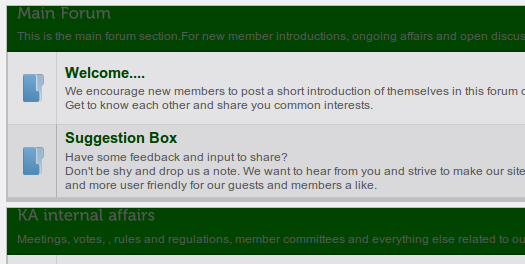
Hello, I'm having problems with the text in forum headers not being centred vertically within their boxes - the text appears right at the top of the box, and would look a lot better if it was in the middle. It's J1.6 and Kunena 1.6.4.
Screenshot attached so you can see what I mean - any assistance gratefully received
Thanks.
Screenshot attached so you can see what I mean - any assistance gratefully received
Thanks.
Please Log in or Create an account to join the conversation.


14 years 9 months ago - 14 years 9 months ago #101673
by sozzled
Blue Eagle vs. Crypsis reference guide
Read my blog and

Replied by sozzled on topic Re: Forum header text misaligned within box
I spent the past 15 minutes going back over all of your old messages to see if I could find the URL of your wesbite (which would have helped me solve the problem in about one mouse-click). You can do this, too, you know. I think that there's some kind of text-wrapping issue involved. You can diagnose and fix this yourself with
Firebug
for Firefox.
Of course, if you would rather have us look at this problem for you instead, can you please post the URL of your website so that we can look at the issue? Thanks.
Oh, and by the way ... the problem is caused by your site template. You have some template-wide rule for H2 elements that's overriding the Kunena template CSS.
Of course, if you would rather have us look at this problem for you instead, can you please post the URL of your website so that we can look at the issue? Thanks.
Oh, and by the way ... the problem is caused by your site template. You have some template-wide rule for H2 elements that's overriding the Kunena template CSS.
Blue Eagle vs. Crypsis reference guide
Read my blog and
Last edit: 14 years 9 months ago by sozzled.
The following user(s) said Thank You: Mr Livered
Please Log in or Create an account to join the conversation.
- Mr Livered
-
Topic Author
- Offline
- Senior Member
-
Less
More
- Posts: 79
- Thank you received: 0
14 years 9 months ago #101675
by Mr Livered
Replied by Mr Livered on topic Re: Forum header text misaligned within box
Thanks, Sozzled, but this one isn't live, it's on my machine.
Is there a way of making Kunena use its own H2 elements rather than letting itself be overriden? It would seem to be simpler than making changes that might have unintended consequences elsewhere on the site. Sorry if that's a dumb question.
Liking your new avatar, by the way, but I think I shall miss the iron man :lol:
Is there a way of making Kunena use its own H2 elements rather than letting itself be overriden? It would seem to be simpler than making changes that might have unintended consequences elsewhere on the site. Sorry if that's a dumb question.
Liking your new avatar, by the way, but I think I shall miss the iron man :lol:
Please Log in or Create an account to join the conversation.
14 years 9 months ago #101704
by sozzled
Blue Eagle vs. Crypsis reference guide
Read my blog and
Replied by sozzled on topic Re: Forum header text misaligned within box
Thanks for your feedback (about my avatar image - I felt after 2½ years of using it here, it was time for a change).
The way Joomla works is that your Joomla site template overrides everything because it's the last piece of CSS that's loaded. Yes, of course it's possible to make Kunena use it's own H2 element but in your case that's not the issue. The Kunena template doesn't contain any rule that causes the display of text to exceed the right margin. Therefore you have to insert a rule that changes your Joomla site template so this rule applies only for Kunena situation and not elsewhere on your site.
You will find the cause in one mouse-click with Firebug for Firefox. You will solve this if you know a little bit about CSS. However, while your site is sequestered the way it is, there's only one thing I can say: please see Support for PC-hosted websites (e.g. WAMP, XAMPP) .
I don't know what you have done with your site CSS definitions - and I'm only guessing that it's something to do with the rule about <h2> elements) - but you have some text wrapping or margin issues. When you have your website online and when we can see it then we can tell you. Otherwise, there's only one option: you have to figure it out for yourself. Sorry, that's the way it is. Good luck.
The way Joomla works is that your Joomla site template overrides everything because it's the last piece of CSS that's loaded. Yes, of course it's possible to make Kunena use it's own H2 element but in your case that's not the issue. The Kunena template doesn't contain any rule that causes the display of text to exceed the right margin. Therefore you have to insert a rule that changes your Joomla site template so this rule applies only for Kunena situation and not elsewhere on your site.
You will find the cause in one mouse-click with Firebug for Firefox. You will solve this if you know a little bit about CSS. However, while your site is sequestered the way it is, there's only one thing I can say: please see Support for PC-hosted websites (e.g. WAMP, XAMPP) .
I don't know what you have done with your site CSS definitions - and I'm only guessing that it's something to do with the rule about <h2> elements) - but you have some text wrapping or margin issues. When you have your website online and when we can see it then we can tell you. Otherwise, there's only one option: you have to figure it out for yourself. Sorry, that's the way it is. Good luck.
Blue Eagle vs. Crypsis reference guide
Read my blog and
The following user(s) said Thank You: Mr Livered
Please Log in or Create an account to join the conversation.
- Mr Livered
-
Topic Author
- Offline
- Senior Member
-
Less
More
- Posts: 79
- Thank you received: 0
14 years 9 months ago #101706
by Mr Livered
Replied by Mr Livered on topic Re: Forum header text misaligned within box
Sozzled, I don't know how you find the time and patience to deal with so many queries so comprehensively, but it is appreciated.
Please Log in or Create an account to join the conversation.
- Mr Livered
-
Topic Author
- Offline
- Senior Member
-
Less
More
- Posts: 79
- Thank you received: 0
14 years 9 months ago #101946
by Mr Livered
Here is the link:
kratomassociation.org/index.php/forum/
Replied by Mr Livered on topic Re: Forum header text misaligned within box
I have uploaded the website to a live server to finish the development, and I would be extremely grateful if you could offer some thoughts on how best to fix this header misalignment.sozzled wrote: When you have your website online and when we can see it then we can tell you.
Here is the link:
kratomassociation.org/index.php/forum/
Please Log in or Create an account to join the conversation.
Time to create page: 0.314 seconds