
- Posts: 2
- Thank you received: 0
Kunena 7.0.6 & Kunena 6.4.12 – Security Updates Released
The Kunena team has announce the arrival of Kunena 7.0.6 [K 7.0.6] in stable which is now available for download as a native Joomla extension for J! 5.4.x/6.0.x. This version addresses most of the issues that were discovered in K 6.2 / K 6.3 / K 6.4 and issues discovered during the last development stages of K 7.0.
The Kunena team is also pleased to announce the twelfth version of Kunena 6.4, a native Joomla extension for Joomla! 5.0, 5.1, 5.2, 5.3, 5.4 and 6.0.
Topics that are moved into this category are generally considered to be closed. Users may want to add additional information but these topics should not be resurrected in order to discuss new problems or unrelated matters.
Question Kunena menu problem
- MajeStik91
-
 Topic Author
- Offline
- New Member
-

Less
More
15 years 2 months ago #89255
by MajeStik91
Kunena menu problem was created by MajeStik91
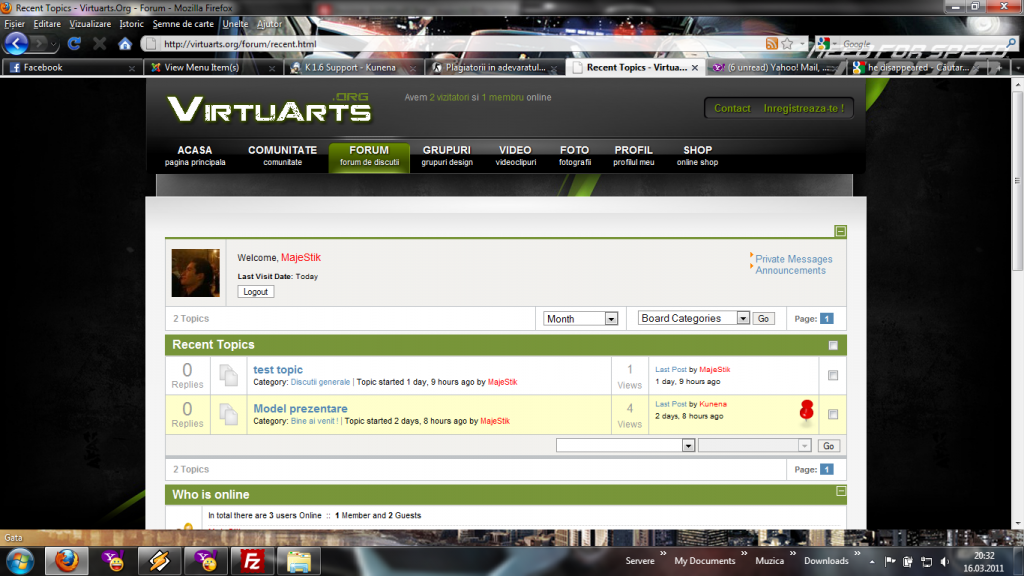
I have a problem with kunena navigation menu.It doesn't show.Without any change he disapeared.I uninstalled the component,I reinstalled again but no result.Why ?
Please Log in or Create an account to join the conversation.


15 years 2 months ago #89258
by Mortti
Replied by Mortti on topic Re: Kunena menu problem
Have you already read this:
Troubleshooting Kunena Menu
(1.3 maybe)
Please Log in or Create an account to join the conversation.
- MajeStik91
-
Topic Author
- Offline
- New Member
-
Less
More
- Posts: 2
- Thank you received: 0
15 years 2 months ago #89260
by MajeStik91
Replied by MajeStik91 on topic Re: Kunena menu problem
Yes.I created the menu from the control panel but still not working.
Please Log in or Create an account to join the conversation.


15 years 2 months ago #89290
by sozzled
Blue Eagle vs. Crypsis reference guide
Read my blog and

Replied by sozzled on topic Re: Kunena menu problem
Please read the guidelines for posting messages in the Support category. They appear at the top of this page. Sometimes things "don't work" and we'll try to do our best to help you. For us to help you (and, by helping you, helping the rest of the community, too) we need for you to help us to understand the specifics of the problem that you are having.
Your question has been asked before but the answer depends on which version of Joomla you are using:
J! 1.5: see [Merged topic] Edit, hide, disable or translate menu items in K 1.6 (e.g. rules, help, search)
J! 1.6: see J! 1.6 + K 1.6.2 - How do I restore my Kunena menu?
If you would like us to help you better, please read the guidelines for posting messages in the Support category and include your K 1.6 configuration report in future. Thank you.
Your question has been asked before but the answer depends on which version of Joomla you are using:
J! 1.5: see [Merged topic] Edit, hide, disable or translate menu items in K 1.6 (e.g. rules, help, search)
J! 1.6: see J! 1.6 + K 1.6.2 - How do I restore my Kunena menu?
If you would like us to help you better, please read the guidelines for posting messages in the Support category and include your K 1.6 configuration report in future. Thank you.
Blue Eagle vs. Crypsis reference guide
Read my blog and
Please Log in or Create an account to join the conversation.
- larryedwards
-
- Offline
- New Member
-
Less
More
- Posts: 3
- Thank you received: 0
15 years 2 weeks ago #96220
by larryedwards
Replied by larryedwards on topic Re: Kunena menu problem
I am running Joomla 1.5.23, js_inspirion template, and just installed Kunena 1.6.4. I made no configuration changes, only to give a position to the menu module and show its title. The menu does not appear. The column for it, however, does appear. That is, if it is the only menu in the "right hand" position, a blank column appears there. Otherwise there is no column there. I have used the trash-burn-build approach. I have uninstalled and reinstalled. Nothing has worked so far. One writer in this forum suggested that my template does not provide a place for the Kunena menu. How likely is that? Any help would be appreciated.
Thanks, Larry
Thanks, Larry
Please Log in or Create an account to join the conversation.
15 years 2 weeks ago #96232
by sozzled
Blue Eagle vs. Crypsis reference guide
Read my blog and
Replied by sozzled on topic Re: Kunena menu problem
G'day, Larry, and welcome to Kunena.
Please read the posting guidelines printed at the top of this page. Even though you have given us some information, it's a lot better if you post your K 1.6 configuration report particularly if you are concerned that there is something wrong with Kunena and it's something that the project team needs to fix.
Often, though, these problems have nothing to do with Kunena but they have to do with the way that you went about installing it. You might find this topic useful (even though it concerns J! 1.6, the basic lesson is the same): [SOLVED] Installation problem
Please read the posting guidelines printed at the top of this page. Even though you have given us some information, it's a lot better if you post your K 1.6 configuration report particularly if you are concerned that there is something wrong with Kunena and it's something that the project team needs to fix.
Often, though, these problems have nothing to do with Kunena but they have to do with the way that you went about installing it. You might find this topic useful (even though it concerns J! 1.6, the basic lesson is the same): [SOLVED] Installation problem
Blue Eagle vs. Crypsis reference guide
Read my blog and
Please Log in or Create an account to join the conversation.
Time to create page: 0.266 seconds