
- Posts: 14
- Thank you received: 0
Kunena 7.0.9 & Kunena 6.4.14 – Security Updates Released
The Kunena team has announce the arrival of Kunena 7.0.9 [K 7.0.9] in stable which is now available for download as a native Joomla extension for J! 5.4.x/6.0.x./6.1.x. This version addresses most of the issues that were discovered in K 6.2 / K 6.3 / K 6.4 and issues discovered during the last development stages of K 7.0
Topics that are moved into this category are generally considered to be closed. Users may want to add additional information but these topics should not be resurrected in order to discuss new problems or unrelated matters.
Question Kunena: Save session failed!
- frankmcpink
-
 Topic Author
- Offline
- New Member
-

Less
More
15 years 11 months ago - 15 years 11 months ago #68126
by frankmcpink
Kunena: Save session failed! was created by frankmcpink
I got this warning on my Kunena 1.6.0 forum
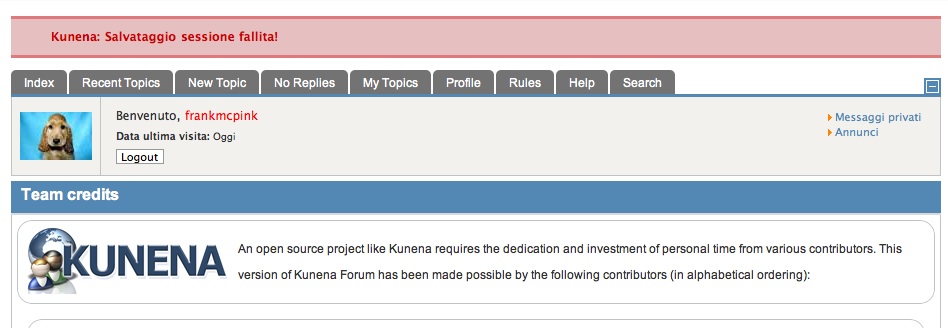
Kunena: Save session failed!
Kunena Internal Error: Enable Debug Mode to bring the problem to the forum www.kunena.com .
Users are no longer able to see the new replies or are marked as unread all posts on the forum.
I don't know how to enable debug mode. Any suggestion please? thanks in advance
Kunena: Save session failed!
Kunena Internal Error: Enable Debug Mode to bring the problem to the forum www.kunena.com .
Users are no longer able to see the new replies or are marked as unread all posts on the forum.
I don't know how to enable debug mode. Any suggestion please? thanks in advance
Last edit: 15 years 11 months ago by frankmcpink.
Please Log in or Create an account to join the conversation.
- frankmcpink
-
Topic Author
- Offline
- New Member
-
Less
More
- Posts: 14
- Thank you received: 0
15 years 11 months ago #68127
by frankmcpink

Replied by frankmcpink on topic Kunena: Save session failed!
Please Log in or Create an account to join the conversation.


15 years 11 months ago #68144
by xillibit
I don't provide support by PM, because this can be useful for someone else.
Replied by xillibit on topic Kunena: Save session failed!
Hello,
Like it's wrote in error message, you need to enable debug mode both in Joomla! configuration panel and in Kunena configuration panel.
Can-you please put a configuration report settings here ?
Like it's wrote in error message, you need to enable debug mode both in Joomla! configuration panel and in Kunena configuration panel.
Can-you please put a configuration report settings here ?
I don't provide support by PM, because this can be useful for someone else.
Please Log in or Create an account to join the conversation.
- frankmcpink
-
Topic Author
- Offline
- New Member
-
Less
More
- Posts: 14
- Thank you received: 0
15 years 11 months ago - 15 years 11 months ago #68221
by frankmcpink
Replied by frankmcpink on topic Kunena: Save session failed!
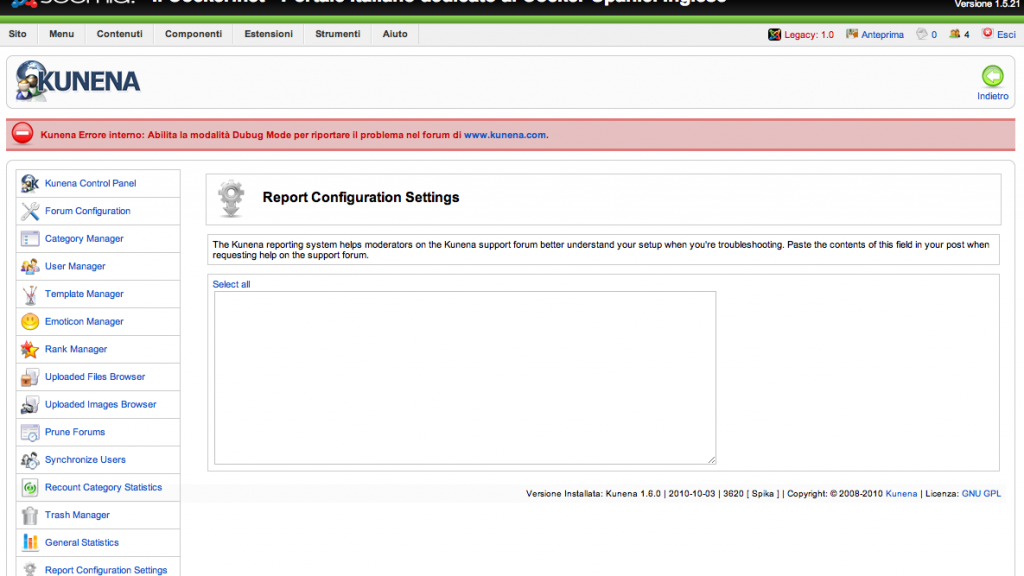
I put website offline and activated joomla debug mode, but I got same warning also in Kunena's reporting configuration settings and the field is empty
 :dry: :S
:dry: :S
Last edit: 15 years 11 months ago by frankmcpink.
Please Log in or Create an account to join the conversation.
15 years 11 months ago #68222
by xillibit
I don't provide support by PM, because this can be useful for someone else.
Replied by xillibit on topic Kunena: Save session failed!
You need to enable debug mode too in kunena configuration panel, there is just a known issue in report configuration settings
I don't provide support by PM, because this can be useful for someone else.
The following user(s) said Thank You: frankmcpink
Please Log in or Create an account to join the conversation.
- frankmcpink
-
Topic Author
- Offline
- New Member
-
Less
More
- Posts: 14
- Thank you received: 0
15 years 11 months ago #68224
by frankmcpink
Replied by frankmcpink on topic Kunena: Save session failed!
Kunena debug mode is enabled too, but same way.
I tried to use JTS-post Assistant
Joomla! Environment Discovery
Joomla! Version Joomla! 1.5.21 Stable [ senu takaa ama wepulai ] 08-October-2010 18:00 GMT
configuration.php Not Writable ( Mode: 444 )
RG_EMULATION N/A
Host Environment Discovery
Architecture i686 ( Linux )
Platform Linux 2.6.18-194.17.1.el5PAE
#1 SMP Wed Sep 29 13:31:51 EDT 2010
Web Environment Discovery
Web Server Version Apache/2.2
Web Host www.ilcocker.net
PHP Environment Discovery
PHP Version 5.2.14
register_globals Enabled
magic_quotes_gpc Enabled
safe_mode Disabled
MySQL Yes
xml Yes
zlib Yes
mbstring Yes
iconv Yes
save.session_path /tmp
Writable
Max. Execution Time 120 seconds
File Upload Enabled
MySQL Environment Discovery
MySQL Server Version 5.0.91-enterprise-gpl-log
Host Info 62.149.150.60 via TCP/IP
Joomla! Environment Discovery
SEF Enabled (with ReWrite)
Legacy Mode Disabled
FTP Layer Disabled
htaccess Implemented
Web Environment Discovery
Current Path /web/htdocs/www.ilcocker.net/home
Document Root /web/htdocs/www.ilcocker.net/home/
Server Acc.
User Acc.
User and Web Server accounts are the same. (PHP/suExec probably installed)
PHP Environment Discovery
PHP API cgi-fcgi
MySQLi Yes
Max. Memory Limit 64M
Max. Upload File Size 25M
Max. Post Size 30M
Max. Input Time -1
Zend Version 2.2.0
Disabled Functions system,popen,dl,passthru,proc_open,shell_exec
MySQL Environment Discovery
Client Version 5.0.77
Character Set latin1
I tried to use JTS-post Assistant
Joomla! Environment Discovery
Joomla! Version Joomla! 1.5.21 Stable [ senu takaa ama wepulai ] 08-October-2010 18:00 GMT
configuration.php Not Writable ( Mode: 444 )
RG_EMULATION N/A
Host Environment Discovery
Architecture i686 ( Linux )
Platform Linux 2.6.18-194.17.1.el5PAE
#1 SMP Wed Sep 29 13:31:51 EDT 2010
Web Environment Discovery
Web Server Version Apache/2.2
Web Host www.ilcocker.net
PHP Environment Discovery
PHP Version 5.2.14
register_globals Enabled
magic_quotes_gpc Enabled
safe_mode Disabled
MySQL Yes
xml Yes
zlib Yes
mbstring Yes
iconv Yes
save.session_path /tmp
Writable
Max. Execution Time 120 seconds
File Upload Enabled
MySQL Environment Discovery
MySQL Server Version 5.0.91-enterprise-gpl-log
Host Info 62.149.150.60 via TCP/IP
Joomla! Environment Discovery
SEF Enabled (with ReWrite)
Legacy Mode Disabled
FTP Layer Disabled
htaccess Implemented
Web Environment Discovery
Current Path /web/htdocs/www.ilcocker.net/home
Document Root /web/htdocs/www.ilcocker.net/home/
Server Acc.
User Acc.
User and Web Server accounts are the same. (PHP/suExec probably installed)
PHP Environment Discovery
PHP API cgi-fcgi
MySQLi Yes
Max. Memory Limit 64M
Max. Upload File Size 25M
Max. Post Size 30M
Max. Input Time -1
Zend Version 2.2.0
Disabled Functions system,popen,dl,passthru,proc_open,shell_exec
MySQL Environment Discovery
Client Version 5.0.77
Character Set latin1
Please Log in or Create an account to join the conversation.
Time to create page: 0.230 seconds