


- Posts: 2
- Thank you received: 0
Kunena 7.1.1 & Kunena 6.4.17 – Security Updates Released
The Kunena team has announce the arrival of Kunena 7.1.1 [K 7.1.1] in stable which is now available for download as a native Joomla extension for J! 5.4.x/6.0.x./6.1.x./6.2.x This version addresses most of the issues that were discovered in K 6.2 / K 6.3 / K 6.4 / K7.0 and issues discovered during the last development stages of K 7.1
Just a reminder: K6.4.17 receives only securities fixes until end of 2026, so it's advised for users to upgrade to K7.1.
Topics that are moved into this category are generally considered to be closed. Users may want to add additional information but these topics should not be resurrected in order to discuss new problems or unrelated matters.
Question Receiving error after initial install - nothing works
15 years 3 months ago - 15 years 3 months ago #104861
by 38West
Receiving error after initial install - nothing works was created by 38West
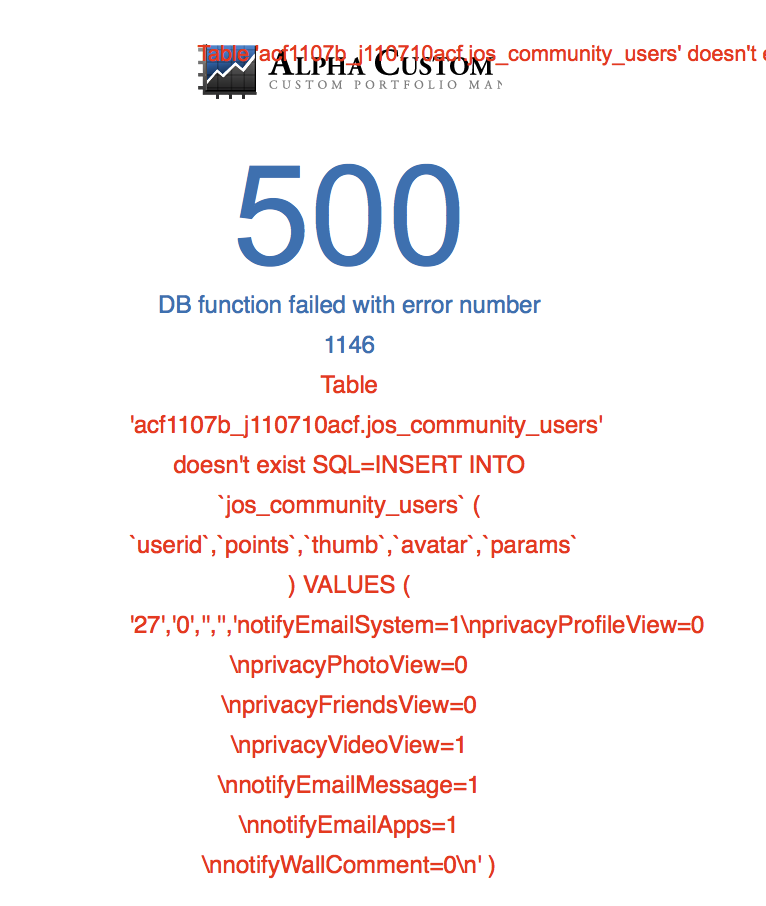
I have a Joomla 1.5.23 site and installed using a Gavick Pro template. I installed the latest Kunena 1.6.5 Forum and it is not working.
www.alphacustomfunds.com/
Note: I have deactivated the forum for now as
After reading a few other posts in the forum here it looked like JomSocial may be a culprit but I do not have JomSocial installed.
What more information do you need from me in order to troubleshoot?
I'm really looking forward to using Kunena Forum, it looks fantastic!
Please help, thank you.
Brian
www.alphacustomfunds.com/
Note: I have deactivated the forum for now as
After reading a few other posts in the forum here it looked like JomSocial may be a culprit but I do not have JomSocial installed.
What more information do you need from me in order to troubleshoot?
I'm really looking forward to using Kunena Forum, it looks fantastic!
This message contains confidential information
Database collation check: The collation of your table fields are correct\
Legacy mode: Disabled | Joomla! SEF: Enabled | Joomla! SEF rewrite: Enabled | FTP layer: Disabled |
This message contains confidential informationhtaccess: Exists | PHP environment: Max execution time: 30 seconds | Max execution memory: 64M | Max file upload: 64M
This message contains confidential information
Joomla default template details : gk_finance_business | author: Robert Gavick - GavickPro | version: 1.0.1 | creationdate: 23/06/2011
Kunena default template details : Blue Eagle (default) | author: Kunena Team | version: 1.6.5 | creationdate: 2011-07-27
Kunena version detailled: Installed version: 1.6.5 | Build: 5005 | Version name: Babel | Kunena detailled configuration:
Warning: Spoiler![th]Kunena config settings:[/th]
board_title Kunena board_offline 0 board_ofset 0.00 offline_message <h2>The Forum is currently offline for maintenance.</h2>\
<div>Check back soon!</div>enablerss 1 enablepdf 1 threads_per_page 20 messages_per_page 6 messages_per_page_search 15 showhistory 1 historylimit 6 shownew 1 jmambot 0 disemoticons 0 template default showannouncement 1 avataroncat 0 catimagepath category_images/ showchildcaticon 1 annmodid 62 rtewidth 450 rteheight 300 enableforumjump 1 reportmsg 1 username 1 askemail 0 showemail 0 showuserstats 1 showkarma 1 useredit 1 useredittime 0 useredittimegrace 600 editmarkup 1 allowsubscriptions 1 subscriptionschecked 1 allowfavorites 1 maxsubject 50 maxsig 300 regonly 0 changename 0 pubwrite 0 floodprotection 0 mailmod 0 mailadmin 0 captcha 0 mailfull 1 allowavatar 1 allowavatarupload 1 allowavatargallery 1 avatarquality 65 avatarsize 2048 allowimageupload 0 allowimageregupload 1 imageheight 800 imagewidth 800 imagesize 150 allowfileupload 0 allowfileregupload 1 filetypes txt,rtf,pdf,zip,tar.gz,tgz,tar.bz2 filesize 120 showranking 1 rankimages 1 avatar_src fb fb_profile fb pm_component no userlist_rows 30 userlist_online 1 userlist_avatar 1 userlist_name 1 userlist_username 1 userlist_posts 1 userlist_karma 1 userlist_email 0 userlist_usertype 0 userlist_joindate 1 userlist_lastvisitdate 1 userlist_userhits 1 latestcategory 0 showstats 1 showwhoisonline 1 showgenstats 1 showpopuserstats 1 popusercount 5 showpopsubjectstats 1 popsubjectcount 5 usernamechange 0 rules_infb 1 rules_cid 1 help_infb 1 help_cid 1 showspoilertag 1 showvideotag 1 showebaytag 1 trimlongurls 1 trimlongurlsfront 40 trimlongurlsback 20 autoembedyoutube 1 autoembedebay 1 ebaylanguagecode en-us fbsessiontimeout 1800 highlightcode 0 rss_type topic rss_timelimit month rss_limit 100 rss_included_categories rss_excluded_categories rss_specification rss2.0 rss_allow_html 1 rss_author_format name rss_author_in_title 1 rss_word_count 0 rss_old_titles 1 rss_cache 900 fbdefaultpage recent default_sort asc alphauserpointsnumchars 0 sef 1 sefcats 0 sefutf8 0 showimgforguest 1 showfileforguest 1 pollnboptions 4 pollallowvoteone 1 pollenabled 1 poppollscount 5 showpoppollstats 1 polltimebtvotes 00:15:00 pollnbvotesbyuser 100 pollresultsuserslist 1 maxpersotext 50 ordering_system mesid post_dateformat ago post_dateformat_hover datetime hide_ip 1 js_actstr_integration 0 imagetypes jpg,jpeg,gif,png checkmimetypes 1 imagemimetypes image/jpeg,image/jpg,image/gif,image/png imagequality 50 thumbheight 32 thumbwidth 32 hideuserprofileinfo put_empty integration_access auto integration_login auto integration_avatar auto integration_profile auto integration_private auto integration_activity auto boxghostmessage 0 userdeletetmessage 0 latestcategory_in 1 topicicons 1 onlineusers 1 debug 0 catsautosubscribed 0 showbannedreason 0 version_check 1 showthankyou 1 showpopthankyoustats 1 popthankscount 5 mod_see_deleted 0 bbcode_img_secure text listcat_show_moderators 1 lightbox 1 activity_limit 0 show_list_time 720 show_session_type 0 show_session_starttime 0 userlist_allowed 0 userlist_count_users 1 enable_threaded_layouts 0 category_subscriptions post topic_subscriptions every pubprofile 1 thankyou_max 10
Third-party components: Jomsocial 2.0.6
Third-party SEF components: AceSEF: The file doesn't exist acesef.xml !
Plugins: System - Mootools Upgrade: Disabled | System - Mootools12: Disabled
Modules: None
Please help, thank you.
Brian
Last edit: 15 years 3 months ago by sozzled. Reason: Reveal K 1.6 configuration report in message
Please Log in or Create an account to join the conversation.


15 years 3 months ago #104862
by sozzled
Blue Eagle vs. Crypsis reference guide
Read my blog and

Replied by sozzled on topic Re: Receiving error after initial install - nothing works
G'day, 38West, and welcome to Kunena.
Yes, the HTTP 500 Internal Server Error information that you posted clearly indicates that there is an issue involving Kunena and JomSocial. Your K 1.6 configuration report - I edited your post to reveal what you posted as raw text - also shows that you have JomSocial 2.0.6 installed. You stated that it is not installed. This statement is at odds with your report. I suggest you look again at your installation and, if you have installed JomSocial, it may be in your interests to uninstall the JomSocial component. After you have uninistalled JomSocial, can you verify if this resolves your HTTP 500 Internal Server Error problem with Kunena. Thank you.
Blue Eagle vs. Crypsis reference guide
Read my blog and
Please Log in or Create an account to join the conversation.
15 years 3 months ago #104863
by 38West
Replied by 38West on topic Re: Receiving error after initial install - nothing works
Wow, quick response. Awesome.
(I've attached screenshots)
Well, I'm not sure what I've got here then. I've included all of the screenshots I could take of the different areas that show components, modules, plugins, etc. and I can't seem to find JomSocial anywhere. I know I didn't install it and I know it didn't come in the QuickInstall from Gavick Pro template either.
Is it possible that it's seeing something like that from JComments or something like that? Or is there some other way to find the JomSocial istall that I can't see listed?
I'm sorry about this.
Please Log in or Create an account to join the conversation.
15 years 3 months ago #104864
by sozzled
Blue Eagle vs. Crypsis reference guide
Read my blog and
Replied by sozzled on topic Re: Receiving error after initial install - nothing works
A couple of days ago we received a
report
from another member of the community in relation a problem involving this Gavick QuickStart "feature". The only comment that I will make is that sometimes these "quick" install features are not always reliable. For a truly reliable installation of Joomla we recommend that people use go to
www.joomla.org
or read one of the fine books that explain how to properly install Joomla. If you have other questions about Gavick Quickstart then you should address those to the Gavick support forum.
According to you configuration report you have JomSocial installed. How it was installed, I cannot say; I can only say that's what your config. report shows. You should also note that JomSocial is a commercial product and it requires that you pay for the right to install it on you site. If you have not paid for that component then you should uninistall it.
To install or uninistall Joomla components, you need to use the Joomla Extension Manager. Information about how to use this Joomla feature is provided on the Joomla help site help.joomla.org .
Blue Eagle vs. Crypsis reference guide
Read my blog and
Please Log in or Create an account to join the conversation.
Time to create page: 0.147 seconds