


- Posts: 6
- Thank you received: 0
Kunena 7.0.4 Released
The Kunena team has announce the arrival of Kunena 7.0.4 [K 7.0.4] in stable which is now available for download as a native Joomla extension for J! 5.4.x/6.0.x. This version addresses most of the issues that were discovered in K 6.2 / K 6.3 / K 6.4 and issues discovered during the last development stages of K 7.0
Topics that are moved into this category are generally considered to be closed. Users may want to add additional information but these topics should not be resurrected in order to discuss new problems or unrelated matters.
Important How do I make my forum viewable by the public?
14 years 10 months ago #99853
by fyistudio
How do I make my forum viewable by the public? was created by fyistudio
I have no idea what happened. I am using the latest Joomal 1.6. Latest version of Community Builder and when I when to change the forum access to public, the Forum Administration Menu item in Kunena is missing?! Please help.
Please Log in or Create an account to join the conversation.


14 years 10 months ago #99984
by Matias
Replied by Matias on topic Re: Forum Administration Menu Item Missing?
Can you please re-phrase your question as I didn't understand what happens and where?
Or maybe show us a screenshot pointing out the issue?
Or maybe show us a screenshot pointing out the issue?
Please Log in or Create an account to join the conversation.


14 years 10 months ago #100030
by sozzled
Blue Eagle vs. Crypsis reference guide
Read my blog and

Replied by sozzled on topic Re: Forum Administration Menu Item Missing?
Maybe we're talking about the wrong thing?
In K 1.5 there was a Forum Administration feature; in K 1.6 it is now called Category Manager The documentation in the Wiki has not been completely reviewed to take these name changes into account. I am talking about When I have a spare day or two I really must update that documentation properly.
In K 1.5 there was a Forum Administration feature; in K 1.6 it is now called Category Manager The documentation in the Wiki has not been completely reviewed to take these name changes into account. I am talking about When I have a spare day or two I really must update that documentation properly.
Blue Eagle vs. Crypsis reference guide
Read my blog and
Please Log in or Create an account to join the conversation.
14 years 10 months ago #100078
by fyistudio
Replied by fyistudio on topic Re: Forum Administration Menu Item Missing?
Sorry, I realize now my question was a little vague, as it was really late at night :silly:
I want to make my forum visible to the public. I thought, based on the documentation that it was done in the forum administrator menu but I guess that is not the case for 1.6.4.
I found in the categories, the option to make the replies available only to registered users, which is what I want but the entire forum should be visible to the public.
Thanks is advance!! :woohoo:
I want to make my forum visible to the public. I thought, based on the documentation that it was done in the forum administrator menu but I guess that is not the case for 1.6.4.
I found in the categories, the option to make the replies available only to registered users, which is what I want but the entire forum should be visible to the public.
Thanks is advance!! :woohoo:
Please Log in or Create an account to join the conversation.
14 years 10 months ago #100113
by sozzled
Perhaps we should start again. I suggest that you go to the Forum Configuration panel (which is where you change the main settings for Kunena) and use the Default icon at the top right corner of that screen. By default, Kunena categories are viewable to the public (unless you further restrict them by using the Category Manager feature.
If this doesn't work then we have evidently misunderstood you and maybe it would help if you showed us a screenshot that points out the issue.
Blue Eagle vs. Crypsis reference guide
Read my blog and
Replied by sozzled on topic Re: Forum Administration Menu Item Missing?
I tried to explain that there is no "forum administration" item. There is a Category Manager feature.fyistudio wrote: I want to make my forum visible to the public. I thought, based on the documentation, that it was done in the forum administrator menu but I guess that is not the case for 1.6.4.
Perhaps we should start again. I suggest that you go to the Forum Configuration panel (which is where you change the main settings for Kunena) and use the Default icon at the top right corner of that screen. By default, Kunena categories are viewable to the public (unless you further restrict them by using the Category Manager feature.
If this doesn't work then we have evidently misunderstood you and maybe it would help if you showed us a screenshot that points out the issue.
Blue Eagle vs. Crypsis reference guide
Read my blog and
Please Log in or Create an account to join the conversation.
14 years 10 months ago #100122
by fyistudio
Replied by fyistudio on topic Re: Forum Administration Menu Item Missing?
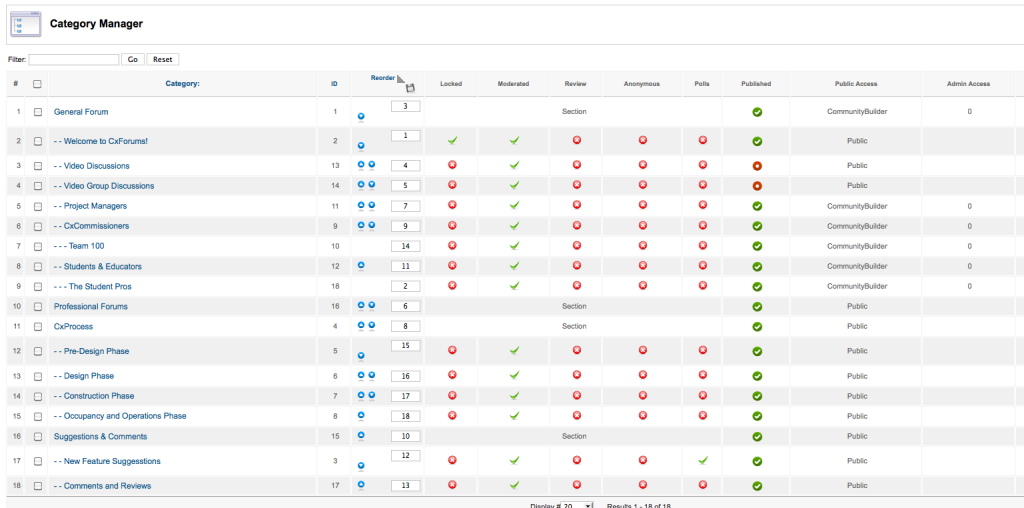
Ok. Here is the screen shot. I know see that the "Public Access" column says "Community Builder" (Probably a detail that I left out is that I have CB 1.4 loaded.
So is this a CB Issue?
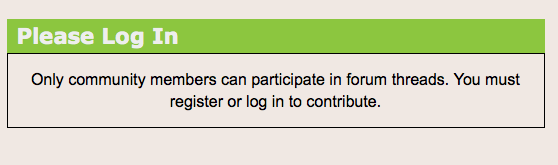
I have attached the screen shot of the backend and also that of what you see on my site when you are not logged in.
So is this a CB Issue?
I have attached the screen shot of the backend and also that of what you see on my site when you are not logged in.
Please Log in or Create an account to join the conversation.
Time to create page: 0.268 seconds