
- Posts: 19
- Thank you received: 0
Kunena 7.0.9 & Kunena 6.4.14 – Security Updates Released
The Kunena team has announce the arrival of Kunena 7.0.9 [K 7.0.9] in stable which is now available for download as a native Joomla extension for J! 5.4.x/6.0.x./6.1.x. This version addresses most of the issues that were discovered in K 6.2 / K 6.3 / K 6.4 and issues discovered during the last development stages of K 7.0
Topics that are moved into this category are generally considered to be closed. Users may want to add additional information but these topics should not be resurrected in order to discuss new problems or unrelated matters.
Question Where do I change the wording "Category Header"
- MatrixDona
-
 Topic Author
- Offline
- Junior Member
-

Less
More
15 years 4 months ago #96142
by MatrixDona
Where do I change the wording "Category Header" was created by MatrixDona
Hi there,
Where do I change the wording displayed here (see picture)
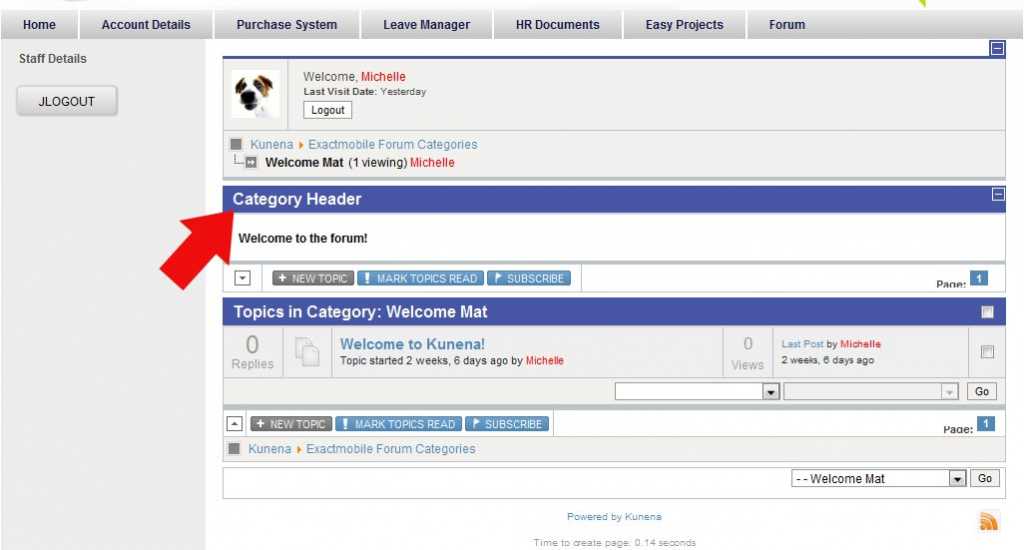
Where do I change the wording displayed here (see picture)
Please Log in or Create an account to join the conversation.


15 years 4 months ago #96143
by sozzled
Blue Eagle vs. Crypsis reference guide
Read my blog and

Replied by sozzled on topic Re: Where do I change the wording "Category Header"
MatrixDona: This is a common question (it's not a support issue). The question has been asked before. Please see
Where is the language file?
Blue Eagle vs. Crypsis reference guide
Read my blog and
Please Log in or Create an account to join the conversation.
- MatrixDona
-
Topic Author
- Offline
- Junior Member
-
Less
More
- Posts: 19
- Thank you received: 0
15 years 4 months ago #96275
by MatrixDona
Replied by MatrixDona on topic Re: Where do I change the wording "Category Header"
Found it thank you  Please accept my apologies for posting in the wrong place.
Please accept my apologies for posting in the wrong place. Please Log in or Create an account to join the conversation.


15 years 3 months ago - 15 years 3 months ago #98584
by gnumoreno
Sozzled,
I don't see the relation between the url you posted and the issue. Let try to elaborate.
When I created the Categories, there is a field called "Category Header", right after Name and Description.
Whenever I go through the following steps:
Enter the Forum, Click on the "Index" Tab, Click on one of the Categories.
The Description shows up just fine but the "Category Header" field shows "Category Header" instead of what I have input in the backend.
What's the relation between this and the language file?
Thanks in advance for your patience and support.
Replied by gnumoreno on topic Re: Where do I change the wording "Category Header"
sozzled wrote: MatrixDona: This is a common question (it's not a support issue). The question has been asked before. Please see Where is the language file?
Sozzled,
I don't see the relation between the url you posted and the issue. Let try to elaborate.
When I created the Categories, there is a field called "Category Header", right after Name and Description.
Whenever I go through the following steps:
Enter the Forum, Click on the "Index" Tab, Click on one of the Categories.
The Description shows up just fine but the "Category Header" field shows "Category Header" instead of what I have input in the backend.
What's the relation between this and the language file?
Thanks in advance for your patience and support.
Last edit: 15 years 3 months ago by gnumoreno. Reason: typo
Please Log in or Create an account to join the conversation.
15 years 3 months ago - 15 years 3 months ago #98623
by sozzled
Blue Eagle vs. Crypsis reference guide
Read my blog and
Replied by sozzled on topic Re: Where do I change the wording "Category Header"
G'day, gnumoreno, and welcome to Kunena.
The question asked at the beginning of this topic was about how to change the displayed text for people looking at the site frontend. If I understand your question, you would like to know how to change the displayed text for people looking at your site backend.
No problem. The answer is still the same (see Where is the language file? ); there is a separate language file for your backend located in your ../administrator folder.
The question asked at the beginning of this topic was about how to change the displayed text for people looking at the site frontend. If I understand your question, you would like to know how to change the displayed text for people looking at your site backend.
No problem. The answer is still the same (see Where is the language file? ); there is a separate language file for your backend located in your ../administrator folder.
Blue Eagle vs. Crypsis reference guide
Read my blog and
Last edit: 15 years 3 months ago by sozzled.
Please Log in or Create an account to join the conversation.
15 years 3 months ago #99016
by gnumoreno
Replied by gnumoreno on topic Re: Where do I change the wording "Category Header"
G'day, sozzled, and thanks for your quick answer.
But no, I'm not trying to change the language on my backend. I will include some screenshots to explain my problem.
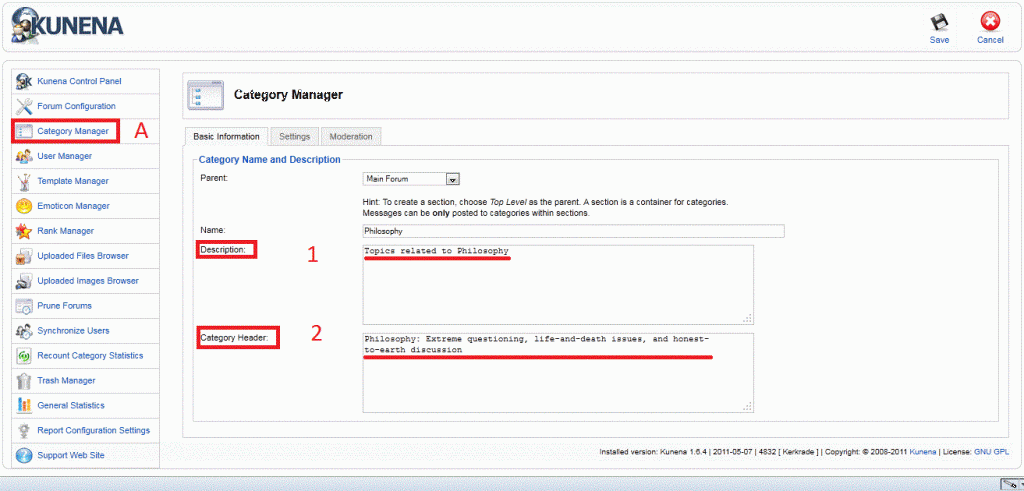
I would expect that the highlighted fields 1 and 2 (in RED) would show up as fields 1 and 2 (in BLUE)
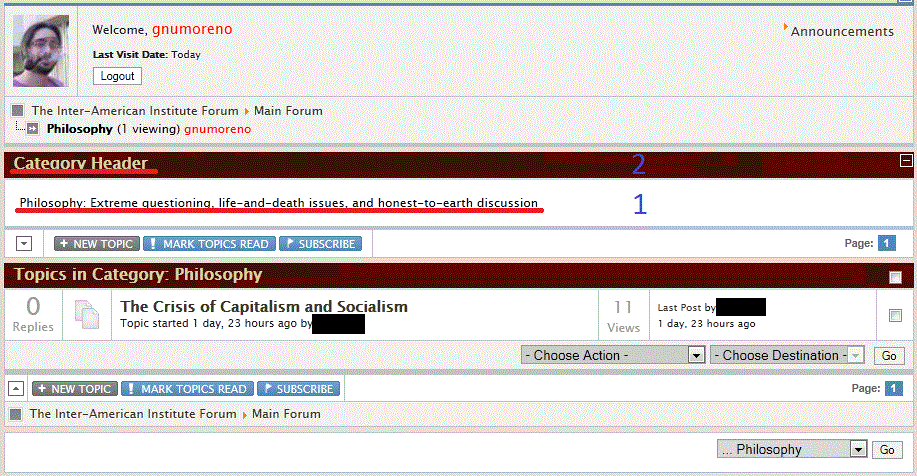
Instead of that what I have is field 1 (in BLUE) shows the category header (field 2 in RED, backend) as the description and the field 2 (in BLUE) shows just the text "Category Header". Field 1 (in RED, backend) does not appear at all.
Can you help me to fix it?
But no, I'm not trying to change the language on my backend. I will include some screenshots to explain my problem.
I would expect that the highlighted fields 1 and 2 (in RED) would show up as fields 1 and 2 (in BLUE)
Instead of that what I have is field 1 (in BLUE) shows the category header (field 2 in RED, backend) as the description and the field 2 (in BLUE) shows just the text "Category Header". Field 1 (in RED, backend) does not appear at all.
Can you help me to fix it?
Please Log in or Create an account to join the conversation.
Time to create page: 0.216 seconds