
- Posts: 121
- Thank you received: 0
Kunena 7.0.8 Released
The Kunena team has announce the arrival of Kunena 7.0.8 [K 7.0.8] in stable which is now available for download as a native Joomla extension for J! 5.4.x/6.0.x./6.1.x. This version addresses most of the issues that were discovered in K 6.2 / K 6.3 / K 6.4 and issues discovered during the last development stages of K 7.0
Topics that are moved into this category are generally considered to be closed. Users may want to add additional information but these topics should not be resurrected in order to discuss new problems or unrelated matters.
Important Smilies not showing!
- FreeThinker
-
 Topic Author
- Offline
- Senior Member
-

Less
More
15 years 9 months ago - 15 years 9 months ago #70718
by FreeThinker
Smilies not showing! was created by FreeThinker
Hi all
first of all this new version rocks...but i'm having a minor issue with a forum on one of my websites..
..it is not showing the smilies!
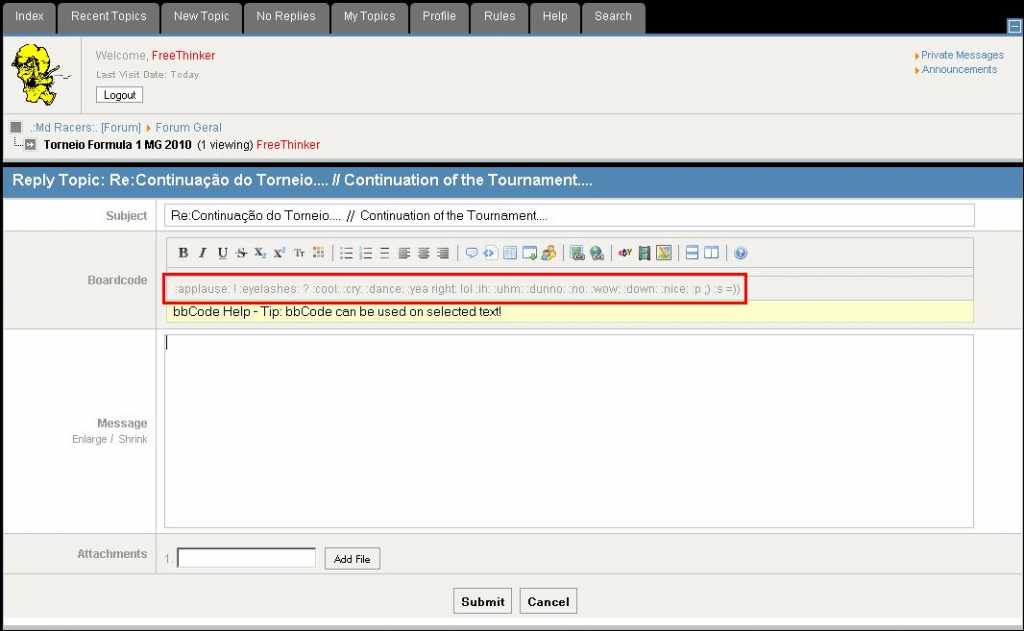
first of all this new version rocks...but i'm having a minor issue with a forum on one of my websites..
..it is not showing the smilies!
Last edit: 15 years 9 months ago by FreeThinker.
Please Log in or Create an account to join the conversation.


15 years 9 months ago #70721
by fxstein
We love stars on the Joomla Extension Directory .
Replied by fxstein on topic Re: Smilies not showing!
Would you mind posting your config report and possible a test account?
You can do that like:
I'd like to see that new topic page. Thx!
You can do that like:
Code:
[confidential]username,password[/confidential]
I'd like to see that new topic page. Thx!
We love stars on the Joomla Extension Directory .
The following user(s) said Thank You: FreeThinker
Please Log in or Create an account to join the conversation.
- FreeThinker
-
Topic Author
- Offline
- Senior Member
-
Less
More
- Posts: 121
- Thank you received: 0
15 years 9 months ago - 15 years 9 months ago #70740
by FreeThinker
Replied by FreeThinker on topic Re: Smilies not showing!
Tryed to send you the info requested thru PM...but service (jomsocial messaging service) is not working ok :dry:
am sending u in
am sending u in
This message contains confidential information
Last edit: 15 years 9 months ago by FreeThinker.
Please Log in or Create an account to join the conversation.


15 years 9 months ago #70747
by xillibit
I don't provide support by PM, because this can be useful for someone else.
Replied by xillibit on topic Re: Smilies not showing!
Hello,
I advise you to disable legacy mode and safe mode too, if it's possible.
Do you have checked that the smilies are right here and the permissions allow the smilies to be read by everyone ?
I advise you to disable legacy mode and safe mode too, if it's possible.
Do you have checked that the smilies are right here and the permissions allow the smilies to be read by everyone ?
I don't provide support by PM, because this can be useful for someone else.
The following user(s) said Thank You: FreeThinker
Please Log in or Create an account to join the conversation.
- FreeThinker
-
Topic Author
- Offline
- Senior Member
-
Less
More
- Posts: 121
- Thank you received: 0
15 years 9 months ago #70822
by FreeThinker
Replied by FreeThinker on topic Re: Smilies not showing!
Thanks xillibit for the reply 
The smilies are on the templates folder
(/public_html/components/com_kunena/template/joomlana_dark/images/emoticons)
...and also appear ok and visible in kunena backend.
About the permissions....
Folders (images \ emotions => are 0755
...and the smilies images => are 0644
Regarding the Legacy mode, i intend to turn it off...but have to eliminate and/or upgrade some features (mods; plg).
*The safe mode I do not know where's it at! :blush:
Cheers
The smilies are on the templates folder
(/public_html/components/com_kunena/template/joomlana_dark/images/emoticons)
...and also appear ok and visible in kunena backend.
About the permissions....
Folders (images \ emotions => are 0755
...and the smilies images => are 0644
Regarding the Legacy mode, i intend to turn it off...but have to eliminate and/or upgrade some features (mods; plg).
*The safe mode I do not know where's it at! :blush:
Cheers
Please Log in or Create an account to join the conversation.
15 years 9 months ago - 15 years 9 months ago #70832
by fxstein
We love stars on the Joomla Extension Directory .
Replied by fxstein on topic Re: Smilies not showing!
The smilies are in the wrong folder.
The template your are using is only overriding very few styles of default and is using everything else from default, including the smilies:
www.mdracers.com/components/com_kunena/t...oticons/applause.gif
this is the path to the very first smilie in the toolbar, and the file simply does not exist.
This might be an issue with smilie management in combination with custom but only partial templates that leverage default for the vast majority of code and images. In this case the dark New topic bbcode editor is still running the default editor that points the smilie bar top the default template location.
We need to find a way around that.
A quick fix is to copy the smilies form the custom template location into the default template location.
@xilibit - would you mind creating a tracker for this issue? Thx!
The template your are using is only overriding very few styles of default and is using everything else from default, including the smilies:
www.mdracers.com/components/com_kunena/t...oticons/applause.gif
this is the path to the very first smilie in the toolbar, and the file simply does not exist.
This might be an issue with smilie management in combination with custom but only partial templates that leverage default for the vast majority of code and images. In this case the dark New topic bbcode editor is still running the default editor that points the smilie bar top the default template location.
We need to find a way around that.
A quick fix is to copy the smilies form the custom template location into the default template location.
@xilibit - would you mind creating a tracker for this issue? Thx!
We love stars on the Joomla Extension Directory .
Last edit: 15 years 9 months ago by fxstein.
The following user(s) said Thank You: FreeThinker
Please Log in or Create an account to join the conversation.
Time to create page: 0.261 seconds