Kunena 7.0.4 Released

The Kunena team has announce the arrival of Kunena 7.0.4 [K 7.0.4] in stable which is now available for download as a native Joomla extension for J! 5.4.x/6.0.x. This version addresses most of the issues that were discovered in K 6.2 / K 6.3 / K 6.4 and issues discovered during the last development stages of K 7.0

Topics that are moved into this category are generally considered to be closed. Users may want to add additional information but these topics should not be resurrected in order to discuss new problems or unrelated matters.

Question Problems with photo upload

More
15 years 6 months ago - 15 years 6 months ago #69404 by Jo-Jo
Hello,

I have the following problem when uploading photo's to the forum.

The files are a lot smaller (bytes) then my set maximum.
Therefor the quality is bad also.

I already set my photo dimensions in PS to 1020 x 680px with a max. just below 500kb before uplaoading.

Here are my settings in the general configuration of Kunena.
Max. filesize is set to 500kb
Max. width is set to 1020 px
Max. height is set to 680 px

When I look at my server (httpdocs/media/kunena/attachments)the uploaded files are suddenly not more then 50kb average.

anyone any idea what is going wrong?

Many thanks in advance.
Last edit: 15 years 6 months ago by Jo-Jo.

Please Log in or Create an account to join the conversation.

More
15 years 6 months ago - 15 years 6 months ago #69420 by fxstein
Replied by fxstein on topic Problems with photo upload
Hi,

A few things:

The maximum file/image attachment size is the max the forum will allow at time of upload. If you set it to 500kB users will only be able to upload 500kB images. In general you can be a bit more generous than 500kB as Kunena always performs a thumbnail and resize operation.

The maximum width and height have a different meaning. You can upload images much bigger in dimensions, Kunena will perform a resize to the max dimensions you have specified.

Lets say you upload an image 1920x1600 and you max setting is 1024x768. Kunena will downsize the image to 1024x768. The file size is controlled through the image quality setting. 100 is best jpeg/png quality and largest file size. In general values 70-80 for quality result in good quality, while reducing the image size considerably from 100% quality.

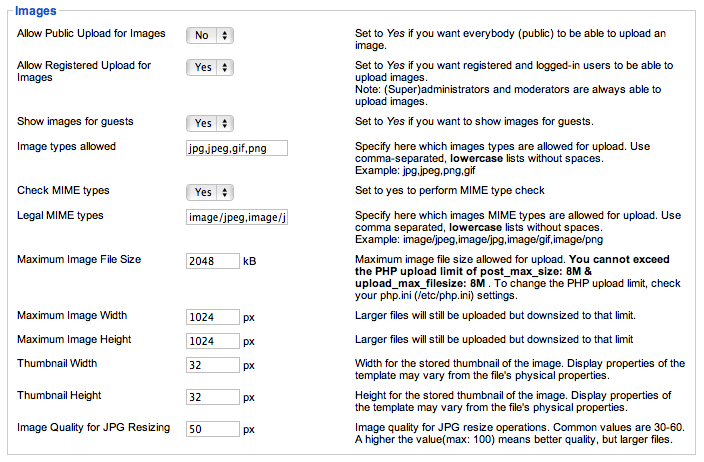
Here are the setting we use for kunena.org


As you can see we go with an image quality of 50% - still perfectly fine for the types of images used here. The resulting space and bandwidth savings are significant.

Hope this helps!

We love stars on the Joomla Extension Directory . :-)
Last edit: 15 years 6 months ago by fxstein.

Please Log in or Create an account to join the conversation.

More
15 years 6 months ago #69474 by Jo-Jo
Replied by Jo-Jo on topic Problems with photo upload
Thanks for the reply.
Thanks to you're answer I see what's going wrong.

I left my settings for max. size and max width and height as it is.
I only changed the image quality to 100%.
Now my files are close to 500kb and the quality is as i would expect it to be.

Thanks a lot!

Please Log in or Create an account to join the conversation.

Time to create page: 0.231 seconds