Kunena 7.0.5 & Kunena 6.4.11 – Security Updates Released

The Kunena team has announce the arrival of Kunena 7.0.5 [K 7.0.5] in stable which is now available for download as a native Joomla extension for J! 5.4.x/6.0.x. This version addresses most of the issues that were discovered in K 6.2 / K 6.3 / K 6.4 and issues discovered during the last development stages of K 7.0.

The Kunena team is also pleased to announce the eleventh version of Kunena 6.4, a native Joomla extension for Joomla! 5.0, 5.1, 5.2, 5.3, 5.4 and 6.0.

Topics that are moved into this category are generally considered to be closed. Users may want to add additional information but these topics should not be resurrected in order to discuss new problems or unrelated matters.

Solved Wrong time format

More
14 years 4 weeks ago - 14 years 4 weeks ago #123681 by aduh
Wrong time format was created by aduh
antyliberal.pl/forum/index.html

Topic create time is: 05/02/2012
and it should be 02/05/2012 (like 2 mai 2012).
How can I fix that ?
Last edit: 14 years 4 weeks ago by sozzled. Reason: Change topic icon

Please Log in or Create an account to join the conversation.

More
14 years 4 weeks ago #123715 by snilloconator
Replied by snilloconator on topic Wrong time format
Hello Aduh,

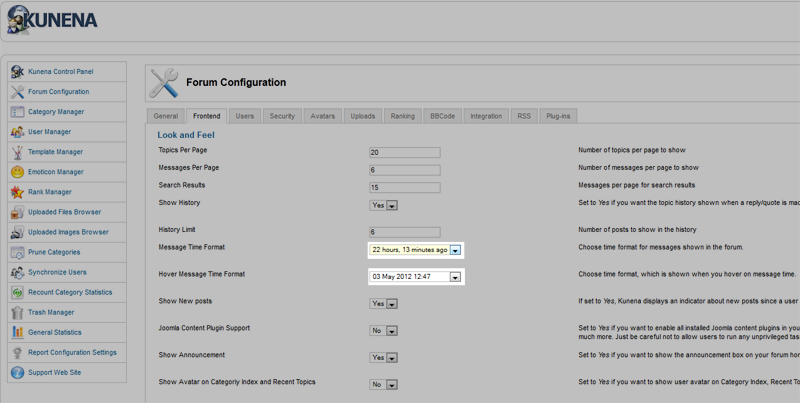
Have you set the time format in the backend of Kunena properly?

Forum Configuration > Frontend > Message Time Format

Please Log in or Create an account to join the conversation.

More
14 years 4 weeks ago #123722 by aduh
Replied by aduh on topic Wrong time format
yes
but there is still first Month and then Day.
In Poland we are using Day/Month/Year format.
Can I change that somehow ?

Please Log in or Create an account to join the conversation.

More
14 years 4 weeks ago #123727 by Matias
Replied by Matias on topic Wrong time format
You can change that from your language file:

COM_KUNENA_DT_DATETIME_FMT="%d %b %Y %H:%M"
COM_KUNENA_DT_DATETIME_TODAY_FMT="Today %H:%M"
COM_KUNENA_DT_DATETIME_UNKNOWN="Unknown"
COM_KUNENA_DT_DATETIME_YESTERDAY_FMT="Yesterday %H:%M"
COM_KUNENA_DT_DATE_FMT="%d %b %Y"
COM_KUNENA_DT_DATE_TODAY_FMT="Today"
COM_KUNENA_DT_DATE_YESTERDAY_FMT="Yesterday"
COM_KUNENA_DT_TIME_FMT="%H:%M"
The following user(s) said Thank You: aduh

Please Log in or Create an account to join the conversation.

More
14 years 4 weeks ago #123818 by aduh
Replied by aduh on topic Wrong time format
this is correct code for Polish time:

COM_KUNENA_DT_DATETIME_FMT="%d/%m/%Y %H:%M"

Please Log in or Create an account to join the conversation.

Time to create page: 0.245 seconds