
- Posts: 73
- Thank you received: 2
Kunena 7.0.5 & Kunena 6.4.11 – Security Updates Released
The Kunena team has announce the arrival of Kunena 7.0.5 [K 7.0.5] in stable which is now available for download as a native Joomla extension for J! 5.4.x/6.0.x. This version addresses most of the issues that were discovered in K 6.2 / K 6.3 / K 6.4 and issues discovered during the last development stages of K 7.0.
The Kunena team is also pleased to announce the eleventh version of Kunena 6.4, a native Joomla extension for Joomla! 5.0, 5.1, 5.2, 5.3, 5.4 and 6.0.
Topics that are moved into this category are generally considered to be closed. Users may want to add additional information but these topics should not be resurrected in order to discuss new problems or unrelated matters.
Question protect images and attached files
- Groenteman
-
 Topic Author
- Offline
- Junior Member
-

Less
More
14 years 6 months ago #112395
by Groenteman
protect images and attached files was created by Groenteman
How to protect images and attached files?
When I upload a file or image as attachment and logout
I can use the image url to see the image and the file
url to download the file.
Did I make a wrong configuration setting? or is it a know issue?
Thanks in advance,
Groenteman
When I upload a file or image as attachment and logout
I can use the image url to see the image and the file
url to download the file.
Did I make a wrong configuration setting? or is it a know issue?
Thanks in advance,
Groenteman
Please Log in or Create an account to join the conversation.


14 years 6 months ago #112403
by sozzled
Blue Eagle vs. Crypsis reference guide
Read my blog and

Replied by sozzled on topic Re: protect images and attached files
You've posted your question in the
Support
category. We ask that, when people post messages in the
Support
category, they read the posting guidelines (these are displayed at the top of this page) so that we will save time by not having to ask for information that should be provided in the first place.
Groenteman wrote:
Groenteman wrote:
Groenteman wrote:
How would we know the answer to that question if you don't provide us with the information?Did I make a wrong configuration setting?
Groenteman wrote:
In what way, specifically, do you want to "protect" images and attached files? If you are asking whether it's possible to prevent guests (in other words, when you logout) from seeing images or attachments, yes it's possible to do that. But that's not a support question. That's a how-to question. So, in effect, the whole issue comes down to understanding what it is that you want to do to "protect" images and I'm not going to try to guess an answer until we know more. Thanks.How to protect images and attached files?
Blue Eagle vs. Crypsis reference guide
Read my blog and
Please Log in or Create an account to join the conversation.
- Groenteman
-
Topic Author
- Offline
- Junior Member
-
Less
More
- Posts: 73
- Thank you received: 2
14 years 6 months ago - 14 years 6 months ago #112530
by Groenteman
Replied by Groenteman on topic Re: protect images and attached files
Hi Sozzled,
I know what you aim at but both settings are set to "No"
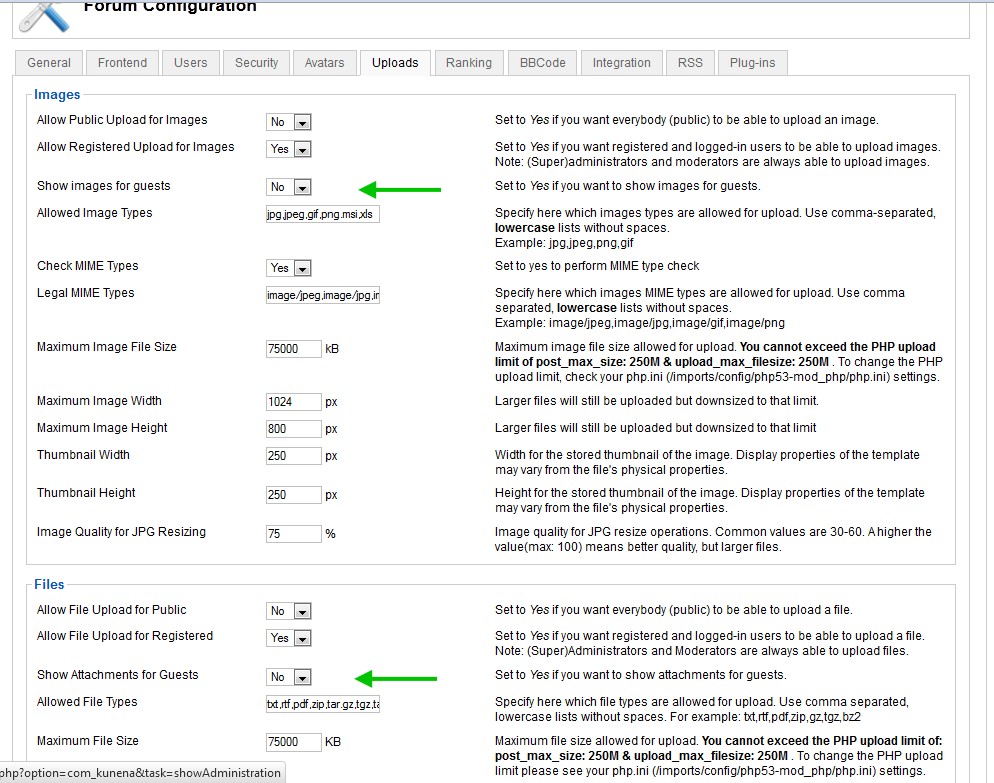
When you know the url to the image or attachment you can see the image or open the attachment.
So maybe I should post it in the bug section?
I understand you ask for the settings but I don't want it to be public.
So if you are not able or willing to answer because I don't ask support conform
the rules. Sorry me.
Groenteman
I know what you aim at but both settings are set to "No"
When you know the url to the image or attachment you can see the image or open the attachment.
So maybe I should post it in the bug section?
I understand you ask for the settings but I don't want it to be public.
So if you are not able or willing to answer because I don't ask support conform
the rules. Sorry me.
Groenteman
Last edit: 14 years 6 months ago by Groenteman.
Please Log in or Create an account to join the conversation.
14 years 6 months ago - 14 years 6 months ago #112551
by sozzled
As far as I can tell, from the little bit of information you have given, there is no defect here. Kunena works the same way that it always has.
Yes, you can hide images from prying eyes - from people who don't login - but no, you can't prevent anyone who knows the URL of the image from using the URL and hotlinking your images. In a general sense, you can't do that anywhere on the internet.
I am only guessing as to what you mean by "protect images and attached files" so, if I've guessed wrongly, please forgive me and clarify what you might mean. I think you're looking for an secure data repository. We've had similar discussions about this a long time ago (see Kunena PHP Download Files / Script ) and nothing has changed to our responses in that discussion. Is this the kind of thing that you are looking for?
Blue Eagle vs. Crypsis reference guide
Read my blog and
Replied by sozzled on topic Re: protect images and attached files
Where's that? :dry:Groenteman wrote: So maybe I should post it in the bug section?
Have a look at any other topic posted in the support section and see for yourself what you can see. What parts of the configuration reports posted by others - the parts that you can see - don't you want us or anyone else to see? Please read the FAQ relating to this point; the reference is shown in the posting guide above.Groenteman wrote: I understand you ask for the settings but I don't want it to be public.
As far as I can tell, from the little bit of information you have given, there is no defect here. Kunena works the same way that it always has.
Yes, you can hide images from prying eyes - from people who don't login - but no, you can't prevent anyone who knows the URL of the image from using the URL and hotlinking your images. In a general sense, you can't do that anywhere on the internet.
I am only guessing as to what you mean by "protect images and attached files" so, if I've guessed wrongly, please forgive me and clarify what you might mean. I think you're looking for an secure data repository. We've had similar discussions about this a long time ago (see Kunena PHP Download Files / Script ) and nothing has changed to our responses in that discussion. Is this the kind of thing that you are looking for?
Blue Eagle vs. Crypsis reference guide
Read my blog and
Last edit: 14 years 6 months ago by sozzled.
Please Log in or Create an account to join the conversation.
- Groenteman
-
Topic Author
- Offline
- Junior Member
-
Less
More
- Posts: 73
- Thank you received: 2
14 years 6 months ago - 14 years 6 months ago #112579
by Groenteman
Replied by Groenteman on topic Re: protect images and attached files
Hi Sozzled,
Thats what I was looking for. Its all clear now.
Using Kunena 1.7 so didn't read in Kunena 1.5 section.
In Joomgallery they use this kind of link:
http://***.****.***/gallery/image?format=raw&type=img&id=8929 and the
inserted image tag as bbcode looks like:
[ IMG]http://***.****.***/gallery/image?format=raw&type=img&id=8929[/ IMG]
People who are logged in can see the image but it won't work when you logout
or visit the site as guest. So hotlinking is not possible this way.
Only my 5 cents to make Kunena better.
Groenteman
Thats what I was looking for. Its all clear now.
Using Kunena 1.7 so didn't read in Kunena 1.5 section.
In Joomgallery they use this kind of link:
http://***.****.***/gallery/image?format=raw&type=img&id=8929 and the
inserted image tag as bbcode looks like:
[ IMG]http://***.****.***/gallery/image?format=raw&type=img&id=8929[/ IMG]
People who are logged in can see the image but it won't work when you logout
or visit the site as guest. So hotlinking is not possible this way.
Only my 5 cents to make Kunena better.
Groenteman
Last edit: 14 years 6 months ago by Groenteman.
Please Log in or Create an account to join the conversation.


14 years 5 months ago #113159
by Matias
Replied by Matias on topic Re: protect images and attached files
We have feature request for this in Kunena 2.0 tracker:
github.com/Kunena/Kunena-2.0/issues/178
github.com/Kunena/Kunena-2.0/issues/178
Please Log in or Create an account to join the conversation.
Time to create page: 0.239 seconds