Kunena 7.0.5 & Kunena 6.4.11 – Security Updates Released

The Kunena team has announce the arrival of Kunena 7.0.5 [K 7.0.5] in stable which is now available for download as a native Joomla extension for J! 5.4.x/6.0.x. This version addresses most of the issues that were discovered in K 6.2 / K 6.3 / K 6.4 and issues discovered during the last development stages of K 7.0.

The Kunena team is also pleased to announce the eleventh version of Kunena 6.4, a native Joomla extension for Joomla! 5.0, 5.1, 5.2, 5.3, 5.4 and 6.0.

Question How to delete a topic completely

More
14 years 10 months ago #99869 by Asbek
Hi, I Am Trying to delete a topic completely but it don´t appear on kunena manager,
Aparently has been deleted but when i am logged in admin account it appears. Thanks.
I Want to remove it completely even it don´t appear when i am logged into the admin account.

Please Log in or Create an account to join the conversation.

More
14 years 10 months ago #99903 by sozzled
Thank you for your very good question.

As we all know, moderators and administrators can delete a topic but this only moves the topic to the trash and it does not completely remove the message records from the database. When a topic is deleted by using the Delete Topic button, the message is hidden from the view of other users but it is still visible to administrators and (if the admin configures Kunena this way) to moderators, too.

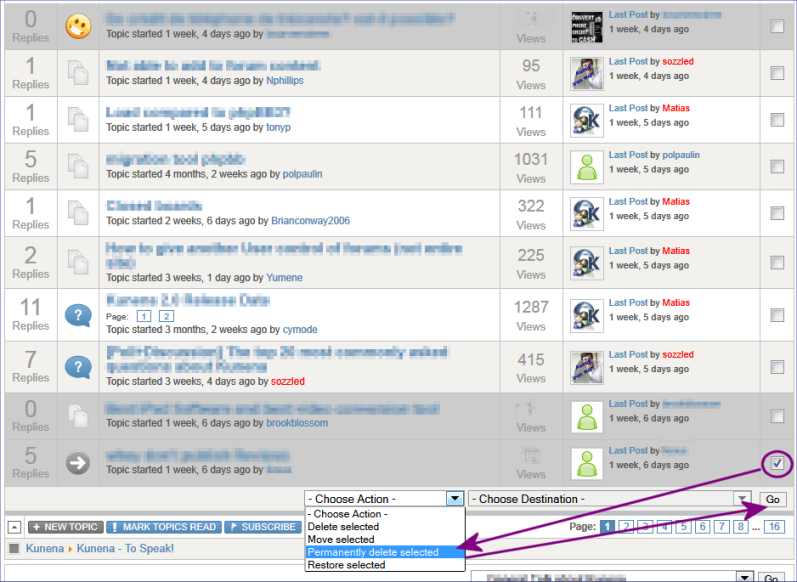
To permanently delete a topic, the easiest way is to use the index view, select the topic with the checkbox in the right hand column, and then use pull-down action as shown in the following image.

Please Log in or Create an account to join the conversation.

Time to create page: 0.272 seconds