
- Posts: 8
- Thank you received: 0
Kunena 7.0.5 & Kunena 6.4.11 – Security Updates Released
The Kunena team has announce the arrival of Kunena 7.0.5 [K 7.0.5] in stable which is now available for download as a native Joomla extension for J! 5.4.x/6.0.x. This version addresses most of the issues that were discovered in K 6.2 / K 6.3 / K 6.4 and issues discovered during the last development stages of K 7.0.
The Kunena team is also pleased to announce the eleventh version of Kunena 6.4, a native Joomla extension for Joomla! 5.0, 5.1, 5.2, 5.3, 5.4 and 6.0.
Idea Change birthday format in profile
- windvanger
-
 Topic Author
- Offline
- New Member
-

Less
More
15 years 3 months ago #85576
by windvanger
Change birthday format in profile was created by windvanger
I have a strange problem in the profile section of the Kunena 1.6.3 forum.
When I visited the profile I get the birthday format in DD-MM-YYYY (day-month-year).
And when I want to change the birthday information in the profile the birthday format is YYYY-MM-DD (year-month-day). Is it possible to change this? It is confusing for the forum visitors.
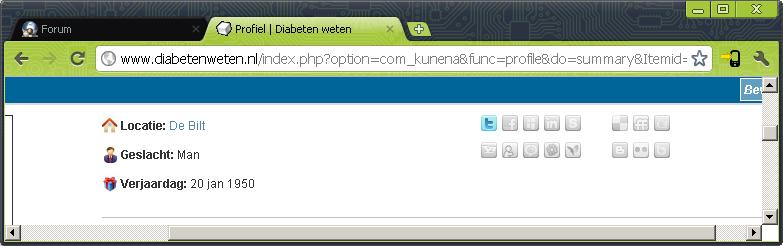
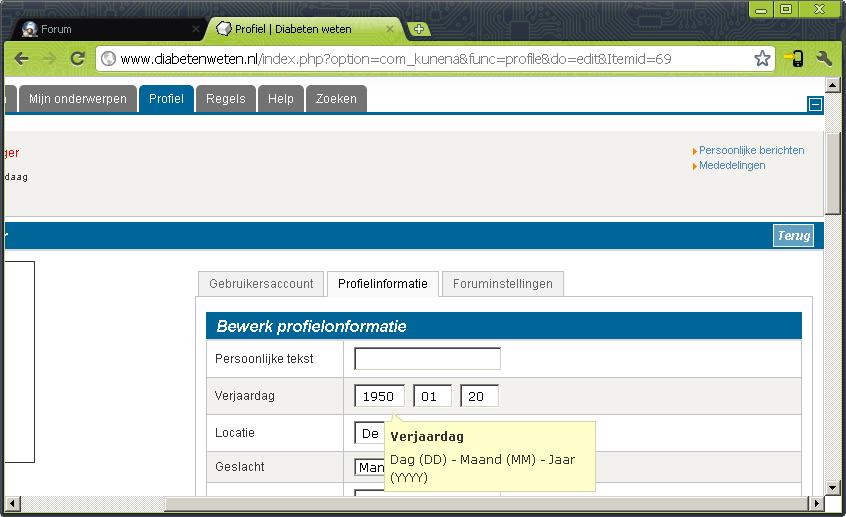
When I visited the profile I get the birthday format in DD-MM-YYYY (day-month-year).
And when I want to change the birthday information in the profile the birthday format is YYYY-MM-DD (year-month-day). Is it possible to change this? It is confusing for the forum visitors.
Please Log in or Create an account to join the conversation.


15 years 3 months ago #85581
by sozzled
Blue Eagle vs. Crypsis reference guide
Read my blog and

Replied by sozzled on topic Re: Change birthday format in profile
The date format in the first picture can be changed simply. You can change the format by editing the language file.
The layout of the items in shown in the second picture cannot be so simply changed. However, you can, if you want, build your own custom template to change the way that the data input textboxes are arranged.
The layout of the items in shown in the second picture cannot be so simply changed. However, you can, if you want, build your own custom template to change the way that the data input textboxes are arranged.
Blue Eagle vs. Crypsis reference guide
Read my blog and
The following user(s) said Thank You: windvanger
Please Log in or Create an account to join the conversation.
- windvanger
-
Topic Author
- Offline
- New Member
-
Less
More
- Posts: 8
- Thank you received: 0
15 years 3 months ago #85596
by windvanger
That's a shame. I was hoping that the layout in the second picture was easy to edit. Do you no if there is a (commercial or free) template with the right (DD-MM-YYYY) date format?
Replied by windvanger on topic Re: Change birthday format in profile
Thanks for the quick reply.sozzled wrote: The date format in the first picture can be changed simply. You can change the format by editing the language file.
The layout of the items in shown in the second picture cannot be so simply changed. However, you can, if you want, build your own custom template to change the way that the data input textboxes are arranged.
That's a shame. I was hoping that the layout in the second picture was easy to edit. Do you no if there is a (commercial or free) template with the right (DD-MM-YYYY) date format?
Please Log in or Create an account to join the conversation.
15 years 3 months ago #85601
by sozzled
Blue Eagle vs. Crypsis reference guide
Read my blog and
Replied by sozzled on topic Re: Change birthday format in profile
I don't personally know the answer to that question, sorry. I have my hands full dealing with questions about the default template! 
Maybe someone else in the community can help you.
Maybe someone else in the community can help you.
Blue Eagle vs. Crypsis reference guide
Read my blog and
Please Log in or Create an account to join the conversation.

14 years 5 months ago #113433
by coopster
Replied by coopster on topic Re: Change birthday format in profile
If you're trying to do what I think the following should help.
Find the file ../components/com_kunena/template/default/profile/editprofile.php
Find the section that looks like this and rearrange the three lines highlighted in blue so they match the order you require.
<?php echo JText::_('COM_KUNENA_MYPROFILE_BIRTHDATE_DESC'); ?>" >
<input type="text" size="2" maxlength="2" name="birthdate3" value="<?php echo $bithdate[2]; ?>" />
<input type="text" size="2" maxlength="2" name="birthdate2" value="<?php echo $bithdate[1]; ?>" />
<input type="text" size="4" maxlength="4" name="birthdate1" value="<?php echo $bithdate[0]; ?>" />
Next, to change the wordning of the tooltip find the file ../language/en-GB/en-GB.com_kunena.ini
Find the section that looks like this COM_KUNENA_MYPROFILE_BIRTHDATE_DESC="Year (YYYY) - Month (MM) - Day (DD)"
Rearrange the text shown highlighted in blue to match the format you require for the tooltip.
That's it - you can either download the files in FTP and edit them locally or edit in cPanel file manager.
Hope this helps
Find the file ../components/com_kunena/template/default/profile/editprofile.php
Find the section that looks like this and rearrange the three lines highlighted in blue so they match the order you require.
<?php echo JText::_('COM_KUNENA_MYPROFILE_BIRTHDATE_DESC'); ?>" >
<input type="text" size="2" maxlength="2" name="birthdate3" value="<?php echo $bithdate[2]; ?>" />
<input type="text" size="2" maxlength="2" name="birthdate2" value="<?php echo $bithdate[1]; ?>" />
<input type="text" size="4" maxlength="4" name="birthdate1" value="<?php echo $bithdate[0]; ?>" />
Next, to change the wordning of the tooltip find the file ../language/en-GB/en-GB.com_kunena.ini
Find the section that looks like this COM_KUNENA_MYPROFILE_BIRTHDATE_DESC="Year (YYYY) - Month (MM) - Day (DD)"
Rearrange the text shown highlighted in blue to match the format you require for the tooltip.
That's it - you can either download the files in FTP and edit them locally or edit in cPanel file manager.
Hope this helps
The following user(s) said Thank You: sozzled
Please Log in or Create an account to join the conversation.
14 years 5 months ago #113435
by sozzled
Blue Eagle vs. Crypsis reference guide
Read my blog and
Replied by sozzled on topic Re: Change birthday format in profile
Thanks. That's basically what I was trying to say a few posts ago; I didn't have time to fill in the details.
Blue Eagle vs. Crypsis reference guide
Read my blog and
Please Log in or Create an account to join the conversation.
Time to create page: 0.276 seconds