Kunena 7.1.1 & Kunena 6.4.17 – Security Updates Released

The Kunena team has announce the arrival of Kunena 7.1.1 [K 7.1.1] in stable which is now available for download as a native Joomla extension for J! 5.4.x/6.0.x./6.1.x./6.2.x This version addresses most of the issues that were discovered in K 6.2 / K 6.3 / K 6.4 / K7.0 and issues discovered during the last development stages of K 7.1
Just a reminder: K6.4.17 receives only securities fixes until end of 2026, so it's advised for users to upgrade to K7.1.

Question Remove Topic icon and yellow code box

More
15 years 9 months ago #85053 by meqrinda
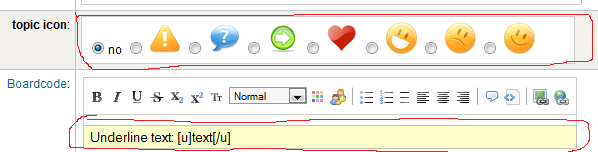
I am trying to remove the 2 things in the red rings on the image.

The topic has been locked.
More
15 years 9 months ago #85117 by sozzled
You can remove the topic icons with the following configuration setting:

Forum Configuration » Frontend » Look and Feel » Selectable Topic Icons = No

You can remove the BBcode context help information by adding the following lines to your Joomla site template:

#Kunena td.kposthint {
display: none;
}
The topic has been locked.
More
15 years 9 months ago #85139 by meqrinda
I am using 1.5.9, Since the SEF would not work in the new edition.
The topic has been locked.
More
15 years 9 months ago #85140 by sozzled
You asked your question in the K 1.6 Common Questions category. The solution I have posted will not work for you.

There is a configuration setting for K 1.5 (I don't remember right now what it is - you should be able to find it yourself) that controls topic icons.

The BBcode context help ... that's something you should be able to figure out with Firebug.

K 1.5.9 is not a supported version. You should upgrade.
The topic has been locked.
Time to create page: 0.115 seconds