
- Posts: 4
- Thank you received: 0
Kunena 7.0.9 & Kunena 6.4.14 – Security Updates Released
The Kunena team has announce the arrival of Kunena 7.0.9 [K 7.0.9] in stable which is now available for download as a native Joomla extension for J! 5.4.x/6.0.x./6.1.x. This version addresses most of the issues that were discovered in K 6.2 / K 6.3 / K 6.4 and issues discovered during the last development stages of K 7.0
Question How To? Set up / find moderate forum. Add text to index tabs, ie rules, help, etc?
- philbailey
-
 Topic Author
- Offline
- New Member
-

Less
More
15 years 8 months ago #82336
by philbailey
How To? Set up / find moderate forum. Add text to index tabs, ie rules, help, etc? was created by philbailey
Newbbie here. Can seem to be able to get a handle on moderation. Cant find moderation tools. Dont know if moderation set up correctly. Basically, not able to moderate at all.
Cant find out how to put some actual useful text in the index tabs like rules, help, etc.
I've searched forum, documentation, and google. If I missed something please point me in the right direction.
Thanks
PDB
Cant find out how to put some actual useful text in the index tabs like rules, help, etc.
I've searched forum, documentation, and google. If I missed something please point me in the right direction.
Thanks
PDB
Please Log in or Create an account to join the conversation.


15 years 8 months ago #82348
by sozzled
Blue Eagle vs. Crypsis reference guide
Read my blog and

Replied by sozzled on topic Re: How To? Set up / find moderate forum. Add text to index tabs, ie rules, help, etc?
(1)
Moderator's tools
(2) How to add a moderator
(3) How to assign a moderator in K 1.6
(4) [Merged topic] Edit, hide, disable or translate menu items in K 1.6 (e.g. rules, help, search)
(2) How to add a moderator
(3) How to assign a moderator in K 1.6
(4) [Merged topic] Edit, hide, disable or translate menu items in K 1.6 (e.g. rules, help, search)
Blue Eagle vs. Crypsis reference guide
Read my blog and
Please Log in or Create an account to join the conversation.
- philbailey
-
Topic Author
- Offline
- New Member
-
Less
More
- Posts: 4
- Thank you received: 0
15 years 8 months ago #82354
by philbailey
Replied by philbailey on topic Re: How To? Set up / find moderate forum. Add text to index tabs, ie rules, help, etc?
Thanks,
Just after posting, in another frustrated try...right there in the documentation is how to set up Rules and Help. I dont know I missed it the other 50 times I searched;)
One further question. In Category Manager/Moderation no one show shows up in the moderator list unless they are assigned moderator in the Rank Title of User Manager. And the Category Manager/Moderation has this:"Please note: after setting moderation to Yes, you must save the forum configuration first before you will be able to use the new button to add moderators." I cant find a new button in this tab no matter what order I use of saving and assigning titles.
Thanks for your help.
Just after posting, in another frustrated try...right there in the documentation is how to set up Rules and Help. I dont know I missed it the other 50 times I searched;)
One further question. In Category Manager/Moderation no one show shows up in the moderator list unless they are assigned moderator in the Rank Title of User Manager. And the Category Manager/Moderation has this:"Please note: after setting moderation to Yes, you must save the forum configuration first before you will be able to use the new button to add moderators." I cant find a new button in this tab no matter what order I use of saving and assigning titles.
Thanks for your help.
Please Log in or Create an account to join the conversation.
15 years 8 months ago - 15 years 8 months ago #82359
by sozzled
The page Component » Kunena Forum » Category Manager » Moderation is where you define whether a category will be moderated or not. If you do not define the category to be a moderated category then you cannot assign category moderators to that category. But global moderators can still moderate an "unmoderated" category; global moderators have moderator privileges on any category that they have access to.
You do not use the rank title of "moderator" to assign moderators. It's all explained in grisly detail in How to assign a moderator in K 1.6
Blue Eagle vs. Crypsis reference guide
Read my blog and
Replied by sozzled on topic Re: How To? Set up / find moderate forum. Add text to index tabs, ie rules, help, etc?
Let's stop here for a moment.philbailey wrote: In Category Manager/Moderation ...
The page Component » Kunena Forum » Category Manager » Moderation is where you define whether a category will be moderated or not. If you do not define the category to be a moderated category then you cannot assign category moderators to that category. But global moderators can still moderate an "unmoderated" category; global moderators have moderator privileges on any category that they have access to.
I'm sorry, I don't understand what you mean. Saving and assigning titles? What are we discussing?philbailey wrote: I cant find a new button in this tab no matter what order I use of saving and assigning titles.
You do not use the rank title of "moderator" to assign moderators. It's all explained in grisly detail in How to assign a moderator in K 1.6
Blue Eagle vs. Crypsis reference guide
Read my blog and
Last edit: 15 years 8 months ago by sozzled.
Please Log in or Create an account to join the conversation.
15 years 8 months ago #83640
by jdenard
Replied by jdenard on topic Moderators assigned to this category:
Hi I can't add a moderator to a category. there is no button to add a moderaotr
see attached screenshot
Thanks for your help
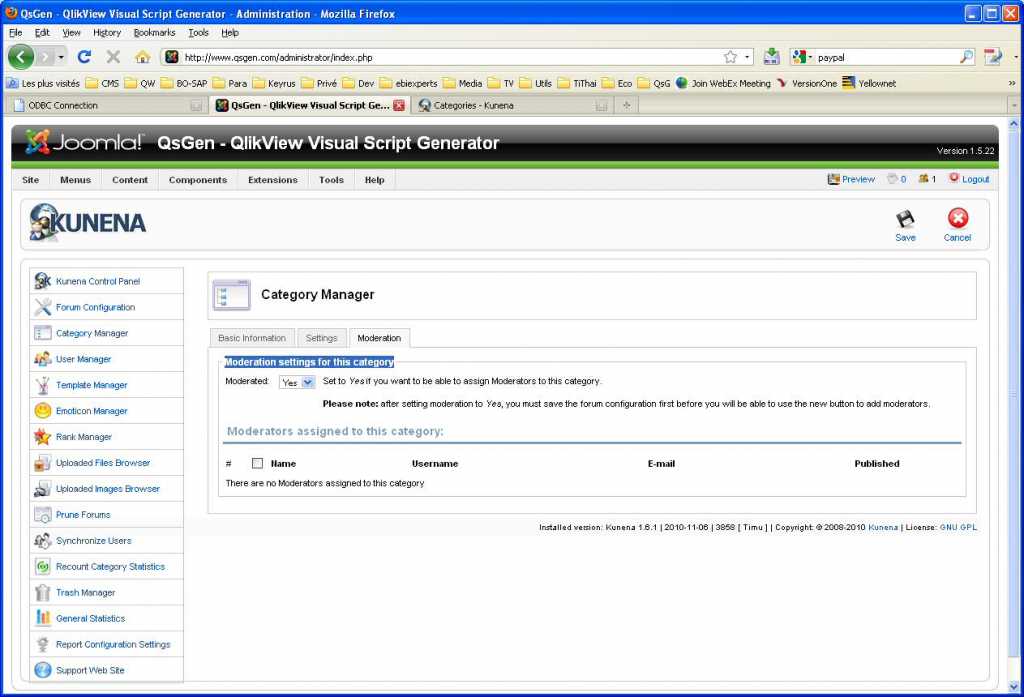
see attached screenshot
Thanks for your help
Please Log in or Create an account to join the conversation.

15 years 7 months ago - 15 years 7 months ago #84641
by nur_afini
Replied by nur_afini on topic Re: How To? Set up / find moderate forum. Add text to index tabs, ie rules, help, etc?
Hi Jdenard
I think the reason you cannot find the button to add moderator is because you haven't defined the user as a Moderator in User Administration whereby in your case I think the menu is called User Manager menu.
Below is the steps:-
1. Go to Kunena Control Panel
2. Go to User Administration / User Manager
3. Click on the user that you want to assign as a Moderator
4. On the Moderation section, select Yes and choose which Forum the person will be the moderator.
Notes: A person can be a moderator for more than one forum category, just press Shift button if you want to select more than one forum category...
Hope this helps
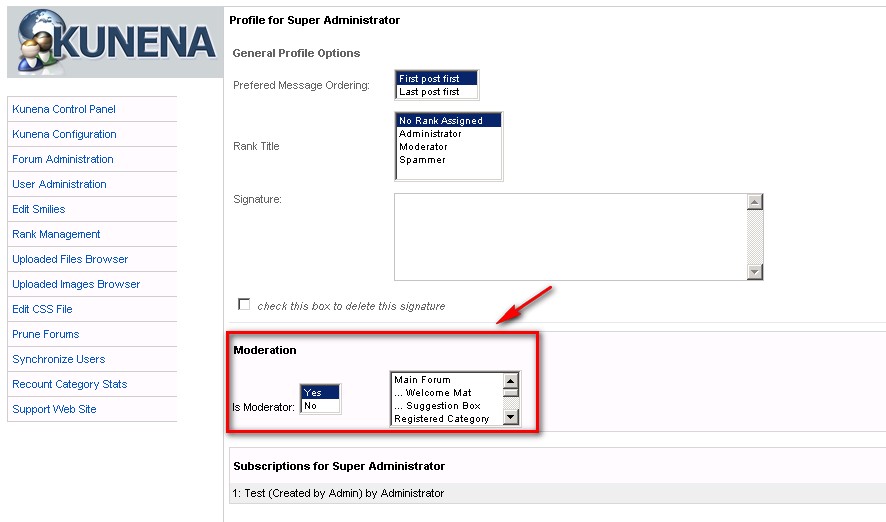
I think the reason you cannot find the button to add moderator is because you haven't defined the user as a Moderator in User Administration whereby in your case I think the menu is called User Manager menu.
Below is the steps:-
1. Go to Kunena Control Panel
2. Go to User Administration / User Manager
3. Click on the user that you want to assign as a Moderator
4. On the Moderation section, select Yes and choose which Forum the person will be the moderator.
Notes: A person can be a moderator for more than one forum category, just press Shift button if you want to select more than one forum category...
Hope this helps
Last edit: 15 years 7 months ago by nur_afini.
Please Log in or Create an account to join the conversation.
Time to create page: 0.260 seconds