


- Posts: 15
- Thank you received: 0
Kunena 7.0.4 Released
The Kunena team has announce the arrival of Kunena 7.0.4 [K 7.0.4] in stable which is now available for download as a native Joomla extension for J! 5.4.x/6.0.x. This version addresses most of the issues that were discovered in K 6.2 / K 6.3 / K 6.4 and issues discovered during the last development stages of K 7.0
Sticky [Merged topic] Edit, hide, disable or translate menu items in Kunena (e.g. rules, help, search)
15 years 1 month ago #89508
by ashquadir
Replied by ashquadir on topic Change "Help" Text in Header Bar
I want to change the word "Help" to "FAQ" in the Help Tab page header.
The words are just below the profile image.
Which file and line do I have to modify?
The words are just below the profile image.
Which file and line do I have to modify?
Please Log in or Create an account to join the conversation.


15 years 1 month ago #89519
by sozzled
Blue Eagle vs. Crypsis reference guide
Read my blog and

Replied by sozzled on topic Re: Change "Help" Text in Header Bar
Topics merged
Commonly-asked question; this topic is a collection of them. The answer is in Customised Menus in the Wiki.
Commonly-asked question; this topic is a collection of them. The answer is in Customised Menus in the Wiki.
Blue Eagle vs. Crypsis reference guide
Read my blog and
Please Log in or Create an account to join the conversation.
15 years 1 month ago - 15 years 1 month ago #90015
by AlexRag
Replied by AlexRag on topic Disable Tabs?
Is there a way to hide the Rules, Help and Profile tab?
The Profile tab in not needed as I'm integrating with CB and there is already an "Update Profile" link on the page. I was able to disable it but the "The profile page has been disabled" message can be confusing to users.
I suppose a workaround is to edit the error message to point to the proper way to view/edit your profile, but it would be better to simply hide a tab that is not needed.
Any solution to the preferred or workaround?
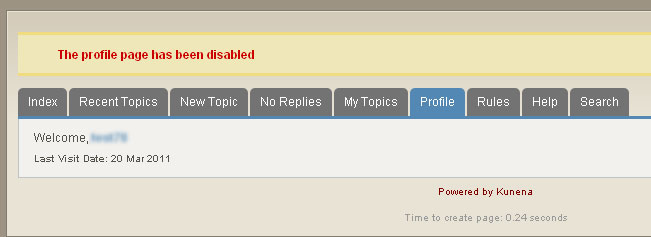
The Profile tab in not needed as I'm integrating with CB and there is already an "Update Profile" link on the page. I was able to disable it but the "The profile page has been disabled" message can be confusing to users.
I suppose a workaround is to edit the error message to point to the proper way to view/edit your profile, but it would be better to simply hide a tab that is not needed.
Any solution to the preferred or workaround?
Last edit: 15 years 1 month ago by AlexRag.
Please Log in or Create an account to join the conversation.
15 years 1 month ago #90016
by sozzled
Blue Eagle vs. Crypsis reference guide
Read my blog and
Replied by sozzled on topic Re: [Merged topic] Edit, hide, disable or translate menu items in K 1.6 (e.g. rules, help, search)
Topics merged
G'day, AlexRag, and welcome to Kunena.
Yes there is a way to hide the Rules and Profile tabs and this topic discusses how to do that. Just unpublish the menu items!
G'day, AlexRag, and welcome to Kunena.
Yes there is a way to hide the Rules and Profile tabs and this topic discusses how to do that. Just unpublish the menu items!
Blue Eagle vs. Crypsis reference guide
Read my blog and
The following user(s) said Thank You: AlexRag
Please Log in or Create an account to join the conversation.
15 years 1 month ago #90846
by AbdRahim
Replied by AbdRahim on topic Cannot change tabs
Where in Kunena configuration is the setting to add or rmove tabs?
Please Log in or Create an account to join the conversation.


15 years 1 month ago #90847
by thetoast
Replied by thetoast on topic Re: Cannot change tabs
Which tabs are you talking about? Like the ones at the top of this page that say Index, Recent Topics, New Topics ect. ect. ?
These can be edited through the "Menu Manager" in your Joomla back end. Under the menu called Kunenamenu
which i think is the default name.
if you use the search feature here and search "Kunena Menu" you will get lots of good in info.
These can be edited through the "Menu Manager" in your Joomla back end. Under the menu called Kunenamenu
which i think is the default name.
if you use the search feature here and search "Kunena Menu" you will get lots of good in info.
The following user(s) said Thank You: AbdRahim
Please Log in or Create an account to join the conversation.
Time to create page: 0.273 seconds