
Kunena 7.0.4 Released
The Kunena team has announce the arrival of Kunena 7.0.4 [K 7.0.4] in stable which is now available for download as a native Joomla extension for J! 5.4.x/6.0.x. This version addresses most of the issues that were discovered in K 6.2 / K 6.3 / K 6.4 and issues discovered during the last development stages of K 7.0
Important Mootools plugin issue after Joomla upgrade


15 years 8 months ago #57576
by fxstein
We love stars on the Joomla Extension Directory .
Mootools plugin issue after Joomla upgrade was created by fxstein
If you are having issues with mootools (e.g. bbcode editor toolbar is missing) AFTER you upgraded your existing Joomla install from pre 1.5.19 to that or any newer install, it is most likely due to an incomplete joomla upgrade.
When you upgrade your joomla version via any of the supported file upgrade steps:
docs.joomla.org/Upgrading_1.5_from_an_existing_1.5x_version
You also have to make sure you logout your admin user and login again. Only then will Joomla perform additional upgrade steps like the installation of the mtupgrade plugin needed for the mootools 1.2.4 support that Kunena 1.6 requires.
So if you are on Joomla 1.5.19 or newer and don't see "System - Mootools Upgrade" it is due to the fact that no new admin login has been performed since.
Do not install this plugin from any other sources, but make sure you log out your admin user and log back in. After that you should be able to find the "System - Mootools Upgrade" plugin inside your plugin manager. Make sure it is enabled.
I just ran into this very same issue on one of my sites and I was finally able to reproduce some of these reported mootools issues caused by this missing upgrade step. Unfortunately the Joomla install descriptions do not list this as a necessary step.
Hope this helps!
FYI: Rocketheme's Versatility III template will work perfectly fine with the new mootools upgrade. :woohoo:
When you upgrade your joomla version via any of the supported file upgrade steps:
docs.joomla.org/Upgrading_1.5_from_an_existing_1.5x_version
You also have to make sure you logout your admin user and login again. Only then will Joomla perform additional upgrade steps like the installation of the mtupgrade plugin needed for the mootools 1.2.4 support that Kunena 1.6 requires.
So if you are on Joomla 1.5.19 or newer and don't see "System - Mootools Upgrade" it is due to the fact that no new admin login has been performed since.
Do not install this plugin from any other sources, but make sure you log out your admin user and log back in. After that you should be able to find the "System - Mootools Upgrade" plugin inside your plugin manager. Make sure it is enabled.
I just ran into this very same issue on one of my sites and I was finally able to reproduce some of these reported mootools issues caused by this missing upgrade step. Unfortunately the Joomla install descriptions do not list this as a necessary step.
Hope this helps!
FYI: Rocketheme's Versatility III template will work perfectly fine with the new mootools upgrade. :woohoo:
We love stars on the Joomla Extension Directory .
The following user(s) said Thank You: Armored Warriors
Please Log in or Create an account to join the conversation.
- Armored Warriors
-

- Offline
- Junior Member
-

Less
More
- Posts: 55
- Thank you received: 0
15 years 8 months ago #58080
by Armored Warriors
Replied by Armored Warriors on topic Re: Mootools plugin issue after Joomla upgrade
i don't show the bar of bbcode and the smiles don't works, how can I solve?
i use joomla 1.15.19
thx
i use joomla 1.15.19
thx
Please Log in or Create an account to join the conversation.


15 years 8 months ago #61133
by sozzled
Blue Eagle vs. Crypsis reference guide
Read my blog and

Replied by sozzled on topic Re: Mootools plugin issue after Joomla upgrade
I have incorporated some of fxstein's tips in
Mootools 1.2.4
in the Wiki.
@Armored Warriors: you may also find this discussion may provide some assistance: [Merged topic] BB Code menu missing
@Armored Warriors: you may also find this discussion may provide some assistance: [Merged topic] BB Code menu missing
Blue Eagle vs. Crypsis reference guide
Read my blog and
Please Log in or Create an account to join the conversation.
- Mindvision
-

- Offline
- New Member
-

Less
More
- Posts: 11
- Thank you received: 0
15 years 8 months ago - 15 years 8 months ago #61444
by Mindvision
Replied by Mindvision on topic Re: Mootools plugin issue after Joomla upgrade
Hi
I have tried everything I can find to solve this issue without success.
Everything seems to work as expected except that users cannot edit their profiles.
This is what I have tried so far:
Turned off all modules
Turned off all components
Turned off all plugins (except new MooTools Upgrade plugin)
Changed the template to standard Joomla install
Any ideas what could be causing this?
I'm running latest Joomla 1.5.20
Kunena 1.6 R2
www.malmesbury.com
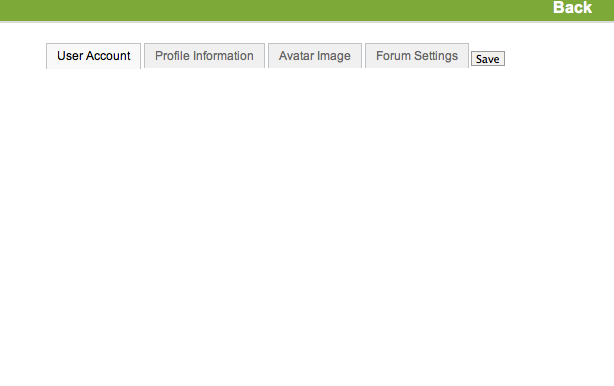
Thanks in advance for any help.
I have tried everything I can find to solve this issue without success.
Everything seems to work as expected except that users cannot edit their profiles.
This is what I have tried so far:
Turned off all modules
Turned off all components
Turned off all plugins (except new MooTools Upgrade plugin)
Changed the template to standard Joomla install
Any ideas what could be causing this?
I'm running latest Joomla 1.5.20
Kunena 1.6 R2
www.malmesbury.com
Thanks in advance for any help.
Last edit: 15 years 8 months ago by Mindvision. Reason: Added screen grab - JPG this time :)
Please Log in or Create an account to join the conversation.
15 years 8 months ago #61447
by sozzled
Blue Eagle vs. Crypsis reference guide
Read my blog and
Replied by sozzled on topic Re: Mootools plugin issue after Joomla upgrade
G'day, Mindvision, and welcome to Kunena.
Have you enabled Javascript in your web browser? :dry:
Have you enabled Javascript in your web browser? :dry:
Blue Eagle vs. Crypsis reference guide
Read my blog and
Please Log in or Create an account to join the conversation.
- Mindvision
-
- Offline
- New Member
-
Less
More
- Posts: 11
- Thank you received: 0
15 years 8 months ago #61448
by Mindvision
Replied by Mindvision on topic Re: Mootools plugin issue after Joomla upgrade
Hello, that was quick.
Yes, I have Javascript running on other areas of the site and my browser is Javascript enabled.
Yes, I have Javascript running on other areas of the site and my browser is Javascript enabled.
Please Log in or Create an account to join the conversation.
Time to create page: 0.244 seconds