Kunena 7.0.4 Released

The Kunena team has announce the arrival of Kunena 7.0.4 [K 7.0.4] in stable which is now available for download as a native Joomla extension for J! 5.4.x/6.0.x. This version addresses most of the issues that were discovered in K 6.2 / K 6.3 / K 6.4 and issues discovered during the last development stages of K 7.0

Topics that are moved into this category are generally considered to be closed. Users may want to add additional information but these topics should not be resurrected in order to discuss new problems or unrelated matters.

Merged Change order of Cancel and Submit buttons

More
15 years 9 months ago #53537 by sozzled
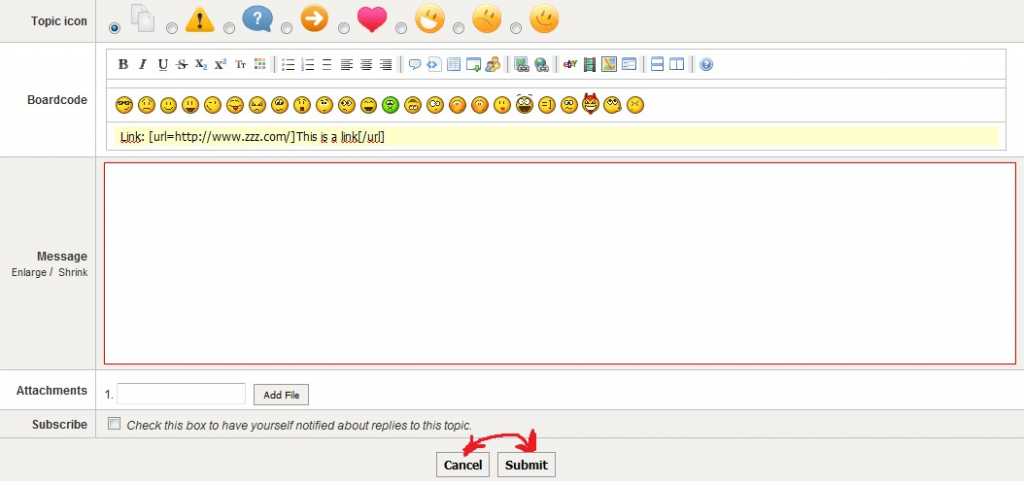
The things you wrote about the Cancel / Submit buttons actually made good sense to me. I guess hadn't taken much notice of the button placement because (perhaps unlike a lot of people, it seems) I read labels on buttons before I press them. But, I suppose a lot of people blindly press buttons out of habit. Good suggestion - let's see what the developers do with this suggestion.

The smileys issue - ugh! - your demonstration clearly shows that Kunena 1.6 has a problem here. I can't see this being fixed soon and it will probably have to wait until K 1.7. I like your suggestion about a "More smileys" option to offer an extended range of emoticons (maybe a webdialog or pop-up) to keep the overall editing tools area down to a "manageable"/convenient size.

I also agree with your comments about the attachment insert feature. The mechanism you now see in K 1.6 was a compromise in order to achieve the multiple-attachment-upload-at-one-time functionality that users have been clamouring for ever since K 1.0.7b. More work is envisaged (to make things easier and better for inserting images/file attachments) for K 1.7.

Thank you. All of these are very good ideas and suggestions.

Please Log in or Create an account to join the conversation.

More
15 years 9 months ago - 15 years 9 months ago #54148 by ChaosHead
I do not understand, why Cancel button is on the first place. Therefore I suggest it to correct.

To change an order of buttons, in a file ...editor\form.php replase
Code:
<td id="kpost-buttons" colspan="2"> <input type="button" name="cancel" class="kbutton" value="<?php echo (' ' . JText::_('COM_KUNENA_GEN_CANCEL') . ' ');?>" onclick="javascript:window.history.back();" title="<?php echo (JText::_('COM_KUNENA_EDITOR_HELPLINE_CANCEL'));?>" /> <input type="submit" name="ksubmit" class="kbutton" value="<?php echo (' ' . JText::_('COM_KUNENA_GEN_CONTINUE') . ' ');?>" title="<?php echo (JText::_('COM_KUNENA_EDITOR_HELPLINE_SUBMIT'));?>" /> </td>
with
Code:
<td id="kpost-buttons" colspan="2"> <input type="submit" name="ksubmit" class="kbutton" value="<?php echo (' ' . JText::_('COM_KUNENA_GEN_CONTINUE') . ' ');?>" title="<?php echo (JText::_('COM_KUNENA_EDITOR_HELPLINE_SUBMIT'));?>" /> <input type="button" name="cancel" class="kbutton" value="<?php echo (' ' . JText::_('COM_KUNENA_GEN_CANCEL') . ' ');?>" onclick="javascript:window.history.back();" title="<?php echo (JText::_('COM_KUNENA_EDITOR_HELPLINE_CANCEL'));?>" /> </td>
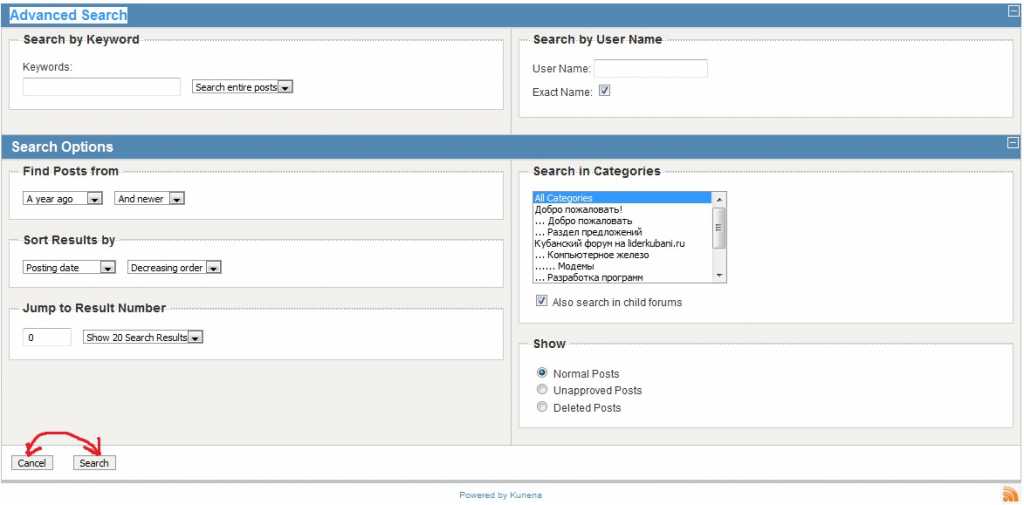
In Advanced Search

in a file ...search\advsearch.php replase
Code:
<td colspan="2"> <input class="kbutton ks" type="reset" value="<?php echo JText::_('COM_KUNENA_SEARCH_CANCEL'); ?>" onclick="window.location='<?php echo CKunenaLink::GetKunenaURL();?>';"/> <input class="kbutton ks" type="submit" value="<?php echo JText::_('COM_KUNENA_SEARCH_SEND'); ?>"/> </td>
with
Code:
<td colspan="2"> <input class="kbutton ks" type="submit" value="<?php echo JText::_('COM_KUNENA_SEARCH_SEND'); ?>"/> <input class="kbutton ks" type="reset" value="<?php echo JText::_('COM_KUNENA_SEARCH_CANCEL'); ?>" onclick="window.location='<?php echo CKunenaLink::GetKunenaURL();?>';"/> </td>

Updated:

in a file ...view\message.contents.php replase
Code:
<input type="reset" class="kbutton kreply-cancel" name="cancel" value="<?php echo JText::_('COM_KUNENA_CANCEL') ?>" /> <input type="submit" class="kbutton kreply-submit" name="submit" value="<?php echo JText::_('COM_KUNENA_GEN_CONTINUE') ?>" />
with
Code:
<input type="submit" class="kbutton kreply-submit" name="submit" value="<?php echo JText::_('COM_KUNENA_GEN_CONTINUE') ?>" /> <input type="reset" class="kbutton kreply-cancel" name="cancel" value="<?php echo JText::_('COM_KUNENA_CANCEL') ?>" />
Last edit: 15 years 9 months ago by ChaosHead.
The following user(s) said Thank You: roland76, Admata

Please Log in or Create an account to join the conversation.

More
15 years 9 months ago #54151 by roland76
Yes, in normal case Submit should before Cancel... You have my vote...

Please Log in or Create an account to join the conversation.
More
15 years 9 months ago #54152 by Admata

ChaosHead wrote: I do not understand, why Cancel button is on the first place. Therefore I suggest it to correct.

I agree! Especially because they are the other way around what they used to be in previous versions and other forums. If they stey as present, meny users in multiple forums will make mistakes with buttons after update Kunena 1.6 and they will be very irritated.

Please Log in or Create an account to join the conversation.

More
15 years 8 months ago #55193 by Baze

sozzled wrote: ...The smileys issue - ugh! - your demonstration clearly shows that Kunena 1.6 has a problem here. I can't see this being fixed soon and it will probably have to wait until K 1.7. I like your suggestion about a "More smileys" option to offer an extended range of emoticons (maybe a webdialog or pop-up) to keep the overall editing tools area down to a "manageable"/convenient size....


Something has just crossed my mind.. can't the same code which is used for showing spoilers inside messages to be implemented in the emoticons area? That way in the boardcode area the users will see something like "click for smilies" and upon clicking the div will expand just like the spoilers do in a message...

just a loud thinking..

Please Log in or Create an account to join the conversation.

More
15 years 8 months ago - 15 years 8 months ago #55201 by Baze
OMG! It's so easy...

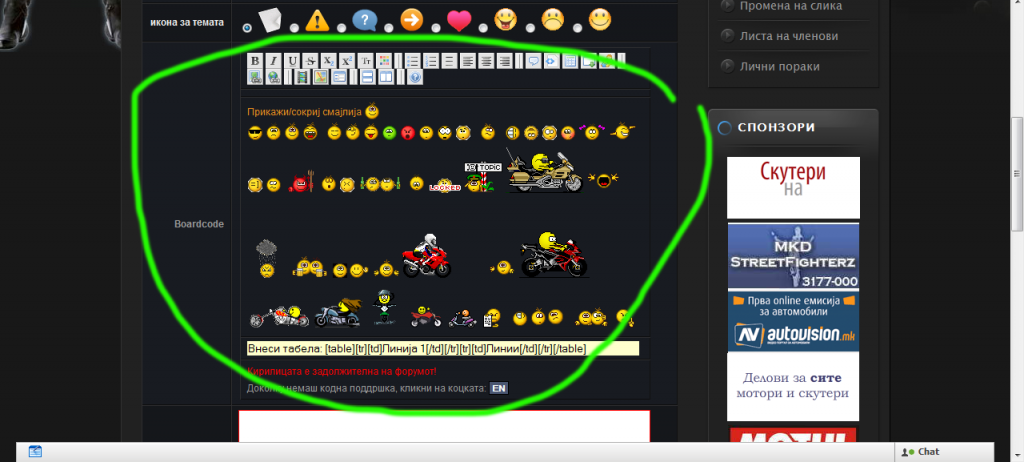
turn this:


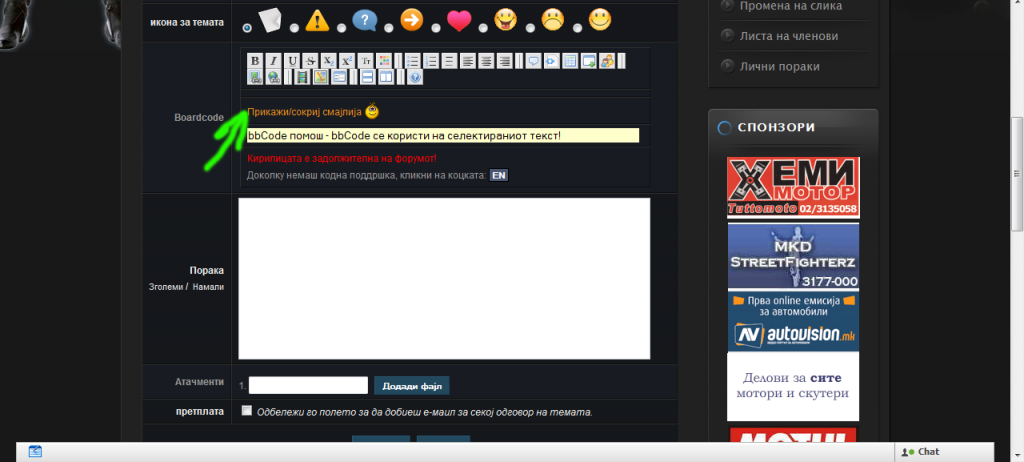
into this:


The emoticons box will expand/collapse on mouse click :)


Just open ..components/com_kunena/template/default/editor/bbcode.php

At line 240
Code:
<div id="smilie"><?php $emoticons = smile::getEmoticons(0, 1); foreach ( $emoticons as $emo_code=>$emo_url ) { echo '<img class="btnImage" src="' . $emo_url . '" border="0" alt="' . $emo_code . ' " title="' . $emo_code . ' " onclick="kbbcode.insert(\''. $emo_code .' \', \'after\', true);" style="cursor:pointer"/> '; } ?> </div>

replace with
Code:
<script type="text/JavaScript"> <!-- Chief... function toggle(d) { var o=document.getElementById(d); o.style.display=(o.style.display=='none')?'block':'none'; } --> </script> <a href="javascript:;" onClick="toggle('smilie');">Show/hide smilies</a>&nbsp<img src="../components/com_kunena/template/default/images/emoticons/smile3.png" style="vertical-align: bottom;" /> <a href="javascript:;" onClick="toggle('two');">&nbsp</a> <div id="smilie" style="display:none;"><?php $emoticons = smile::getEmoticons(0, 1); foreach ( $emoticons as $emo_code=>$emo_url ) { echo '<img class="btnImage" src="' . $emo_url . '" border="0" alt="' . $emo_code . ' " title="' . $emo_code . ' " onclick="kbbcode.insert(\''. $emo_code .' \', \'after\', true);" style="cursor:pointer"/> '; } ?> </div> <div id="two" style="display:none;"></div>

Sorry for writing this here, please split/move wherever is necessary.
Last edit: 15 years 8 months ago by Baze.
The following user(s) said Thank You: squale, shipedia

Please Log in or Create an account to join the conversation.

Time to create page: 0.516 seconds