
Kunena 7.0.9 & Kunena 6.4.14 – Security Updates Released
The Kunena team has announce the arrival of Kunena 7.0.9 [K 7.0.9] in stable which is now available for download as a native Joomla extension for J! 5.4.x/6.0.x./6.1.x. This version addresses most of the issues that were discovered in K 6.2 / K 6.3 / K 6.4 and issues discovered during the last development stages of K 7.0
Topics that are moved into this category are generally considered to be closed. Users may want to add additional information but these topics should not be resurrected in order to discuss new problems or unrelated matters.
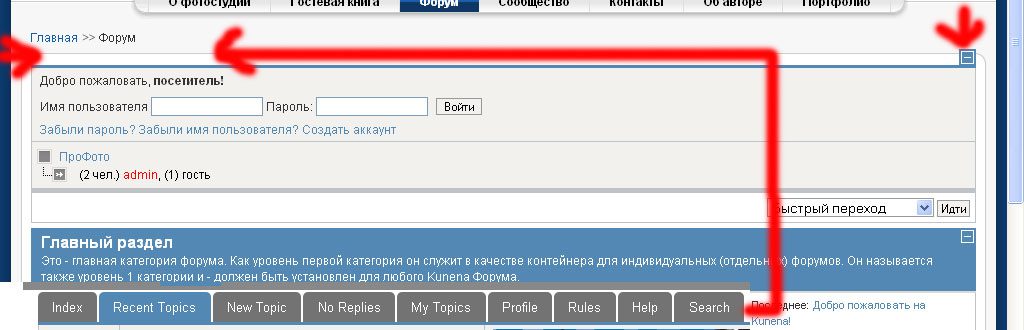
Question Do not show buttons.


16 years 1 month ago #58334
by lev
Sorry for my English.
Do not show buttons. was created by lev
After installing 1.6 on the forum J1.5.20. Do not show buttons.:whistle:
Sorry for my English.
Please Log in or Create an account to join the conversation.


16 years 1 month ago #58336
by @quila
Replied by @quila on topic Re: Do not show buttons.
Hi,
you need to create Kunena Menu, here is documentation docs.kunena.com/index.php/Creating_customized_menus
Regards
you need to create Kunena Menu, here is documentation docs.kunena.com/index.php/Creating_customized_menus
Regards
The following user(s) said Thank You: lev
Please Log in or Create an account to join the conversation.
16 years 1 month ago #58350
by lev
Sorry for my English.
Replied by lev on topic Re: Do not show buttons.
Maybe I did not quite understand. The fact is that the buttons are displayed when the main section, but is designed to enter the main section of the theme, the buttons disappear.
Here you can view: forum
Here you can view: forum
Sorry for my English.
Please Log in or Create an account to join the conversation.

16 years 1 month ago #58351
by MindTooth
Replied by MindTooth on topic Re: Do not show buttons.
My first suggestion would be that you are getting problems from either mod_rewrite or utf-8 URIs or maybe both.
Try to disable one at a time, to test.
Try to disable one at a time, to test.
Please Log in or Create an account to join the conversation.
16 years 1 month ago #58360
by lev
Sorry for my English.
Replied by lev on topic Re: Do not show buttons.
Create a menu - found. And what then? Remove the old menu, then Control Panel, click on "Create a menu and created all of the menu with the title in the menu Joomla" Kunena menu. I'm not sure how to remove the old menu?
Sorry for my English.
Please Log in or Create an account to join the conversation.


16 years 1 month ago - 16 years 1 month ago #58396
by sozzled
Blue Eagle vs. Crypsis reference guide
Read my blog and

Replied by sozzled on topic Re: K 1.6 does not show horizonatl menu
It takes a bit of digging around to solve this issue.
The first question for me (when I read the subject "Do not show buttons") was what are these "buttons"? We are really talking about the K 1.6 menu.
There is an issue at the moment with the creation of the K 1.6 menu. The issue mainly seems to affect users who installed K 1.6, then uninistalled (or downgraded) Kunena, and then re-installed K 1.6 again. When people uninistalled older development versions of K 1.6 they had problems recreating a working menu. This is a known problem. There is no proper "fix" for the problem. There is only a workaround to get you through the problem.
The workaround has been mentioned before in other discussions - many other discussions because a lot of people have installed and then uninstalled and then re-installed. If you only install K 1.6 (on a clean site) or you upgrade from K 1.5 or you only upgrade from K 1.6 beta+ then you should not have these issues. There were definitely problems with upgrading from some of the early K 1.6 alpha versions.
The workaround is this: if you have uninstalled K 1.6 from your site, you should also delete and trash the K 1.6 menu. This problem will be fixed in a later release - I have every confidence that it will be fixed - but, for now, this is the "solution". Delete and trash old menus (every menu item that relates to K 1.6) and then use the "Create Menu" facility on your K 1.6 control panel. Sometimes you have to persevere. Sometimes you might even have to repeat the procedure a second time. I don't know why that seems to be the case.
See Horizontal menu not visible . I hope this helps.
The first question for me (when I read the subject "Do not show buttons") was what are these "buttons"? We are really talking about the K 1.6 menu.
There is an issue at the moment with the creation of the K 1.6 menu. The issue mainly seems to affect users who installed K 1.6, then uninistalled (or downgraded) Kunena, and then re-installed K 1.6 again. When people uninistalled older development versions of K 1.6 they had problems recreating a working menu. This is a known problem. There is no proper "fix" for the problem. There is only a workaround to get you through the problem.
The workaround has been mentioned before in other discussions - many other discussions because a lot of people have installed and then uninstalled and then re-installed. If you only install K 1.6 (on a clean site) or you upgrade from K 1.5 or you only upgrade from K 1.6 beta+ then you should not have these issues. There were definitely problems with upgrading from some of the early K 1.6 alpha versions.
The workaround is this: if you have uninstalled K 1.6 from your site, you should also delete and trash the K 1.6 menu. This problem will be fixed in a later release - I have every confidence that it will be fixed - but, for now, this is the "solution". Delete and trash old menus (every menu item that relates to K 1.6) and then use the "Create Menu" facility on your K 1.6 control panel. Sometimes you have to persevere. Sometimes you might even have to repeat the procedure a second time. I don't know why that seems to be the case.
See Horizontal menu not visible . I hope this helps.
Blue Eagle vs. Crypsis reference guide
Read my blog and
Last edit: 16 years 1 month ago by sozzled.
Please Log in or Create an account to join the conversation.
Time to create page: 0.254 seconds