
- Posts: 33
- Thank you received: 0
Kunena 7.1.0 Released
The Kunena team has announce the arrival of Kunena 7.1.0 [K 7.1.0] in stable which is now available for download as a native Joomla extension for J! 5.4.x/6.0.x./6.1.x./6.2.x This version addresses most of the issues that were discovered in K 6.2 / K 6.3 / K 6.4 / K7.0 and issues discovered during the last development stages of K 7.1
Just a reminder: K6.4.16 receives only securities fixes until end of 2026, so it's advised for users to upgrade to K7.1.
Topics that are moved into this category are generally considered to be closed. Users may want to add additional information but these topics should not be resurrected in order to discuss new problems or unrelated matters.
Question Edit Your Details - Profile Page
- rhys_daniels
-
 Topic Author
- Offline
- Junior Member
-

Less
More
17 years 1 week ago - 17 years 1 week ago #31421
by rhys_daniels
Edit Your Details - Profile Page was created by rhys_daniels
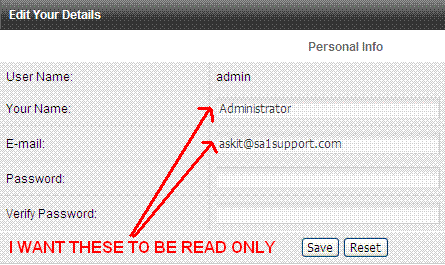
When clicking on "My Profile" and then navigating to "Edit Your Details" i have the option of editing the following fields: "Your Name" & "Email".
I want to make the fields "Your Name" & "Email" read only with no ability to change these details.
I have attached a image for better understanding. If you look at the image i would like those fields to display like the "User Name" field.

I want to make the fields "Your Name" & "Email" read only with no ability to change these details.
I have attached a image for better understanding. If you look at the image i would like those fields to display like the "User Name" field.
Last edit: 17 years 1 week ago by rhys_daniels.
Please Log in or Create an account to join the conversation.
- webnettingsolutions
-
- Offline
- New Member
-

Less
More
- Posts: 2
- Thank you received: 0
16 years 7 months ago #42033
by webnettingsolutions

Looks as if I may be in trouble if you did not receive a response to your question in over 4 months. I would like to accomplish something similar. What I need to do is to disable the option for "your name" like we can with "user name" under the my profile, edit your options field. I have searched this forum more than once for a few hours total and I can not find an answer to this question. I am using Kunena 1.59 and would greatly appreciate any help on this matter.
Thank you in advance
Replied by webnettingsolutions on topic Re:Edit Your Details - Profile Page
Looks as if I may be in trouble if you did not receive a response to your question in over 4 months. I would like to accomplish something similar. What I need to do is to disable the option for "your name" like we can with "user name" under the my profile, edit your options field. I have searched this forum more than once for a few hours total and I can not find an answer to this question. I am using Kunena 1.59 and would greatly appreciate any help on this matter.
Thank you in advance
Please Log in or Create an account to join the conversation.


16 years 7 months ago #42038
by sozzled
Blue Eagle vs. Crypsis reference guide
Read my blog and

Replied by sozzled on topic Re:Edit Your Details - Profile Page
This really shouldn't be too difficult to solve. Although I haven't looked to see which PHP file is used to display the information shown in the illustration, it would only be a matter of changing the <input type=text ...> elements and add a
disabled
attribute, thus:

-
<input type="text" size="40" ... name="name" class="inputbox" disabled>
<input type="text" size="40" ... name="email" class="inputbox" disabled>
Blue Eagle vs. Crypsis reference guide
Read my blog and
Please Log in or Create an account to join the conversation.
- webnettingsolutions
-
- Offline
- New Member
-
Less
More
- Posts: 2
- Thank you received: 0
16 years 7 months ago #42087
by webnettingsolutions
Replied by webnettingsolutions on topic Re:Edit Your Details - Profile Page
Thank you for your reply, but even though I do not know php I would probably have better luck if you could direct me to the actual file that needs to be changed. There are a plethora of .php files inside the kunena program. I just spent the last hour looking for it to no avail. Should I also be looking in the "default" template area even though I am using "default_ex"? There are plenty of php files with "profile" or "user" in the file name, but non of them brought me any fruition.
Thanks again
Thanks again
Please Log in or Create an account to join the conversation.
16 years 7 months ago #42088
by sozzled
Blue Eagle vs. Crypsis reference guide
Read my blog and
Replied by sozzled on topic Re:Edit Your Details - Profile Page
webnettingsolutions wrote:
Exactly my point. I didn't have the time to find which one is involved. I'm not a developer, I'm just a user. I was merely pointing you to how to go about solving the problem. I'll leave the detailed research to someone else. If someone else knows which PHP file is affected, between us I am sure we can come up with a solution.There are a plethora of .php files inside the kunena program.
Blue Eagle vs. Crypsis reference guide
Read my blog and
Please Log in or Create an account to join the conversation.
Time to create page: 0.119 seconds