


- Posts: 10
- Thank you received: 0
Kunena 7.1.1 & Kunena 6.4.17 – Security Updates Released
The Kunena team has announce the arrival of Kunena 7.1.1 [K 7.1.1] in stable which is now available for download as a native Joomla extension for J! 5.4.x/6.0.x./6.1.x./6.2.x This version addresses most of the issues that were discovered in K 6.2 / K 6.3 / K 6.4 / K7.0 and issues discovered during the last development stages of K 7.1
Just a reminder: K6.4.17 receives only securities fixes until end of 2026, so it's advised for users to upgrade to K7.1.
Topics that are moved into this category are generally considered to be closed. Users may want to add additional information but these topics should not be resurrected in order to discuss new problems or unrelated matters.
Question Create a menu item link to a specific forum or category.
16 years 10 months ago #37780
by skyabove
Create a menu item link to a specific forum or category. was created by skyabove
Is it possible to create a menu item to a specific forum or category?
I know that it can be done by creating a menu item with via external link and using the URL directly to the forum but this does not allow you to have any modules on the page.
Any ideas?
Please Log in or Create an account to join the conversation.


16 years 10 months ago - 16 years 10 months ago #37782
by sozzled
Blue Eagle vs. Crypsis reference guide
Read my blog and

Replied by sozzled on topic Re:Create a menu item link to a specific forum or category.
skyabove wrote:
skyabove wrote:
Let us suppose that you have a normal Kunena forum setup. You have a menu link to the default Kunena display (e.g. <yoursite>/forum, whatever that might be. And you can assign modules to that display on that menu item. OK? So far so good?
Now, suppose you create a new menu item, that you setup as an "external link" with the target <yoursite>/forum//9-general-discussions (for example). Whatever modules you had assigned to the original Kunena menu item will also be assigned on this new menu item. The general theory about Joomla menu assignment is explained here: help.joomla.org/content/view/1985/278/ . Does that help?
Yes, as asked in Kunena default page and answered in the same topic.Is it possible to create a menu item to a specific forum or category?
skyabove wrote:
That's half-true.I know that [you can create] ... a menu item with via external link and [use it to link] directly to the forum but this does not allow you to have any modules on the page.
Let us suppose that you have a normal Kunena forum setup. You have a menu link to the default Kunena display (e.g. <yoursite>/forum, whatever that might be. And you can assign modules to that display on that menu item. OK? So far so good?
Now, suppose you create a new menu item, that you setup as an "external link" with the target <yoursite>/forum//9-general-discussions (for example). Whatever modules you had assigned to the original Kunena menu item will also be assigned on this new menu item. The general theory about Joomla menu assignment is explained here: help.joomla.org/content/view/1985/278/ . Does that help?
Blue Eagle vs. Crypsis reference guide
Read my blog and
Last edit: 16 years 10 months ago by sozzled.
Please Log in or Create an account to join the conversation.
16 years 10 months ago #37821
by skyabove
Replied by skyabove on topic Re:Create a menu item link to a specific forum or category.
Yes, I see how that should work.
I have a link set up exactly as you said. Direct to the forum.
www.microbusinessfanatic.com/forums
It is in the top menu.
I have assigned several modules to that menu item but they still do not show.
Please Log in or Create an account to join the conversation.
16 years 10 months ago #37823
by sozzled
Blue Eagle vs. Crypsis reference guide
Read my blog and
Replied by sozzled on topic Re:Create a menu item link to a specific forum or category.
skyabove wrote:

What's your problem?
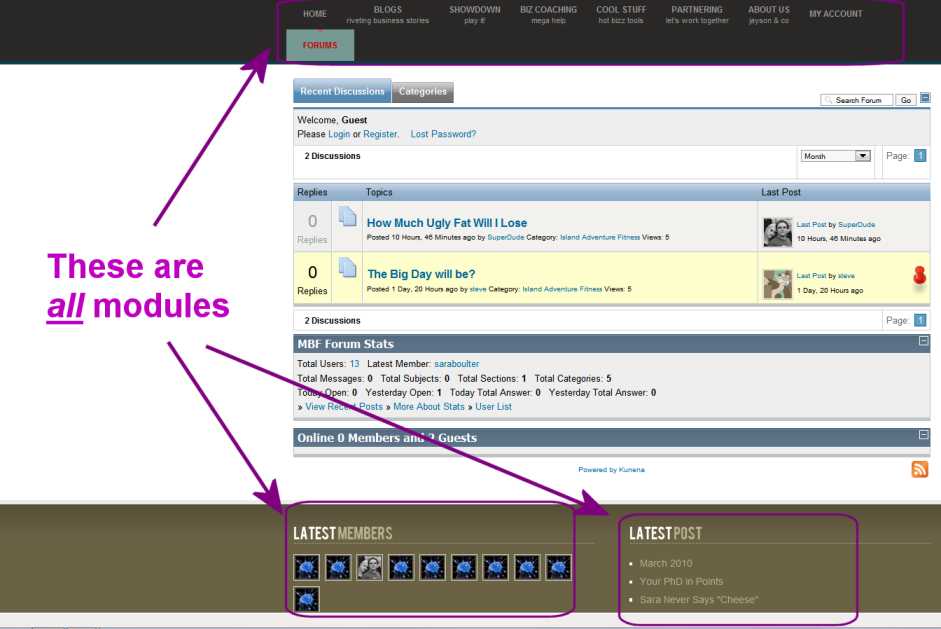
I don't think you understand what a "module" is. Have a look at your site:I have assigned several modules to that menu item but they still do not show.
What's your problem?
Blue Eagle vs. Crypsis reference guide
Read my blog and
Please Log in or Create an account to join the conversation.
16 years 10 months ago #37824
by skyabove
Replied by skyabove on topic Re:Create a menu item link to a specific forum or category.
Ok, I get it now! Finally, I know.
So just to be clear. I can assign modules to the default menu link to the default forum.
Whatever modules assigned there will show up anywhere else I link to the forum.
So there is no way to have different modules on different forum menu links?
Please Log in or Create an account to join the conversation.
16 years 10 months ago #37825
by skyabove
Replied by skyabove on topic Re:Create a menu item link to a specific forum or category.
yes, I understand that. I do understand what modules are. The header and footer mods show up as they are published to all. Any module that I publish to all menu items will show in the forum link as well as the rest of the site. I mentioned this in a previous post.
I understand it now. It is not an issue with Kunena but rather a limitation. I can assign specific modules to the default forum only. Where ever else I link to the forum it will show the modules I assigned to the default forum link.
If I create a menu link to a specific forum or category (via External Link). I will not be able to assign a specific module (different than the one I assigned to the default)
Got it. I get it. Done.
There are no parameters in Kunena menu type that would let me link to a specific category or forum.
I am stuck with the modules I assign to the default menu item on every other menu link I send to the forum.
Please Log in or Create an account to join the conversation.
Time to create page: 0.133 seconds