


- Posts: 3
- Thank you received: 0
Kunena 7.1.1 & Kunena 6.4.17 – Security Updates Released
The Kunena team has announce the arrival of Kunena 7.1.1 [K 7.1.1] in stable which is now available for download as a native Joomla extension for J! 5.4.x/6.0.x./6.1.x./6.2.x This version addresses most of the issues that were discovered in K 6.2 / K 6.3 / K 6.4 / K7.0 and issues discovered during the last development stages of K 7.1
Just a reminder: K6.4.17 receives only securities fixes until end of 2026, so it's advised for users to upgrade to K7.1.
Topics that are moved into this category are generally considered to be closed. Users may want to add additional information but these topics should not be resurrected in order to discuss new problems or unrelated matters.
Question Cannot select avatar in User Profile.
16 years 11 months ago #34686
by Mavrud
Cannot select avatar in User Profile. was created by Mavrud
Hi,
I'm using Joomla 1.5.15 and Kunena 1.5.7.
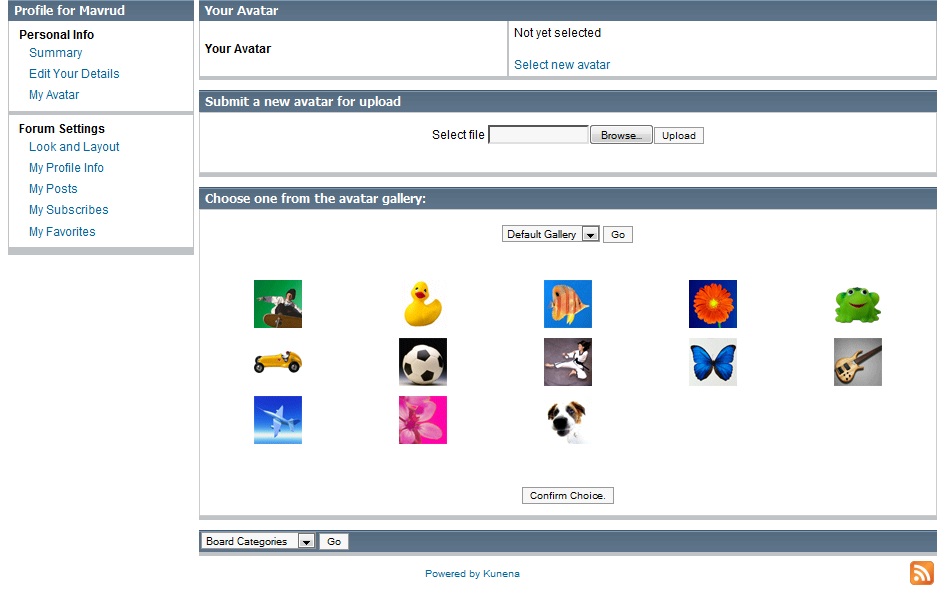
The issue is that i cannot select any avatar in user profile because there is no radio button next to the pictures.
I tried to upload a custom avatar, which worked, but then again i couldn't remove it because there is no checkbox where it should be ("check this to remove...").
If you have any idea on how to correct this i would appreciate it.
Thanks.
Please Log in or Create an account to join the conversation.


16 years 11 months ago #34687
by xillibit
I don't provide support by PM, because this can be useful for someone else.
Replied by xillibit on topic Re:Cannot select avatar in User Profile.
Hello,
Do you using rockcandy templates or a template from Rockettheme ?
This problem remenber me a similar issue, where the check boxes disappeared near to the topic icons.
Do you using rockcandy templates or a template from Rockettheme ?
This problem remenber me a similar issue, where the check boxes disappeared near to the topic icons.
I don't provide support by PM, because this can be useful for someone else.
Please Log in or Create an account to join the conversation.
16 years 11 months ago #34688
by Mavrud
Replied by Mavrud on topic Re:Cannot select avatar in User Profile.
Hi,
Yes, i am using a RocketTheme template for Joomla and of course there are several rok modules, but not rokcandy.
From what i see these are the rokmodules that i have:
RokAjaxSearch
RokMicroNews
RokNavMenu
RokNewsPager
RokNewsFlash News
RokStock
RokStories
RokTabs
RokWeather.
Out of these i am using RokAjaxSearch and RokWeather so far.
Thanks.
Please Log in or Create an account to join the conversation.
16 years 11 months ago #34689
by xillibit
I don't provide support by PM, because this can be useful for someone else.
Replied by xillibit on topic Re:Cannot select avatar in User Profile.
Go in the configuration panel of your joomla! template and for the option :
Enable input styling set it on disabled
Enable input styling set it on disabled
I don't provide support by PM, because this can be useful for someone else.
Please Log in or Create an account to join the conversation.
16 years 11 months ago #34690
by Mavrud
Replied by Mavrud on topic Re:Cannot select avatar in User Profile.
Thank you very much. Worked great, radio-buttons are back 
Please Log in or Create an account to join the conversation.
16 years 11 months ago #34698
by xillibit
I don't provide support by PM, because this can be useful for someone else.
Replied by xillibit on topic Re:Cannot select avatar in User Profile.
You are welcome 
I don't provide support by PM, because this can be useful for someone else.
Please Log in or Create an account to join the conversation.
Time to create page: 0.123 seconds