
- Posts: 8
- Thank you received: 0
Kunena 7.1.1 & Kunena 6.4.17 – Security Updates Released
The Kunena team has announce the arrival of Kunena 7.1.1 [K 7.1.1] in stable which is now available for download as a native Joomla extension for J! 5.4.x/6.0.x./6.1.x./6.2.x This version addresses most of the issues that were discovered in K 6.2 / K 6.3 / K 6.4 / K7.0 and issues discovered during the last development stages of K 7.1
Just a reminder: K6.4.17 receives only securities fixes until end of 2026, so it's advised for users to upgrade to K7.1.
Topics that are moved into this category are generally considered to be closed. Users may want to add additional information but these topics should not be resurrected in order to discuss new problems or unrelated matters.
Question Image and video issues with Kunena 1.5.4
- wherediputit
-
 Topic Author
- Offline
- New Member
-

Less
More
17 years 1 month ago #31354
by wherediputit
Replied by wherediputit on topic Re:Image and video issues with Kunena 1.5.4
Thank You,
I'll be backing up and upgrading kunena tonight, so I'll be back to report after it is done!
Thanks again for all of your help!
I'll be backing up and upgrading kunena tonight, so I'll be back to report after it is done!
Thanks again for all of your help!
Please Log in or Create an account to join the conversation.
- wherediputit
-
Topic Author
- Offline
- New Member
-
Less
More
- Posts: 8
- Thank you received: 0
17 years 1 month ago #31400
by wherediputit
Replied by wherediputit on topic Re:Image and video issues with Kunena 1.5.4
Okay, so I backed up and upgraded to 1.5.6 and I'm sorry to say, the same issues are still happening. Both images and videos are being narrowed a ton, and images still work and show up as a link to view the fullsize, but we want more control to not have them show up at thumbnail size. And of course we want youtube videos to show up same size as usual, not 90-100 pixels.
Thank you for all of your help!
Thank you for all of your help!
Please Log in or Create an account to join the conversation.


17 years 1 month ago #31474
by xillibit
I don't provide support by PM, because this can be useful for someone else.
Replied by xillibit on topic Re:Image and video issues with Kunena 1.5.4
Hello,
Do you have a link to your site because i don't understand exactly your problem ?
Do you have a link to your site because i don't understand exactly your problem ?
I don't provide support by PM, because this can be useful for someone else.
Please Log in or Create an account to join the conversation.
- wherediputit
-
Topic Author
- Offline
- New Member
-
Less
More
- Posts: 8
- Thank you received: 0
17 years 1 month ago #31600
by wherediputit
Replied by wherediputit on topic Re:Image and video issues with Kunena 1.5.4
Hi xillibit,
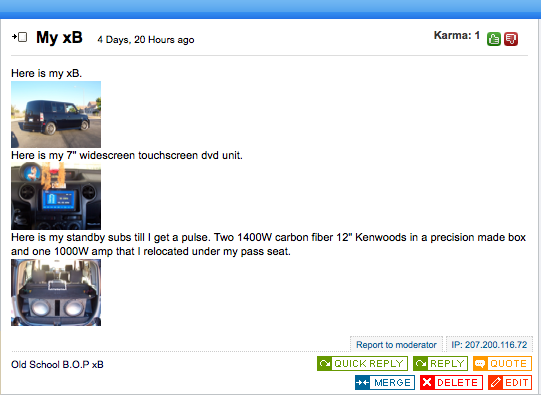
I am attaching a screenshot of a post from the site (the site is currently registered users only, so I figured I'd do that to save you from having to register, but if you'd like to the website is www.pulseaudio.net )
The problem I'm having is that, when an image is either attached, or img linked from another site, it is resized in the post to 90px wide, max width. The same thing is happening when trying to embed youtube videos. Either using the embed code from youtube, or by clicking the film strip in the reply topic, when posted the video box is only about 90px wide.
I checked the code for a thread with pictures, and saw that somehow in the < img src=... code it is picking up a style= max-width90px for each picture. Videos are picking up a similar code,
< object classid="clsid:d27cdb6e-ae6d-11cf-96b8-444553540000" codebase=" fpdownload.macromedia.com/pub/shockwave/cabs/flash/swflash.cab " width="90" height=" 355 > (edited to not actually activate code.)
I might have found out what it is, the div is calling a class, and I'll look into that for sure, is there any other things you can think of that is causing this to automatically declare it to be 90px wide?
The image was from a post made by "boxedin" on the forum at my client's website.
I appreciate all of your help with this,
Thank You,
K.C.
Please Log in or Create an account to join the conversation.

17 years 1 month ago #31602
by Matias
Replied by Matias on topic Re:Image and video issues with Kunena 1.5.4
Try changing Frontend > Textarea Width to larger value. Setting it too wide will break layout with huge pictures in a small window.
Please Log in or Create an account to join the conversation.
- wherediputit
-
Topic Author
- Offline
- New Member
-
Less
More
- Posts: 8
- Thank you received: 0
17 years 1 month ago #31605
by wherediputit
Replied by wherediputit on topic Re:Image and video issues with Kunena 1.5.4
Problem solved!
Thanks a ton Matias! Now everything looks much better.
Thank you everybody for your help!
K.C.
Thanks a ton Matias! Now everything looks much better.
Thank you everybody for your help!
K.C.
Please Log in or Create an account to join the conversation.
Time to create page: 0.126 seconds