


- Posts: 14
- Thank you received: 0
Kunena 7.1.1 & Kunena 6.4.17 – Security Updates Released
The Kunena team has announce the arrival of Kunena 7.1.1 [K 7.1.1] in stable which is now available for download as a native Joomla extension for J! 5.4.x/6.0.x./6.1.x./6.2.x This version addresses most of the issues that were discovered in K 6.2 / K 6.3 / K 6.4 / K7.0 and issues discovered during the last development stages of K 7.1
Just a reminder: K6.4.17 receives only securities fixes until end of 2026, so it's advised for users to upgrade to K7.1.
Topics that are moved into this category are generally considered to be closed. Users may want to add additional information but these topics should not be resurrected in order to discuss new problems or unrelated matters.
Question display bug statistic black arrow
17 years 1 month ago - 17 years 1 month ago #30347
by sharky_46
display bug statistic black arrow was created by sharky_46
Hi,
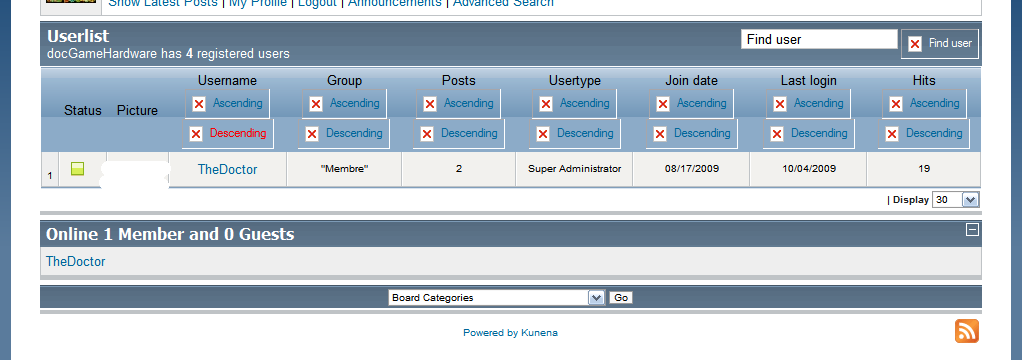
I updated to kunena 1.5.6 from 1.5.5, and still have a problem, in place of black arrow, it is written : 'ascendind" and "descending" ? I installed the original kunena version.
How to fix and solve this problem please ? It's the same with Firefox and Internet Explorer... I am the only one to have this problem ? See the image attachment.

Thanks
I updated to kunena 1.5.6 from 1.5.5, and still have a problem, in place of black arrow, it is written : 'ascendind" and "descending" ? I installed the original kunena version.
How to fix and solve this problem please ? It's the same with Firefox and Internet Explorer... I am the only one to have this problem ? See the image attachment.
Thanks
Last edit: 17 years 1 month ago by sharky_46.
Please Log in or Create an account to join the conversation.
17 years 1 month ago #30349
by sharky_46
Replied by sharky_46 on topic Re:display bug statistic black arrow
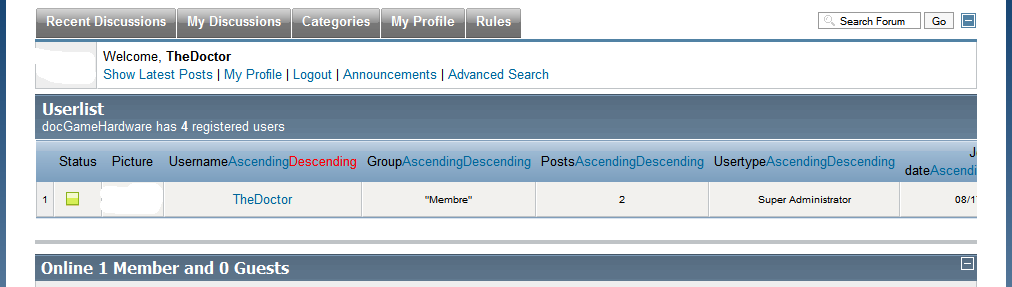
This is the bug and the image attachment from Firefox.
Could you help me to solve this problem please, it's urgent !
Thanks in advance

Could you help me to solve this problem please, it's urgent !
Thanks in advance
Please Log in or Create an account to join the conversation.


17 years 1 month ago #30394
by Matias
Replied by Matias on topic Re:display bug statistic black arrow
Joomla installer corrupts sometimes files, so installing from tar, tar.gz, or bz2 may help to solve the problem.
Please Log in or Create an account to join the conversation.
17 years 1 month ago #30418
by sharky_46
Replied by sharky_46 on topic Re:display bug statistic black arrow
Hi, thanks for your answer,
I looked and files up.gif and down.gif exists, I replaced them a second time, but I still have the same problem. How to know if files are corrupt ?
So you think I need tu unistall kunena 1.5.6 and replace it by a kunena.tar, tar.gz should fix this problem ?
I looked and files up.gif and down.gif exists, I replaced them a second time, but I still have the same problem. How to know if files are corrupt ?
So you think I need tu unistall kunena 1.5.6 and replace it by a kunena.tar, tar.gz should fix this problem ?
Please Log in or Create an account to join the conversation.
17 years 1 month ago #30419
by sharky_46
Replied by sharky_46 on topic Re:display bug statistic black arrow
I remember that in my first installation of kunena 1.5.5, after installing it I had patched it with a french version SFK 3.2.30, so it could come from this, perhaps there is a conflict ?
Please Log in or Create an account to join the conversation.
17 years 1 month ago - 17 years 1 month ago #30423
by sharky_46
Replied by sharky_46 on topic Re:display bug statistic black arrow
Hi, I think I found the problem origin, it come from my .htaccess.
I uninstalled and re-install a french kunena SFK 3.4 tar.gz version, but yesterday it was exactly the same with original kunena 1.5.6.zip version, when I uninstall and re-install kunena, I deleted my htaccess because it gives me right error and the back arrow are back. But when I put back my htaccess, they disappear again, so I think I need to comment a line or a caracter in my htaccess. I joined it on attacment, please could you look at it and try to help me to find which line or wich caracter is going wrong with kunena ?
Thanks in advance,
Best Regards,
david ;
Last edit: 17 years 1 month ago by sharky_46.
Please Log in or Create an account to join the conversation.
Time to create page: 0.133 seconds