


- Posts: 3
- Thank you received: 0
Kunena 7.0.6 & Kunena 6.4.12 – Security Updates Released
The Kunena team has announce the arrival of Kunena 7.0.6 [K 7.0.6] in stable which is now available for download as a native Joomla extension for J! 5.4.x/6.0.x. This version addresses most of the issues that were discovered in K 6.2 / K 6.3 / K 6.4 and issues discovered during the last development stages of K 7.0.
The Kunena team is also pleased to announce the twelfth version of Kunena 6.4, a native Joomla extension for Joomla! 5.0, 5.1, 5.2, 5.3, 5.4 and 6.0.
Topics that are moved into this category are generally considered to be closed. Users may want to add additional information but these topics should not be resurrected in order to discuss new problems or unrelated matters.
Question Avitar Upload Problem
16 years 11 months ago #23103
by WrongWay
Avitar Upload Problem was created by WrongWay
Hi all,
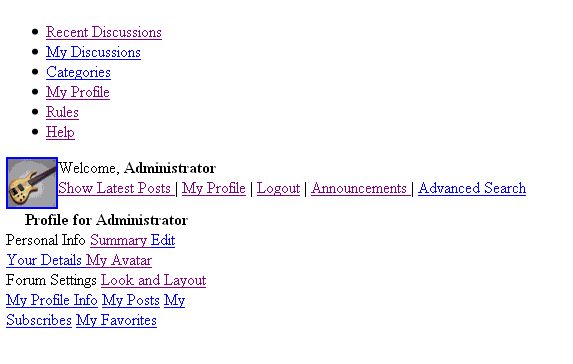
Im basically a Joomla beginner and have installed version 1.5.1 and I have installed the Kunena forums latest version. When trying to upload a avitar picture, I can navigate to the upload field on the profile tab but when I click the "upload" button, Im re-directed to a garbled html looking page, solid white with only highlighted links for the profile. I uploaded the Kunena component via .zip file and maybe theres a problem with the original upload? Im clueless, can someone direct me to the proper documentation or maybe someone already knows the solution for this?
Thanks!
Im basically a Joomla beginner and have installed version 1.5.1 and I have installed the Kunena forums latest version. When trying to upload a avitar picture, I can navigate to the upload field on the profile tab but when I click the "upload" button, Im re-directed to a garbled html looking page, solid white with only highlighted links for the profile. I uploaded the Kunena component via .zip file and maybe theres a problem with the original upload? Im clueless, can someone direct me to the proper documentation or maybe someone already knows the solution for this?
Thanks!
Please Log in or Create an account to join the conversation.


16 years 11 months ago - 16 years 11 months ago #23105
by sozzled
Blue Eagle vs. Crypsis reference guide
Read my blog and

Replied by sozzled on topic Re:Avatar Upload Problem
Are we discussing Joomla 1.5.1? I know nothing about that version, sorry.
Perhaps this discussion topic might be helpful: Avatar upload doesn't work
Perhaps this discussion topic might be helpful: Avatar upload doesn't work
Blue Eagle vs. Crypsis reference guide
Read my blog and
Last edit: 16 years 11 months ago by sozzled.
Please Log in or Create an account to join the conversation.


16 years 11 months ago #23110
by Matias
Replied by Matias on topic Re: Avitar Upload Problem
Can you please provide a screen shot or a copy of the broken page?
Does enabling debug mode in Joomla give red error page? If it does, can you provide the information to us?
Does enabling debug mode in Joomla give red error page? If it does, can you provide the information to us?
Please Log in or Create an account to join the conversation.

16 years 11 months ago #23165
by jimmykirk
Replied by jimmykirk on topic Re:Avitar Upload Problem
Your version of PHP, if it's less than 5.2.1, does not support the function "sys_get_temp_dir".
What you can do as a fix if you don't want to compile 5.2.1 or higher and re-install, is you can put the following in about line 27 on the file
/components/com_kunena/template/default/plugin/myprofile/myprofile_avatar_upload.php
right after...
"require_once(KUNENA_PATH_LIB .DS. 'kunena.file.class.php');"
if ( !function_exists('sys_get_temp_dir')) {
function sys_get_temp_dir() {
if (!empty($_ENV)) { return realpath($_ENV); }
if (!empty($_ENV)) { return realpath( $_ENV); }
if (!empty($_ENV)) { return realpath( $_ENV); }
$tempfile=tempnam(uniqid(rand(),TRUE),'');
if (file_exists($tempfile)) {
unlink($tempfile);
return realpath(dirname($tempfile));
}
}
}
That will fix the problem in the mean time.
Cheers m8,
Jimmy
What you can do as a fix if you don't want to compile 5.2.1 or higher and re-install, is you can put the following in about line 27 on the file
/components/com_kunena/template/default/plugin/myprofile/myprofile_avatar_upload.php
right after...
"require_once(KUNENA_PATH_LIB .DS. 'kunena.file.class.php');"
if ( !function_exists('sys_get_temp_dir')) {
function sys_get_temp_dir() {
if (!empty($_ENV)) { return realpath($_ENV); }
if (!empty($_ENV)) { return realpath( $_ENV); }
if (!empty($_ENV)) { return realpath( $_ENV); }
$tempfile=tempnam(uniqid(rand(),TRUE),'');
if (file_exists($tempfile)) {
unlink($tempfile);
return realpath(dirname($tempfile));
}
}
}
That will fix the problem in the mean time.
Cheers m8,
Jimmy
Please Log in or Create an account to join the conversation.
16 years 11 months ago #23212
by Matias
Replied by Matias on topic Re:Avitar Upload Problem
In that require there's a call:
CKunenaPath::tmpdir() which can be used to get around of this bug.
This bug is fixed in K1.5.4, which will be released in few hours.
CKunenaPath::tmpdir() which can be used to get around of this bug.
This bug is fixed in K1.5.4, which will be released in few hours.
Please Log in or Create an account to join the conversation.
16 years 11 months ago - 16 years 11 months ago #23285
by WrongWay
Replied by WrongWay on topic Re: Avitar Upload Problem
Here's a shot of what I receive after selecting a photo to upload for the avitar and then clicking upload.

Last edit: 16 years 11 months ago by WrongWay. Reason: attachment fix
Please Log in or Create an account to join the conversation.
Time to create page: 0.223 seconds